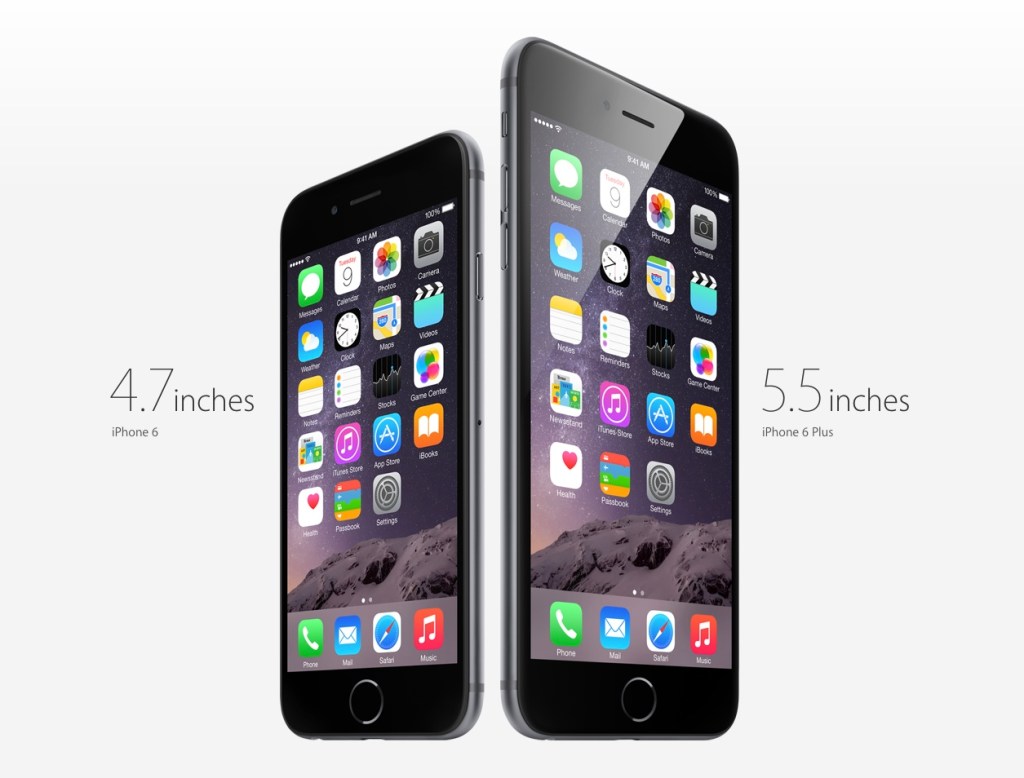
Tag: Apple

  • Ten Days with the iPhone 6 Plus

    Ten Days with the iPhone 6 Plus

    Moving from any of the earlier iPhones to the new 6 Plus is challenging, even if you’re acquainted with one of the larger smartphones on the market. In part, this is because it won’t feel like an iPhone when you first start. Of course, I’m talking about the larger screen and the digital gymnastics required to operate it, although the way it fits in your clothing (you actually notice it for once) will also give you pause. My first experience with a larger phone was in 2012 when I bought (and eventually sold off) a Samsung Galaxy S III.

    At the end of that 10-day experiment, I concluded:

    I don’t want to mess with battery settings and tweaks. I don’t want the ‘freedom’ to spend hours scouring the web for ways to make my phone better. I want a phone made by a solid company that I trust, optimized to the best of their ability in a combination of software and hardware design, so that I cannot possibly believe that I could do better myself. Because that frees me to do everything else. But I also want that phone to have a larger screen.

    I went back to my comparatively tiny 4S, and upgraded to the slightly better iPhone 5 when it came out. But now, with the new 2014 iPhones, I’ve finally gotten what I wished for: A great phone. A big screen. And not as two separate things.

    Why the Plus and not the regular 6? Fear of missing out, really. It’s funny how the Samsung’s screen felt gigantic at 4.8” back then, but now Apple’s 4.7” seems so conservative; too small a leap for all the time I’ve waited for them to do this. The iPhone 6 was perfect for 2012, but we live in extreme times, us 2014-ers.

    Handling and Design

    So, the challenges. It’s been an uncertain 10 days. My theory is that the 6 Plus is a polarizing device if you are a smaller person/have smaller hands. You either know whether you’re okay with the compromises or not. I’ve spoken with women who use Galaxy Note phones, and a common sentiment has been “I can’t use most of the other large phones one-handed anyway (or put them in a pocket), so I just went for the biggest one”. It seems that if you have small hands, you either want a really small phone (iPhone 4-5 series), or go all the way with a 5”+ display and hold it all the time or stow it in a bag.

    But if you have larger hands like me (I can just about hold a basketball with one hand), you could technically use the thing one-handed, but that doesn’t mean you should. It’s still a dangerous balancing act each time, and I swear I’m using muscles I haven’t before, causing a slight ache in the forearms. I’ve read laments that you can’t use it one-handed while lying in bed. Untrue; I’ve done it for hours at a time, hence the pain. Deciding whether one should do all the things one technically could is the hard stuff life is made of. Most people aren’t ready for decisions like this until they’ve had a few kids.

    And remember how the iPhone 5 looked “terrible” when it first leaked online, and many wished it wasn’t real? The odd two-toned back, the suboptimal placement of the camera lens against the rounded corner and, later, the broken look of an inevitably dinged-up chamfered edge? Now those same people look back and consider it, all in all, a handsome design. I was one of those people, and this makes me feel unqualified to comment at length on the iPhone 6 family now. But damn if it ain’t ugly with that protruding camera module and those fat, rubbery antenna lines!

    But the phone’s roundness serves a functional purpose that I appreciate. Many sleek, obsidian phones appeal visually, but don’t feel right in the hands. Sony and other manufacturers have put out a bunch of very nice slabs, but nestle their bottom corners into the fleshy pad under your thumb for a 20-minute news reading session and you’ll see. The iPhone 4 was a similarly beautiful device. It felt pretty good too, but that design wouldn’t hold up when enlarged to accommodate a 5.5” screen. I’d say the iPhone 6 and 6 Plus are the “right” shape for what they need to do.

    Nevertheless, I very much disagree with the smoothness of its back, coupled with such a thin body. Once you add one of the Apple leather cases, it becomes much easier to pick up, hold securely, and use comfortably. It’s a case that fixes just about all of the phone’s superficial design flaws. Leather’s tactility and softness actually allows you to feel more of a connection to the device.

    Others have noted Apple’s adherence to the classic iPhone look for the 6 Plus, with thick top and bottom borders despite the larger screen. This of course allows for a large physical Home/TouchID button, and visual balance. Held in the hand, the phone seems comically tall, and if you can only grasp it below the midpoint, its weight distribution wants to tip itself forward and outward. But use the phone in landscape, and the need for symmetrical weight distribution is obvious. The same goes for the borders: many Android phones have a “right” way to hold them in landscape; merely touch the wrong edge and you’ve accidentally hit a hidden capacitive button that takes you back to the Home menu. I much prefer Apple’s grabbable safe zones.

    Give It Time

    In the first week, I was completely undecided. I looked at the smaller iPhones my friends and colleagues had ordered, and wondered if I’d made a mistake I would have to live with for a whole year. #Bendgate/#Bendghazi didn’t help, but that worry passed within a couple of days. It’s a strong phone, my tight jeans from Uniqlo have a bit of stretch to them, and most importantly, I have AppleCare+ and faith in their customer service.

    I found myself fondling other people’s iPhone 6s, and remembering the times when I could enclose an entire phone in my hand. They grow up so fast! And then at some point after the first week, it just clicked. Somewhat unbeknownst to my conscious brain, it became the perfect size for an iPhone. Later that day, I picked up a friend’s iPhone 6 and waited for the regret to kick in. Nada.

    Switching to an inherently inconvenient form factor that prevents you from carrying and interacting with your most-used computer in the ways that you’re accustomed to is bound to be uncomfortable. I figure even if you’ve made rational peace with all the factors you’re well informed about, it takes a little bit of time for the heart to come around. That’s a problem for Apple in the showroom. I wonder how many people immediately chose the 6 when they might have been happier with a 6 Plus. Next year’s 6S Plus sales will tell the story.

    Off-Screen Considerations

    Battery Life

    The second-biggest new feature for many is the 6 Plus’s enhanced battery life. During the final weeks of my old iPhone’s tenure, its inability to stay functional from morning to night was a bigger annoyance than the small screen. Finally, that problem has also been licked.

    So far, it’s been tremendous1. Also, if you imagine that you may someday be unhappy enough with the iPhone 6’s battery that you’ll buy a Mophie battery case or similar, remember that it will essentially make for an overall bigger and heavier device than the iPhone 6 Plus, which probably won’t need one. That makes for a pretty clear choice. My best example to recall is one particularly busy day with lots of messaging, photo sharing, a 20-minute phone call, GPS directions for a short trip, playing a 3D racing game for a bit, and streaming Spotify music at “Extreme” quality over 4G during my commute, and still making it home 12 hours later with 20% to spare.

    Gaming

    If you play games, you’ll find the 6 Plus an amazing machine. Its screen is bigger, brighter, and better than that of any portable on the market, including Sony’s PS Vita and Nintendo’s 3DS XL. There’s a common argument against the smartphone as a challenger to these systems, and it involves the lack of physical controls. I won’t get into that discussion here; suffice it to say I’ve played hours of Real Racing 3 (free) on my phone and never missed the joystick. Also, if you’ve ever squinted at tiny enemies in an FPS on your old iPhone, and struggled with having two thumbs blocking the action, you’ll recognize that the 6 Plus has the potential to help some genres take off on mobile. I’m planning to give X-COM another go now that everything will be more discernible, and keep in mind that was a console game ported over from the Xbox 360.

    As I understand it, iOS 8’s “Metal” graphics architecture also allows game developers to squeeze more of the kind of performance out of Apple’s chips that they’re able to on dedicated gaming machines, which don’t have to worry about accommodating many of the other features that a general purpose ~~phone~~ computer supports. Games are going to look ridiculously good.

    Photography

    It’s better. It’s astoundingly good for a smartphone. Yes, the optical image stabilization gives you an extra f-stop in low light when photographing still scenes, but you shouldn’t be using the default Camera.app for those anyway. The Cortex Camera app takes longer exposures with very good software stabilization, and supersamples/averages out sensor noise in dark scenes almost completely.

    Productivity

    Everybody talks about landscape mode, but the benefits are still questionable to me, 10 days in. Fire up Mail.app and you’ll see that it’s a little too cramped to be more useful. The information density improves if you turn your system-wide dynamic text size down to one of the lowest settings, which takes more advantage of the HD resolution and 400ppi display. But it’s not for everyone, and I suspect that for a good chunk of people (for example, those over 40), the 5.5” display is best employed as a big screen, not a dense screen.

    Typing is a mixed bag because I’d gotten really good at the old iOS keyboard. In apps that haven’t been updated for the new phones, the default keyboard appears larger, which messes with your muscle memory. Since iOS 8 launched, I’ve mostly used SwiftKey (it beat out Swype in accuracy). Its swipe mode helps with one-handed input when that’s necessary — having a thumb in continuous contact with the screen just feels more stable than lifting and tapping.

    I think the most productive thing about the bigger screen will be the ability to sketch things of moderate complexity. In the past, you might get some basic shapes down before having to pinch-zoom around a lot to create anything useful. Usually I’d feel stupid within 20 seconds of trying, and give up. Now, I think you might be able to sketch a decent wireframe on your phone. No more napkins.

    In particular, I can’t wait for a version of Paper by FiftyThree, or Penultimate, that takes advantage of the 6 Plus. I’d love to complement my Evernote and Moleskine notebooks with some quick and editable digital drawings. I have to mention that every time I’ve tried out a Galaxy Note and stylus, the software has been the most terrible part of the experience. Samsung bundles some in-house notes app with an incomprehensible and dated-looking UI when they really should have partnered with an established third-party app to provide one. I don’t know that there are any on Android, though. Seems like a real miss that they’ve had these larger devices on the market for so longer and didn’t nail the sketching use case.

    Conclusion

    After 10 days, I’m definitely bullish on this form factor. It took awhile to get over the hump, and if we enjoyed the generous return policies that customers in the U.S. seem to have, I might have been tempted to trade it in for the more familiar iPhone 6. But quite a few pundits have called the Plus a new kind of device (for Apple), one that asks you to reset your expectations of an iPhone in exchange for a more capable companion, and they’re quite right2.

    In the years between the iPhones 4 and 6, I was often beguiled by larger devices (in spite of the Android OS), and bought the Galaxy S III, Nexus 4, and XiaoMi RedMi and Mi3 phones for research/secondary phone purposes. Each time, I went back to the iPhone in relief — seeing its small screen as the weakest link in a strong Mac and iOS product ecosystem — and cursed the seeming necessity of compromise in every aspect of this mortal coil. Now at last, that itch is dead.

    1. Although iOS is meant to prevent apps from misbehaving and sucking your battery dry, there are exceptions. Some take every opportunity to wake up in the background, using location data for geofencing and refreshing streams. I’ve found Normal: Battery Analytics to be a useful app, even with iOS 8’s new ability to show which apps use the most power. Normal goes a step further, comparing your battery stats with other users to let you know if your problems are in the minority, and predicting how many hours of standby time you’d claw back by forcing those apps to quit instead of just leaving them in the background. I’d always believed that a backgrounded app couldn’t abuse your battery in iOS, but from the sounds of their literature, I might have been wrong. 
    2. Apart from sketching, writing and editing text on the 6 Plus is itself a very different experience. It’s liberating to see a taller expanse of your document rising above the keyboard, especially in full-screen capable apps like iA Writer Pro, which I used for this post, switching between Mac and iPhone. It feels less like you’re wrestling your phrases into place, and more like they can come out and lie anywhere they want on the floor and it’s exactly what you wanted. 
  • ➟ The Beats Question

    Apple’s Pursuit of Beats May Foretell a Shift
    By BEN SISARIO, nytimes.com

    If Apple makes a major marketing push for Beats’s subscription model — or, even better, if Apple integrates Beats into its ecosystem of online services and physical products — it could mean a big lift for streaming.

    Apple entering the streaming music market (virtually overnight) with the clout and installed user base of iTunes would be massive, and it’s probably not an exaggeration to say Spotify’s days as currently structured would be numbered. Looks like we’re in for the next phase of music industry economics.

    Since the rumor surfaced a couple of days ago, people have tried to rationalize why Apple would buy the headphone and services company. Some good theories and analysis of both brands have resulted; I think it’s fantastic to have lots of smart people simultaneously indulge in a thought exercise, the answers to which we will probably have in the near future.

    My resistance to the idea has largely been because I’ve heard several pairs of Beats headphones myself, and haven’t been impressed. It’s not about being overpriced, but being bad experiences, functionally. A pair of BeoPlay H6 headphones at S$700 is subject to many of the same criticisms one might use against Beats: they’re too expensive, they’re made in China, the margins are criminally high, you’re paying for the brand, and so on — except the H6s really do deliver on the music experience. I suppose many Beats owners will say the same, but there are an awful lot of people with taste who disagree. Apple’s brand, to me, has always been on the opposite end of that spectrum. Perhaps this is an effort to change who we currently think of as their customers.

    The Beats Music service, on the other hand, has been really impressive in my short time testing it out. There’s a feature called “The Sentence”, where you fill in a statement that defines the mood and situation you’re in, and Beats Music provides the appropriate soundtrack. I wish Spotify had something like it. I said in a tweet the other day that $3.2bn was the complacency tax of being asleep at the wheel of the world’s largest digital music store, and @craigmod noted that it was a rather low price to pay, in that case. Quite true.

    The iTunes reluctance to play the streaming library game appears to be a legacy of Steve Jobs’s (and the senior executive team’s) approach to music as a tangible possession. He used to rationalize the download model by explaining how people prefer to own their music, and have collections, possibly informed by his own experiences with vinyls and CDs and so on. While it may have been true in the early days of the iTunes Store, I’ve observed even in my own listening habits as an older person that it’s no longer true. Collections matter, but song access is becoming ubiquitous and hence irrelevant. In a world where everyone pays $10/mo for music, we can build all the collections we want, without having to think about first buying a digital copy or worry about losing access. Why should you? It’s $10/mo for the rest of your life and everybody stays afloat and happy. Sold.

    I wouldn’t be surprised if Beats Music became the backbone of a new iTunes Unlimited offering, and the headphones remained a standalone brand, sold prominently (as ever) in Apple retail locations.

    [I first wrote this entry on my experimental blog about technological change, entitled T-Axis. I’ll be cross-posting stuff here for awhile.]

  • Cortex Camera is your best bet for quality iPhone photos

    Cortex Camera is your best bet for quality iPhone photos

    Original iPhone capture
    Original iPhone capture
    IMG_0506
    Cortex Camera capture

    It’s hard to believe that you can get different results from the same hardware—the same smartphone camera—just seconds apart. The first photo was taken with the iPhone 5S’s built-in camera app, which employs some impressive software techniques to improve most photos. In this case, a low-light scene forced an ISO sensitivity of 1000.

    The second photo was taken with Cortex Camera, which takes a series of images over 2 seconds or so (you don’t have to keep your hands perfectly still, but still-as-possible helps). These are then combined for far less noise, more accurate colors, and higher resolution (12mp on the iPhone 5/5S, which normally take 8mp images). The default Camera.app also combines up to four captures for better photos, but is optimized to work for all situations. For any scene without moving subjects and where you have the luxury of time, Cortex delivers better results.

    Camera.app 100% crop
    Camera.app 100% crop
    Cortex Camera 100% crop
    Cortex Camera 100% crop

    The shots above are 100% crops from the same scene. Note that the Cortex Camera version is both larger and more detailed. It has more potential for processing, and beats a fair few prosumer point and shoot cameras at the pixel level.

    The first app to do this “supersampling” was Occipital’s ClearCam, which I used to swear by. However, like their other app 360 Panorama, ClearCam hasn’t received any updates in the wake of iOS 7, and appears to have been abandoned as the company pushes their new Kickstarter-backed project, the Structure Sensor. At this time, ClearCam makes you wait longer and has a cumbersome alignment and enhancement process. Cortex Camera just takes the picture and saves it all in one step. It’s a damn shame, because both Occipital apps were among the first and best of their kind, enabling users to do things with their iPhones that seemingly defied the capabilities of the hardware. They clearly have a knack for clever imaging technology; I just hope they take a longer view of supporting their products some day.

    If you’re in the market for a new app to take and share those 360-degree panoramas, Sphere (formerly Tour Wrist) does a good job and is free. Bubbli is also promising, but captures video instead of photos to stitch a scene together, which means you have to pan slowly to get an even exposure. If you’ve got the cash and a love of new gadgets (mustnotbuymustnotbuy) Ricoh’s new Theta camera does the trick in a single click. It’s the first consumer-ready spherical capture camera and looks like a presentation remote. Simply hold it above your head and hit the button, and it takes in the entire scene. What’s more, the $400 device has built-in wifi and beams photos over to your iPhone for instant sharing. It’s not hard to imagine this feature on an iPhone a decade from now.

  • A Sudden Crop of New iPhone Photo Apps

    iPhone photography apps hit a sort of peak with Hipstamatic, Instagram, Camera+, 645 Pro, and Snapseed. The past few months have seen a few quirky apps being released (Gridditor being one that comes to mind), but most have been crappy knockoffs of the very successful but sadly neglected Camera+*, or silly ones for decorating your shots with candy-colored doodles or cartoon stamps.

    Very little for the serious photographer determined to replace a compact camera with an iPhone… until these came along!

    •••

    Blux Camera: The first app I’ve seen to offer the equivalent of what’s called “Auto Scene Mode” on most point-and-shoot cameras. The app applies a compensation scene mode based on what it thinks you need (taking local weather into account too). I’ve been waiting for someone to do this, but Blux seems to go even further with 14 filters, tilt-shift effects, and a futuristic, customizable UI that might prove too fiddly in actual use. Still, it looks very good and it’s free for a couple of days.
    Edit: Having tried it now, it’s not worth the trouble. Too much high-tech flash, not enough substance and usability. I’d put this at the top of the cheesy knockoff category.

    Alt Photo: This one has some real pedigree, like VSCO Cam, coming from maker of pro Photoshop plugins, Alien Skin Software. It has one of the best-looking brightness adjustment algorithms I’ve seen in an iPhone app (Mattebox has another great one), not to mention some nicely tuned filters designed to emulate film looks.

    Perfectly Clear: This just got a big 3.0 update today, with a fully redesigned UI and higher quality results. This is a one-function app — it tunes up lackluster photos with more clarity, color, and brightness — and it does it well. There’s now also the ability to remove noise for no extra charge; it used to be an in-app purchase. It even claims to recognize and brighten eyes, smoothen skin, and whiten teeth. That last one sounds like a joke, but there it is on the page.

    Scout Camera: A camera replacement app with a few nice filters, and the welcome ability to see and shoot in 1:1, 4:3, 3:2, and 16:9 aspect ratios, all live. It’s a shame you can’t change filters on a photo after you’ve shot it, and that you can’t import your own photos into its lightbox for editing. Hopefully the developer is looking into these things, because you can get those aspect ratios from 645 Pro too, and there’s little reason to make this your first choice in a pinch.

    Beamr: From the makers of JPEGmini, one of the best photo technologies I’ve seen in awhile (it crunches down high quality JPEGs to half their size, and your eyes won’t see the difference) comes this new photo sharing app. The app description is a bit confusing, but I think it uploads your full-size photos using the aforementioned tech, and then creates a flippable online magazine — oh god, those are back? — that you can send as a link to friends and family. The selling point here is high quality photos, not the recompressed junk you see on Facebook or other sharing sites.

    Photoset: Another sharing app, this one from Tumblr. It lets you very quickly create a layout of several photos by dragging them around, and then publish them to a webpage on Photoset.com or to an existing Tumblr blog. Pretty cool, and much more versatile than using something like, say, Twitphoto for impromptu sharing.

    • I say Camera+ has been neglected despite having recently been updated because of how unusable its filters look these days on brighter iPhone 5 photos, and because other much needed refinements never materialized. It’s like there’s nobody there looking out to keep it #1.
  • MacHeist 4 ends today

    MacHeist 4 ends today. The annual bundle has gotten bigger and better — just US$29 for a ton of apps and services worth 20 times more — but they’ve struggled to reach the minimum target of 25,000. That was how many needed to be sold before the premium bonus apps became unlocked for everyone. After 8 days into the 10-day window, they gave up and opened them anyway. Now they’ve finally crossed the mark (26,053 at time of writing) with hours left to go.

    There’s probably a longer article in here about why this is the case. Bundles like these used to make a much bigger splash, and I remember a period where Groupon-like daily deal sites for Mac applications were like… daily deal sites for free iOS applications. I guess that’s where the attention has gone now, and much of the spending intent has followed the growth in mobile platforms. Prices there are generally lower too, and I wonder if this means independent Mac apps have to start charging less, or more, to keep profits up.

    Anyway, I highly recommend you look into MacHeist while it’s available. 25% of the money goes to charity, and you get a 15-month subscription to Evernote Premium as part of it. I usually pay US$45/year for Evernote and find it immensely useful as a place to store all the webpages I see and want to have searchable, shopping and reading lists, wholesale documents for safekeeping, and snippets of data in an offline notebook whenever I go on a trip. It’s essentially a digitized version of your memory for sanity. There are also great games like Braid, Bioshock 2, and the episodic adventures of Sam & Max, Jurassic Park, and Strong Bad, from developer Telltale Games. That’s like… a hundred hours of gameplay.

    One great utility was added this morning: Bartender. It’s not a cocktail recipes app, the world hardly needs more of those, but a tool that sits in your Mac’s menu bar and subsumes all the other menu bar items into it. I’ve greatly cleaned up the visual clutter on mine (made somewhat worse by recent versions of OS X preferring to show menu bar icons in monochrome only), moving things like Bluetooth status, Volume, Dropbox, and my Jawbone status monitor into Bartender’s “bar menu”. Good stuff, and normally sells for US$15.

  • iPhone 5 Camera Comparison vs. Ricoh GR Digital III

    The new iPhone 5 features an improved camera, mainly in the area of image signal processing in the A6 chip, which reportedly allows it to do intelligent sharpening, noise removal, and pixel binning for low-light situations. The lens elements have also been rearranged, resulting in a slightly different field of vision from the iPhone 4S. There’s also the new sapphire crystal lens cover which resists scratches — unfortunately, I already have a tiny speck of dust on the inside of mine, which I’ll have to get them to clean at some point.

    I’m more interested in seeing how the iPhone 5 competes with other point and shoot cameras than with the iPhone 4S. Here are two scenes taken with the Ricoh GR Digital III (my review here), a high-end compact comparable to Panasonic’s LUMIX LX3/5/7 series, and Canon’s S90/95/100 cameras.

    The photos below are direct from camera and have not been fixed or enhanced. The GRD III is something of a prosumer camera, and if handled correctly, i.e. with manual controls and lots of fiddling, is capable of some great results. For parity with the iPhone 5, these photos were taken in fully automatic mode, letting the camera figure things out.

    Ricoh GRD 3

    I had to take this shot twice because the Ricoh chose a very shallow focus, directed on the leaves in the middle, which left the stone duck and foreground leaves blurred out. It’s a little underexposed, but the larger sensor gives some beautiful detail to the fern.

    iPhone 5

    The iPhone 5 analyzed the same scene, and chose to keep a relatively deep focus for a usable shot the first time around. The photo is also noticeably warmer (pleasant, but perhaps inaccurate) and brighter. This photo is good to go without any editing, which is how most users want it. No problems with sharpness in the details.

    Ricoh GRD 3

    The GRD had trouble focusing again, and ended up with a spot in the middle (above and to the right of her nose), which keeps the dog’s legs in focus but not the face. Although what fine details that were in focus got captured with a good amount of clarity, the photo is pretty dull and boring on the whole. Your aunt would not consider this a keeper without a trip to iPhoto.

    iPhone 5

    Again, brighter and warmer. I don’t think the iPhone makes everything warmer, only in shade and indoor lighting conditions. None of the daylight shots I’ve seen so far look overly warm. Sharpness is consistent across all areas of interest, and noise is acceptable for ISO 400. Fine fur details are not as well resolved as in the GRD photo, but this may be down to JPEG compression. Using an app that allows setting lower JPEG compression, such as 645 Pro, may compensate for this.

    For most purposes, I can’t see why the iPhone 5 wouldn’t be an adequate camera replacement. In terms of straight-from-the-camera usability, these photos are astounding compared to the GRD III, which used to cost in the region of USD$500-600 (it has now been replaced by the GRD IV model).

    I’ve gone on a few trips where I ended up taking all or most of my photos on an iPhone 4/4S, with few regrets. Focusing on the 4S was a little touchy, and it tended to take photos before focus had fully locked, if you hit the button too soon; this seems to work the way it should on the iPhone 5.

  • Nudged

    It’s been a long day. I heard the news about Steve Jobs from Facebook and Twitter while I was still in bed in the morning. I didn’t think it’d be this soon; like John Gruber, I kept believing he’d pull through again. Not shocked, not depressed, but deeply moved by the enormity of what had been lost.

    I said to someone that future generations capable of mapping time and parallel dimensions might look at their charts and see how the course of our world changed at this moment. Things are different now, for us all, than they might have been if he lived to be 90. I don’t know anyone who could doubt that.

    At lunch, I bought the iPod classic I’ve been thinking about for the past week. Silver, not black. Closest to the original. I remember getting an iPod with my first Mac, an iBook, and loving it passionately as an extension of that computing experience, one that I was thrilled to take out with me each day. The music player and laptop had nothing in common from a technical point of view, but they were both imbued with the same values.

    Steve’s values, or Apple’s values? The common theory is that these days, they’re indistinguishable thanks to codifying efforts by Jobs himself, but I can’t discount the value of great leadership or ignore the subtle differences present even in people who share the same values. The company he founded will continue to succeed within the trajectory they’re now on, but we’re missing a nudger now. A man who puts the rest of us on a different course as a matter of his own existence.

    I didn’t want this to be a Steve-Jobs-changed-my-life post, but crossing paths with those first two instances of his work caused my own views and interests to be nudged, my trajectory recalculated. Until the maps of some time travelers fall into my lap, I can’t imagine the life I was going to have before he touched it.

  • Ditching Read It Later for Instapaper

    This evening I made the switch from Read It Later to Instapaper. The latter is by far the more popular service. On the surface, it might be hard to choose one over the other. Their iPhone apps both cost $4.99 (Read It LaterInstapaper), they both have free-to-use websites, they both suck the text out of a web article you’re too busy to read at the moment of encounter, and store it online for later enjoyment. Well, at least that’s the idea.

    It seems grabbing the right text off a page isn’t that easy, and RIL was just letting me down too many times. Quite often I’d have words like Home, About, and Related Articles – clearly bits of the navigational interface missed by the dust filter – appearing before or in the middle of the story I wanted to read. Sometimes they’d be the only words on display: the article itself having been weeded out and tossed aside, 90% of the page’s content or not!
    The RIL text engine wasn’t very smart about pretending to be a normal browser either. Sometimes the policing mechanisms of a website would prevent it from loading the intended content and direct RIL to the front page instead. In the instances where I might only get around to reading the article months later, there’d be simply no way to remember what I was supposed to have been saving. Salon, Edge Magazine, Wired Mobile, and The New York Times all gave it trouble, among others.
    There were reasons I stayed this long, though. Read It Later excels at being social. After reading an item I really liked, I could send it to Diigo for full-text archiving, or Evernote, or tweet it, Facebook it, bookmark it in Delicious, share it in Google Reader, or even email the plain text to a friend who might be interested. The Diigo bit was closest to my heart. But for every sweet feature – a full-screen view and a scrollbar for quick skimming are two examples worth mentioning – there’d also be the disadvantages of being second-best.
    I think the reason Instapaper has such a knack for sniffing out the right words from a page is that dedicated users send Marco Arment emails whenever something doesn’t work right. By his own admission, the system is a pile of hacks, but as far as the end user (me) is concerned, it just works. I wish it didn’t always have to be about Features vs. Excellence, but Instapaper definitely wins the lower-my-blood-pressure challenge. RIL probably doesn’t get enough feedback to develop a comparably intelligent engine, but missing the first paragraph of every article on the New York Times? Come on.
    Also, most apps install support for Instapaper first, and the wait for RIL integration is always long and uncertain. I don’t know if Nate Weiner, Read It Later’s developer, does anything to help adoption of his service along, but like in the case of the new Twitterrific for iPhone, users like me end up being the ones petitioning other app developers to please please please consider adding RIL support. It sucks.
    Plus, in the time since I last saw Instapaper, it’s received a bunch of great new features like a paginated viewing method, and an enhanced presentation with inline graphics. I’ll miss RIL’s sharing features, and hope Instapaper adds just a couple more export options to the current choices of Tumblr & Twitter (Diigo, please!), but for the moment it’s enough that I can bookmark stuff and be secure in the knowledge that they’ll be waiting for me, complete, when I get to them.
    The fact that this blog somehow appears in the screenshot for Instapaper in the App Store has nothing to do with it, I swear!