Tag: iPhone

  • Upgrade Your iPhone’s Camera with ClearCam

    Buy ClearCam on the App Store

    Occipital’s ClearCam (usually $1.99) was one of my favorite camera apps; it exemplified the kind of surprising software experience that made the iPhone special; an inexpensive downloadable bundle that seemed to change what the hardware in your hands could do: it took photos at a higher quality and resolution than the sensor in the phone allowed.

    How? By capturing a burst of photos (5-6) and combining them to average out noise, sharpen edges, and boost light sensitivity with a proven technique called Super Resolution. It was the only app of its kind on the store, and Occipital seemed to know their imaging stuff, having also made the outstanding 360 Panorama (featured in my list of essential camera and photo apps).

    It allowed the 5mp iPhone 4 to capture crisp 11mp images, but upon the release of the 8mp iPhone 4S, the app simply stopped working. I never found a replacement, and didn’t believe it would be coming back, thinking the processing requirements of working on an 8mp image were perhaps too much for a phone to handle.

    Now, more than a year on, the app has finally received an update. If you have an iPhone 5, you can now shoot at an astounding maximum size of 18mp. The results are far better than if you took an 8mp photo and resampled it in Photoshop. This isn’t a simple resize; even when brought down to the same resolution as a standard shot, it’s a cleaner image being assembled — the fact that it’s also twice the resolution is just the kicker.

    The advantage is especially apparent in noisy low-light shots, shown in the 100% detail shots below. Notice how the lines in the larger ClearCam capture manage to be cleaner, and how the smooth surface areas have much less visible noise. The quality of the noise reduction is much higher than you would get from noise reduction post-processing based off a single image. A simple Unsharp Mask operation would improve the ClearCam shot even further.

    100% detail from 8mp standard camera shot
    100% detail from 8mp standard camera shot
    100% detail from 18mp ClearCam shot
    100% detail from 18mp ClearCam shot

    Over my experience with the app, I’ve found the ClearCam versions are just as usable, if not more so. Outside of photography, it’s extremely handy for whiteboard captures in a work environment.

    One of the most exciting advantages of having clean 18mp shots is that it gives you a lot of freedom to crop and still have something the size of a normal shot. It’s almost as good as having a 2x or more optical zoom on your iPhone.

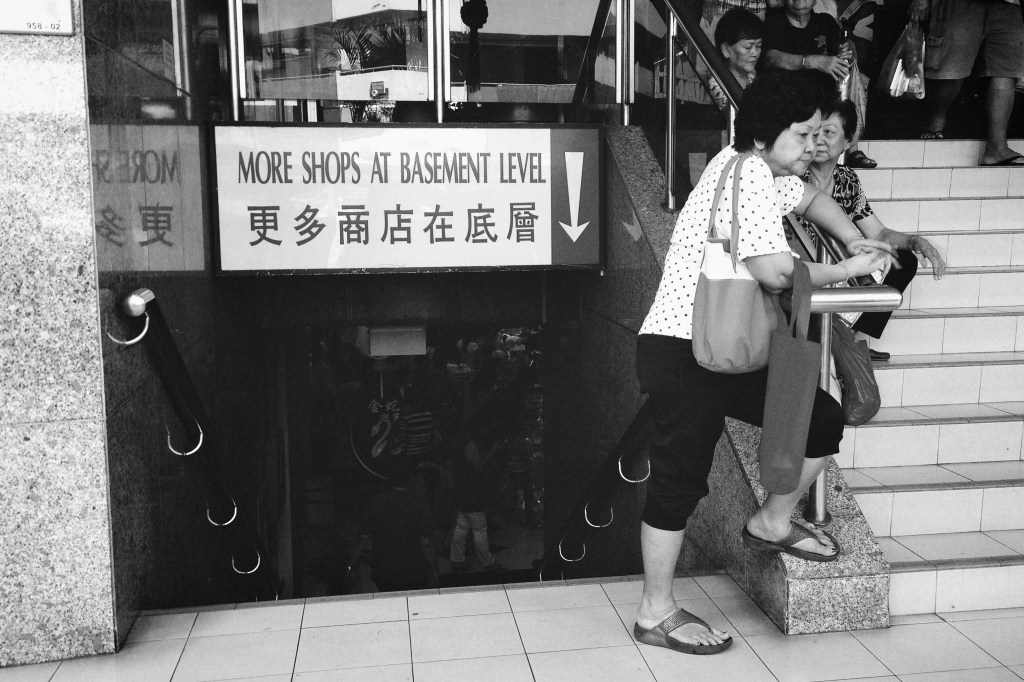
    Fu Lu Shou Complex
    (Above) This was cropped from a wider shot, to frame the stairway (I liked the old-fashioned sign) and old lady leaning on the rails. The final photo is still a generous 11mp!

    As long as you don’t have too much movement going on in the shot, ClearCam’s “Enhanced” mode is worth using as your default means of capture. The app also offers a “Quick” mode, which takes 3-4 standard resolution shots in a quick burst, and then analyzes them to save only the clearest, least-blurry photo to your Camera Roll. It’s an alternative to the “Stabilizer Mode” that many other apps offer, where your photo is only taken once your hands are still. Often, when it’s really hard to steady yourself (when it’s freezing, for example), you can be stuck holding your phone for a long time waiting for the shutter to trigger.

    Here are some other ClearCam photos I got today, all processed with the excellent VSCO Film 01 & 02 for Aperture.

    Fu Lu Shou Complex
    Fu Lu Shou Complex
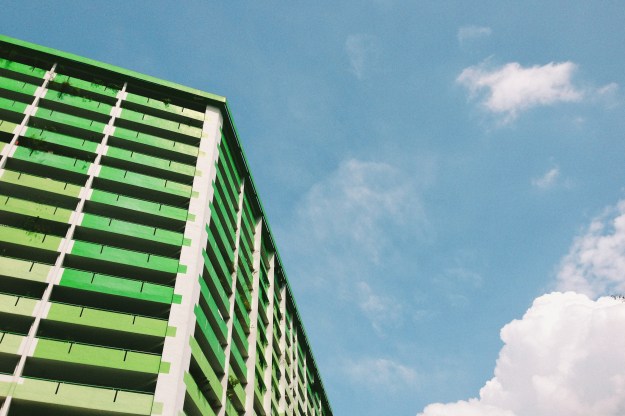
    HDB block & blue skies
    HDB block & blue skies
    Waiting for the bus
    Waiting for the bus
    Waiting for the bus 2
    Waiting for the bus 2
    ArtScience Museum
    ArtScience Museum

    Jan 14 Edit: Replaced the previous indoor low-light shot examples with a better pair taken at the Singapore ArtScience Museum.

  • ➟ Canon Powershot N

    n_1

    Canon Powershot N first impressions: Digital Photography Review

    Very intrigued by Canon’s latest consumer product shown off at CES. It’s an almost-square, mint tin-sized box with an 8x optical zoom lens, 12mp resolution, and wireless-N connectivity designed to work with your smartphone. Anything you shoot with it can be instantly shared in the ways you are already accustomed to, and the camera even applies a bunch of artistic filters automatically.

    This is an interesting and astute reaction to recent trends in consumer photography: namely, people shoot and share an imagebucket load of photos with their smartphones; the more advanced of these photographers care about and strive to eke ever more quality and clarity out of their daily shots, you even see some happy to carry DSLRs around to get shots exclusively for low-res online sharing; the emergence of middle-ground devices such as Micro Four-Thirds cameras, ultra-thin laptops, tablets (hell, even phablets); and of course, the rapid demise of consumer compact cameras for everyday use, having been deemed too much bulk and inconvenience for too little versatility and quality.

    This new PowerShot N cleverly defines a new middle-ground: a more ergonomically sound and high-quality experience than shooting with a smartphone’s camera, with comparable quality and superior portability versus other compacts, whilst enjoying all the connected features of your phone.

  • Essential iPhone Camera and Photo Apps

    Essential iPhone Camera and Photo Apps

    img_5642

    I sometimes get asked to suggest camera apps to new iPhone users, and often fall into the trap of recommending ones I’m in love with at the time, but aren’t necessarily good for everyone or indispensable.

    I’ve bought and put every major release through their paces over the last four years, and although some start off impressively, they turn out not to be suitable for everyday use and soon find themselves forgotten in a folder, never to be used again. One common reason for this is the production of looks that are too distinctive or recognizable. Imagine a library of photos taken over a year, all with the same fake light leak in the top-left corner. Pretty unacceptable. Some all-in-one jobs let you “fix” photos with a few presets, but if your problem falls somewhere in between, the inability to fine-tune can be a deal-breaker.

    So here are my more considered picks for the best camera and editing applications on the iPhone. Over time, I cleared out my entire screen of folders filled with photo apps, and now only keep a few essentials handy. You’ll be in good hands with any of these, as they tend to do a single thing well, or many things more than adequately.

    (more…)

  • A Sudden Crop of New iPhone Photo Apps

    iPhone photography apps hit a sort of peak with Hipstamatic, Instagram, Camera+, 645 Pro, and Snapseed. The past few months have seen a few quirky apps being released (Gridditor being one that comes to mind), but most have been crappy knockoffs of the very successful but sadly neglected Camera+*, or silly ones for decorating your shots with candy-colored doodles or cartoon stamps.

    Very little for the serious photographer determined to replace a compact camera with an iPhone… until these came along!

    •••

    Blux Camera: The first app I’ve seen to offer the equivalent of what’s called “Auto Scene Mode” on most point-and-shoot cameras. The app applies a compensation scene mode based on what it thinks you need (taking local weather into account too). I’ve been waiting for someone to do this, but Blux seems to go even further with 14 filters, tilt-shift effects, and a futuristic, customizable UI that might prove too fiddly in actual use. Still, it looks very good and it’s free for a couple of days.
    Edit: Having tried it now, it’s not worth the trouble. Too much high-tech flash, not enough substance and usability. I’d put this at the top of the cheesy knockoff category.

    Alt Photo: This one has some real pedigree, like VSCO Cam, coming from maker of pro Photoshop plugins, Alien Skin Software. It has one of the best-looking brightness adjustment algorithms I’ve seen in an iPhone app (Mattebox has another great one), not to mention some nicely tuned filters designed to emulate film looks.

    Perfectly Clear: This just got a big 3.0 update today, with a fully redesigned UI and higher quality results. This is a one-function app — it tunes up lackluster photos with more clarity, color, and brightness — and it does it well. There’s now also the ability to remove noise for no extra charge; it used to be an in-app purchase. It even claims to recognize and brighten eyes, smoothen skin, and whiten teeth. That last one sounds like a joke, but there it is on the page.

    Scout Camera: A camera replacement app with a few nice filters, and the welcome ability to see and shoot in 1:1, 4:3, 3:2, and 16:9 aspect ratios, all live. It’s a shame you can’t change filters on a photo after you’ve shot it, and that you can’t import your own photos into its lightbox for editing. Hopefully the developer is looking into these things, because you can get those aspect ratios from 645 Pro too, and there’s little reason to make this your first choice in a pinch.

    Beamr: From the makers of JPEGmini, one of the best photo technologies I’ve seen in awhile (it crunches down high quality JPEGs to half their size, and your eyes won’t see the difference) comes this new photo sharing app. The app description is a bit confusing, but I think it uploads your full-size photos using the aforementioned tech, and then creates a flippable online magazine — oh god, those are back? — that you can send as a link to friends and family. The selling point here is high quality photos, not the recompressed junk you see on Facebook or other sharing sites.

    Photoset: Another sharing app, this one from Tumblr. It lets you very quickly create a layout of several photos by dragging them around, and then publish them to a webpage on Photoset.com or to an existing Tumblr blog. Pretty cool, and much more versatile than using something like, say, Twitphoto for impromptu sharing.

    • I say Camera+ has been neglected despite having recently been updated because of how unusable its filters look these days on brighter iPhone 5 photos, and because other much needed refinements never materialized. It’s like there’s nobody there looking out to keep it #1.
  • iPhone 5 Camera Comparison vs. Ricoh GR Digital III

    The new iPhone 5 features an improved camera, mainly in the area of image signal processing in the A6 chip, which reportedly allows it to do intelligent sharpening, noise removal, and pixel binning for low-light situations. The lens elements have also been rearranged, resulting in a slightly different field of vision from the iPhone 4S. There’s also the new sapphire crystal lens cover which resists scratches — unfortunately, I already have a tiny speck of dust on the inside of mine, which I’ll have to get them to clean at some point.

    I’m more interested in seeing how the iPhone 5 competes with other point and shoot cameras than with the iPhone 4S. Here are two scenes taken with the Ricoh GR Digital III (my review here), a high-end compact comparable to Panasonic’s LUMIX LX3/5/7 series, and Canon’s S90/95/100 cameras.

    The photos below are direct from camera and have not been fixed or enhanced. The GRD III is something of a prosumer camera, and if handled correctly, i.e. with manual controls and lots of fiddling, is capable of some great results. For parity with the iPhone 5, these photos were taken in fully automatic mode, letting the camera figure things out.

    Ricoh GRD 3

    I had to take this shot twice because the Ricoh chose a very shallow focus, directed on the leaves in the middle, which left the stone duck and foreground leaves blurred out. It’s a little underexposed, but the larger sensor gives some beautiful detail to the fern.

    iPhone 5

    The iPhone 5 analyzed the same scene, and chose to keep a relatively deep focus for a usable shot the first time around. The photo is also noticeably warmer (pleasant, but perhaps inaccurate) and brighter. This photo is good to go without any editing, which is how most users want it. No problems with sharpness in the details.

    Ricoh GRD 3

    The GRD had trouble focusing again, and ended up with a spot in the middle (above and to the right of her nose), which keeps the dog’s legs in focus but not the face. Although what fine details that were in focus got captured with a good amount of clarity, the photo is pretty dull and boring on the whole. Your aunt would not consider this a keeper without a trip to iPhoto.

    iPhone 5

    Again, brighter and warmer. I don’t think the iPhone makes everything warmer, only in shade and indoor lighting conditions. None of the daylight shots I’ve seen so far look overly warm. Sharpness is consistent across all areas of interest, and noise is acceptable for ISO 400. Fine fur details are not as well resolved as in the GRD photo, but this may be down to JPEG compression. Using an app that allows setting lower JPEG compression, such as 645 Pro, may compensate for this.

    For most purposes, I can’t see why the iPhone 5 wouldn’t be an adequate camera replacement. In terms of straight-from-the-camera usability, these photos are astounding compared to the GRD III, which used to cost in the region of USD$500-600 (it has now been replaced by the GRD IV model).

    I’ve gone on a few trips where I ended up taking all or most of my photos on an iPhone 4/4S, with few regrets. Focusing on the 4S was a little touchy, and it tended to take photos before focus had fully locked, if you hit the button too soon; this seems to work the way it should on the iPhone 5.

  • Ten Days with Android & the Samsung Galaxy S III


    Fulltype7

    I’ve been an iPhone user since the first day it was possible to be one in Singapore. I love the platform, but I’ve been intrigued for awhile now by the larger-screened Android devices that I see every day on public transport here. Anecdotal evidence suggests that these enjoy greater acceptance and penetration in Asia than elsewhere in the world. The comments thread that begins here on an Asymco post are quite enlightening, for further reading on the Korean market.

    The short version of those insights, from memory: the Korean market is heavily dominated by Samsung, which predominantly makes Android devices. Koreans (and other metropolitan dwellers in areas of low urban crime must fall into this category — e.g. Singapore, Tokyo) spend a lot of time commuting on public transport. Large screen phones are more suitable for information consumption than tablets in such situations, where one stands in a crowd and holds a handrail; in some cases a single session may last 1-2 hours. An interesting phrase in one of the comments called Koreans “diligent information sponges”. It’s hard not to imagine a face glued to a large 4.8″ screen, hoovering up the day’s news and social media updates on the way to work. Games and movies are also better — I see many a Chinese drama series being watched on large phone screens whenever I take the subway. My theory is that personal security concerns may deter commuters in some cities from being fully immersed in such devices. I’d love to hear more opinions on this.

    More so than for users who drive or walk or have shorter commutes, where typical smartphone sessions throughout a day are counted in minutes and not hours, the impracticalities of a large screen are tolerated here. Women I’ve spoken to say they wouldn’t mind at all if the next iPhone had a screen that was as big as or nearly as big as the Samsung Galaxy S III (4.8″). They ‘can’t put the iPhone 4S in their pockets anyway’. The Galaxy Note seems impractically big, even to me, but I see many women here on a daily basis who appear to enjoy using it. The difficulty of one-handed operation does not seem to be a deal-breaker for the Singaporean/Korean/Asian user.

    So having managed to resist the urge to buy an unlocked, off-contract Galaxy S II a year ago at full price, just for research, I recently found myself fixated on the idea of getting the new Galaxy S III at a subsidized price as my contract comes to an end. Note that my first reaction to the phone was amusement, followed by dismissal. Their launch presentation was absurd, and had more than a couple of WTF moments (for example, one of the presenters slipping and using the word ‘bizarre’ to describe it). But within two weeks, I’d convinced myself I should get one. I don’t know how this always happens to me. I figured with 4.0 Ice Cream Sandwich, Android was finally ready for prime time.

    It’s been 10 days. Here’s what I’ve experienced.

    Almost immediately, I noticed that battery life wasn’t what it’s been promised to be. Android gives you plenty of ways to break down the battery meter (and plenty of ways to have a nervous breakdown watching stats). You can see exactly what percentage of power consumption is going to the screen, the cellular radios, applications, and so on. I discovered that my phone wasn’t going to sleep when the screen was turned off. It was actively trying to do something, but I didn’t know what. So I shelled out 4 bucks and bought BetterBatteryStats, which promises to identify what those behind-the-scenes “wakelocks” are. If you’re thinking that this is already sounding like more trouble than you want from your phone, out of the box, you’ll know how I felt coming from the iPhone.

    It turns out that it was a problem with Google Backup, a feature similar to how the iPhone will back itself up to iCloud over Wi-Fi each day when you plug it in to charge; except this phone was trying to do it all the time, apparently even over 3G. I turned the feature off, and things seemed to get a little better. The next big battery drain problem came from a background process associated with switching networks to find a good signal in areas of low coverage, except this was happening everywhere. My “Cell Standby” usage was at 30%, when Android users on other phones see numbers closer to 5-10%. Because I’ve encountered this complaint consistently from other Galaxy S III owners on forums, it could be a design or software fault.

    I then spent another day reading up about a feature called Fast Dormancy, which may or may not have been the problem, depending on whether or not my phone provider has optimized their network for it — all of the above a moot point, I eventually found, because Samsung disabled the secret menu option in Android that would have allowed me to turn it off like some American users found was improving their battery life. Oh yes, I spent a few hours messing around with these secret menus too. Remember typing in stuff like *#*#49090** into feature phone dialers, pre-iPhone? That’s still around.

    There also also many apps you can get for optimizing your battery life. Some seem to be nothing more than placebo task killers; others are more intelligent and can disconnect the mobile data network in intervals to save battery life. Unlike iOS, where push notifications are delivered via a single Apple-managed connection that’s probably kinder to battery life, many Android apps have to run in the background and do periodic checks. New tweets and emails, for example, can only be set to come in at 15, 30, 60 minute intervals, depending on the app.

    The built-in keyboard has pretty bad word prediction. You can install third-party keyboards. I’ve tried like four. They all have their own flaws. Don’t like the way the homescreen works? You can install third-party launchers. I’ve tried like four. You can guess they all have flaws. Android defenders point to this ability as a key strength. I’ll admit I had a little fun. I used to waste a lot of time on my PCs futzing around and hacking solutions to problems. But it’s far from optimal for most users. Speaking of touch controls, capacitive buttons are as bad as I’ve heard they are. The “Back” button area is extremely easy to nudge when holding the phone in landscape position, such as when you’re watching a film or playing a game. Even in portrait orientation, if you hold the phone tight, it’s easy for the fleshy bit of the palm under your thumb to creep over the edge and trigger it, exiting you from your current screen.

    Charging: The phone charges via a standard Micro USB cable, but when connected to a USB power source such as a computer, it charges very slowly. I’m talking upwards of 10 hours for a full charge. Online research suggests that for some reason, it only takes in a fraction of the power being delivered to it, if it detects that data could also come down this cable. There are instructions to DIY mod your cable so that it charges as quickly over USB as via an AC adapter. This was just too much for me, so I spent even more of my valuable time tracking down a cable that does the same job out of the box. It’s the McKal MM83A Supercharger cable. You’re welcome.

    After having gone through the things I have in 10 days, where the state and maintenance of my phone has been constantly on my mind, I think the drawbacks outweigh the large and beautiful screen on this phone (quality-wise, it’s not better than the iPhone’s Retina display). I haven’t even mentioned the lack of really solid Twitter applications on this thing, or how Path’s Android app is so inferior to the iPhone version, or how scrolling is still nowhere as fluid or as natural from a physics standpoint as it is on the iPhone, THROUGHOUT the iPhone experience. I believe scrolling can be quite different on Android, from app to app, but I’m not entirely sure at this moment.

    But when I hold my iPhone now, it feels wrong. It feels more like a little camera than a phone (the camera on the iPhone is tons better, as is the selection of photo apps on iOS — I have yet to find a credible, well-designed photography app on Android. There is nothing in the league of Hipstamatic, Camera+, VSCO Cam, Infinicam, Noir, TiltShift Generator, and many others I have happily paid for on iOS. The best ones are the ones that are also available on iOS: Pixlr-o-matic, Instagram, AfterFocus). The screen feels cramped, and it’s a little heavier and thicker than I’d like. I miss having the glanceability of Twitter/Facebook widgets on my homescreen alongside app shortcut icons (something that Windows Phone 7 gets a lot of praise for too). But other aspects of the iPhone user experience are beyond comparison. I don’t want to mess with battery settings and tweaks. I don’t want the ‘freedom’ to spend hours scouring the web for ways to make my phone better. I want a phone made by a solid company that I trust, optimized to the best of their ability in a combination of software and hardware design, so that I cannot possibly believe that I could do better myself. Because that frees me to do everything else. But I also want that phone to have a larger screen.

    Essentially, I’ve been paying to relearn a lesson I already did back in 2007 with the first iPhone. I’ll keep using it for now and see what else I can learn about Android (it’s beneficial for my work, anyway), but I’m crossing my fingers that whatever iPhone comes next will give me every reason to sell this off, and restore my sanity. When someone asks me if they should buy an iPhone or an Android phone, my new answer is “If an Android phone is right for you, you’d already know it.” It’s the right choice for those people, but not most, not the way it is now.


  • Everpix, The Rise of Centralized Cloud Photos, and The Decline of Flickr

    Everpix-web

    I signed up for Everpix last night and have been thinking about it all morning, even as I’ve yet to get my photo collection uploaded to it.

    In essence, Everpix is an online repository of every digital photo you’ve ever taken, supported by a background Mac utility that keeps it in sync with your iPhoto/Aperture/Lightroom, and an iPhone app that syncs your Camera Roll, and allows you to view your library in the cloud. Crucially, it also syncs with your online photos on Flickr, Instagram, Google+/Picasa, and Facebook.

    Every photo is private by default, and making an album (called a Moment), or part of it, public, gives you an obfuscated URL that can be shared with others. You can also publish photos ‘offshore’ to Facebook Albums, Twitter, and possibly other destinations.

    Philosophically, this is almost everything I want my Flickr account to be right now, but that they are so, so far away from achieving. I signed up for Flickr Pro to have an online backup of all my photos, with the ones I want to share set to ‘Public’ visibility. In the past few years, the internet has moved on, and we now share photos on other stickier social networks. There’s been a fair bit written in the past week about Flickr’s decline as a destination, and it’s because photographers at all levels are getting more views and feedback through Facebook, G+, and even other photo sites like 500px and Smugmug.

    Adobe had a go at cloud photos with a product called Carousel that was recently renamed to Revel (why?), but that effort tried to be an entire workflow, with a desktop photo management app that had half-baked Lightroom editing tools built in. Adopting a product like that involves a complete change of tools. Good for beginners, but bad for anyone comfortable with what they have.

    Everpix promises to meet us halfway. Use whatever you’re used to, and have all those photos in the cloud, with easy publishing to any and all online destinations through beautiful web and mobile apps. All publishing actions take place between Everpix’s servers and the other web service, so the user experience is simply that of instantaneous uploads. It’s the best of both worlds: backup and effective sharing.

    You can tell this is an important facet of the service because one of their core features is “Auto Curation”. Click a button, and the service picks what it thinks are your best photos, with clear faces, even exposure, and other secret sauce traits. Another click, and those are shared online.

    More than just disrupting Flickr, it also shows us what Apple’s iCloud Photo Stream could be, but understandably isn’t just yet. Rolling out free, unlimited storage and access to millions of iOS users would test their billion dollar war chest; the inevitable failures, their invaluable credibility. Everpix is a small startup in beta that I’ve decided to entrust with access to all my photos; I’m hoping their pricing structure, when revealed, will be reasonable enough to pay for.

  • Shadow Cities: The moment a location-based game surprised me

    Seth Schiesel’s effusive review for the New York Times:

    If you have an iPhone, you simply must try this game. Shadow Cities isn’t just the future of mobile gaming. It may actually be the most interesting, innovative, provocative and far-reaching video game in the world right now, on any system.

    I looked up at the sole approaching man, and he looked back at me. I couldn’t believe the first thought in my head: “Could he be one of them?”

    I was walking up the street to my home, and had just been playing Shadow Cities when that moment, an experience of virtual world crossover that no other game had ever produced before, hit me. There are few truly new sensations in gaming each year, and that was a whopper. Giving another person in real life a nervous glance, wondering if they’re a player too, sounds like the kind of crap you might put in an ad (sure enough, it’s in Shadow Cities’ trailer), but there it was, happening to me. Sure, the Nintendo 3DS has its StreetPass feature, but the mechanics there are like a coin toss, and largely irrelevant to the games you play on it.

    Shadow Cities is a freemium, competitive, GPS-based game of global warfare on a local scale. Essentially, all players are divided into two factions. After picking a side in this MMORPG-style game, you see your surroundings in the form of a glowing map; a parallel world of magic. Your goal is to work, with others if possible, to gain control of territory and harvest energy to put your faction over the top. You’re not limited to where you actually are, either. Creating a beacon will allow friends from around the world to temporarily visit your area.

    The side that I picked, the science-based Architects, are total underdogs right now, forced into playing guerilla tactics against a more powerful enemy. All day, my similarly low-ranked colleague (@jeanfinds) and I had been running away from hopeless battles, trying to eke out small victories.

    At the aforemention moment when I was walking home, I’d just placed two towers in the neighborhood that would help generate energy as long as no one disrupted them. I needed to protect them. When I looked up at the other man, I could feel my lizard brain actually priming itself with a fight-or-flight cocktail of apprehension and aggression.

    But I won’t lie: the game has a steep but short learning curve. I installed it last night at a company dinner party at Jean’s suggestion, and only managed to fully understand its menus, unique vocabulary, and mechanics sometime this afternoon with her help. But it’s worth it. Every gamer and designer remotely interested in multiplayer experiences should try it for at least a couple of days. Level up past 5, and play it with a friend or two (I’m going to convince my office to get together and dominate the central business district), and see where the bar is for location-based games on any platform, free or paid.

    There’s a lot of polish in this Finnish game. Unlike other freemium MMO titles, there aren’t long load times between views. It renders its smooth 3D graphics quickly while loading network data secondarily, much like how the iPhone appears to launch apps instantly by going straight to static screens that look like running apps. It’s all quite impressive, and I look forward to getting further with it.

    Visit www.shadowcities.com