Tag: iPhone

  • Ten Days with the iPhone 6 Plus

    Ten Days with the iPhone 6 Plus

    Moving from any of the earlier iPhones to the new 6 Plus is challenging, even if you’re acquainted with one of the larger smartphones on the market. In part, this is because it won’t feel like an iPhone when you first start. Of course, I’m talking about the larger screen and the digital gymnastics required to operate it, although the way it fits in your clothing (you actually notice it for once) will also give you pause. My first experience with a larger phone was in 2012 when I bought (and eventually sold off) a Samsung Galaxy S III.

    At the end of that 10-day experiment, I concluded:

    I don’t want to mess with battery settings and tweaks. I don’t want the ‘freedom’ to spend hours scouring the web for ways to make my phone better. I want a phone made by a solid company that I trust, optimized to the best of their ability in a combination of software and hardware design, so that I cannot possibly believe that I could do better myself. Because that frees me to do everything else. But I also want that phone to have a larger screen.

    I went back to my comparatively tiny 4S, and upgraded to the slightly better iPhone 5 when it came out. But now, with the new 2014 iPhones, I’ve finally gotten what I wished for: A great phone. A big screen. And not as two separate things.

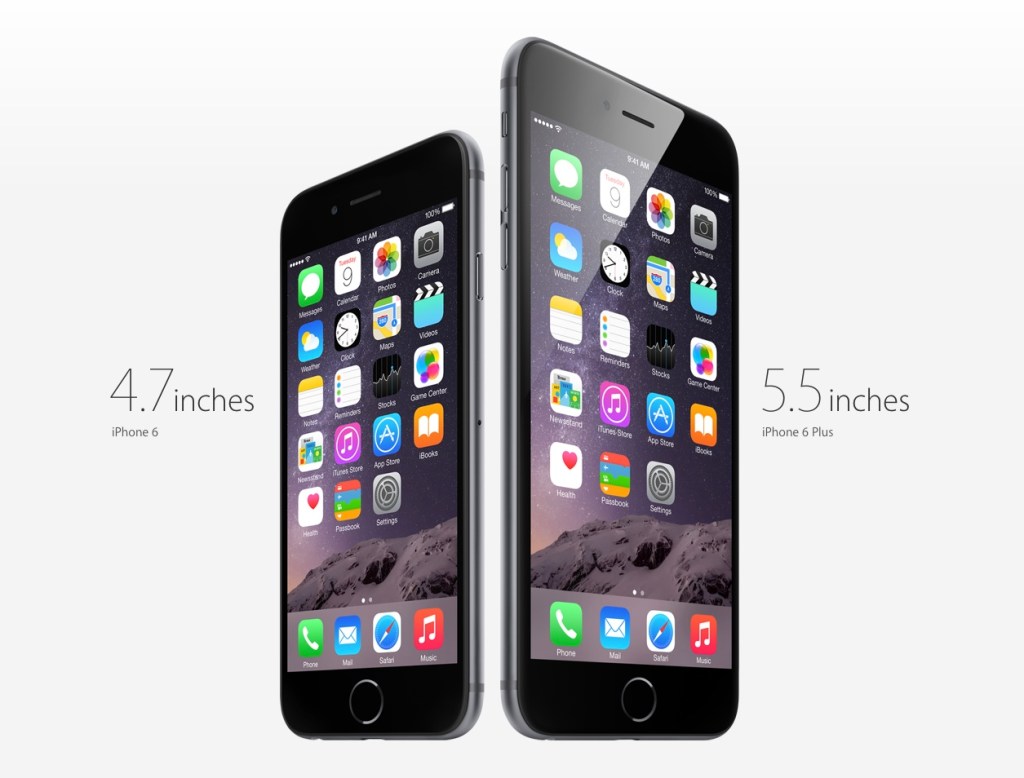
    Why the Plus and not the regular 6? Fear of missing out, really. It’s funny how the Samsung’s screen felt gigantic at 4.8” back then, but now Apple’s 4.7” seems so conservative; too small a leap for all the time I’ve waited for them to do this. The iPhone 6 was perfect for 2012, but we live in extreme times, us 2014-ers.

    Handling and Design

    So, the challenges. It’s been an uncertain 10 days. My theory is that the 6 Plus is a polarizing device if you are a smaller person/have smaller hands. You either know whether you’re okay with the compromises or not. I’ve spoken with women who use Galaxy Note phones, and a common sentiment has been “I can’t use most of the other large phones one-handed anyway (or put them in a pocket), so I just went for the biggest one”. It seems that if you have small hands, you either want a really small phone (iPhone 4-5 series), or go all the way with a 5”+ display and hold it all the time or stow it in a bag.

    But if you have larger hands like me (I can just about hold a basketball with one hand), you could technically use the thing one-handed, but that doesn’t mean you should. It’s still a dangerous balancing act each time, and I swear I’m using muscles I haven’t before, causing a slight ache in the forearms. I’ve read laments that you can’t use it one-handed while lying in bed. Untrue; I’ve done it for hours at a time, hence the pain. Deciding whether one should do all the things one technically could is the hard stuff life is made of. Most people aren’t ready for decisions like this until they’ve had a few kids.

    And remember how the iPhone 5 looked “terrible” when it first leaked online, and many wished it wasn’t real? The odd two-toned back, the suboptimal placement of the camera lens against the rounded corner and, later, the broken look of an inevitably dinged-up chamfered edge? Now those same people look back and consider it, all in all, a handsome design. I was one of those people, and this makes me feel unqualified to comment at length on the iPhone 6 family now. But damn if it ain’t ugly with that protruding camera module and those fat, rubbery antenna lines!

    But the phone’s roundness serves a functional purpose that I appreciate. Many sleek, obsidian phones appeal visually, but don’t feel right in the hands. Sony and other manufacturers have put out a bunch of very nice slabs, but nestle their bottom corners into the fleshy pad under your thumb for a 20-minute news reading session and you’ll see. The iPhone 4 was a similarly beautiful device. It felt pretty good too, but that design wouldn’t hold up when enlarged to accommodate a 5.5” screen. I’d say the iPhone 6 and 6 Plus are the “right” shape for what they need to do.

    Nevertheless, I very much disagree with the smoothness of its back, coupled with such a thin body. Once you add one of the Apple leather cases, it becomes much easier to pick up, hold securely, and use comfortably. It’s a case that fixes just about all of the phone’s superficial design flaws. Leather’s tactility and softness actually allows you to feel more of a connection to the device.

    Others have noted Apple’s adherence to the classic iPhone look for the 6 Plus, with thick top and bottom borders despite the larger screen. This of course allows for a large physical Home/TouchID button, and visual balance. Held in the hand, the phone seems comically tall, and if you can only grasp it below the midpoint, its weight distribution wants to tip itself forward and outward. But use the phone in landscape, and the need for symmetrical weight distribution is obvious. The same goes for the borders: many Android phones have a “right” way to hold them in landscape; merely touch the wrong edge and you’ve accidentally hit a hidden capacitive button that takes you back to the Home menu. I much prefer Apple’s grabbable safe zones.

    Give It Time

    In the first week, I was completely undecided. I looked at the smaller iPhones my friends and colleagues had ordered, and wondered if I’d made a mistake I would have to live with for a whole year. #Bendgate/#Bendghazi didn’t help, but that worry passed within a couple of days. It’s a strong phone, my tight jeans from Uniqlo have a bit of stretch to them, and most importantly, I have AppleCare+ and faith in their customer service.

    I found myself fondling other people’s iPhone 6s, and remembering the times when I could enclose an entire phone in my hand. They grow up so fast! And then at some point after the first week, it just clicked. Somewhat unbeknownst to my conscious brain, it became the perfect size for an iPhone. Later that day, I picked up a friend’s iPhone 6 and waited for the regret to kick in. Nada.

    Switching to an inherently inconvenient form factor that prevents you from carrying and interacting with your most-used computer in the ways that you’re accustomed to is bound to be uncomfortable. I figure even if you’ve made rational peace with all the factors you’re well informed about, it takes a little bit of time for the heart to come around. That’s a problem for Apple in the showroom. I wonder how many people immediately chose the 6 when they might have been happier with a 6 Plus. Next year’s 6S Plus sales will tell the story.

    Off-Screen Considerations

    Battery Life

    The second-biggest new feature for many is the 6 Plus’s enhanced battery life. During the final weeks of my old iPhone’s tenure, its inability to stay functional from morning to night was a bigger annoyance than the small screen. Finally, that problem has also been licked.

    So far, it’s been tremendous1. Also, if you imagine that you may someday be unhappy enough with the iPhone 6’s battery that you’ll buy a Mophie battery case or similar, remember that it will essentially make for an overall bigger and heavier device than the iPhone 6 Plus, which probably won’t need one. That makes for a pretty clear choice. My best example to recall is one particularly busy day with lots of messaging, photo sharing, a 20-minute phone call, GPS directions for a short trip, playing a 3D racing game for a bit, and streaming Spotify music at “Extreme” quality over 4G during my commute, and still making it home 12 hours later with 20% to spare.

    Gaming

    If you play games, you’ll find the 6 Plus an amazing machine. Its screen is bigger, brighter, and better than that of any portable on the market, including Sony’s PS Vita and Nintendo’s 3DS XL. There’s a common argument against the smartphone as a challenger to these systems, and it involves the lack of physical controls. I won’t get into that discussion here; suffice it to say I’ve played hours of Real Racing 3 (free) on my phone and never missed the joystick. Also, if you’ve ever squinted at tiny enemies in an FPS on your old iPhone, and struggled with having two thumbs blocking the action, you’ll recognize that the 6 Plus has the potential to help some genres take off on mobile. I’m planning to give X-COM another go now that everything will be more discernible, and keep in mind that was a console game ported over from the Xbox 360.

    As I understand it, iOS 8’s “Metal” graphics architecture also allows game developers to squeeze more of the kind of performance out of Apple’s chips that they’re able to on dedicated gaming machines, which don’t have to worry about accommodating many of the other features that a general purpose ~~phone~~ computer supports. Games are going to look ridiculously good.

    Photography

    It’s better. It’s astoundingly good for a smartphone. Yes, the optical image stabilization gives you an extra f-stop in low light when photographing still scenes, but you shouldn’t be using the default Camera.app for those anyway. The Cortex Camera app takes longer exposures with very good software stabilization, and supersamples/averages out sensor noise in dark scenes almost completely.

    Productivity

    Everybody talks about landscape mode, but the benefits are still questionable to me, 10 days in. Fire up Mail.app and you’ll see that it’s a little too cramped to be more useful. The information density improves if you turn your system-wide dynamic text size down to one of the lowest settings, which takes more advantage of the HD resolution and 400ppi display. But it’s not for everyone, and I suspect that for a good chunk of people (for example, those over 40), the 5.5” display is best employed as a big screen, not a dense screen.

    Typing is a mixed bag because I’d gotten really good at the old iOS keyboard. In apps that haven’t been updated for the new phones, the default keyboard appears larger, which messes with your muscle memory. Since iOS 8 launched, I’ve mostly used SwiftKey (it beat out Swype in accuracy). Its swipe mode helps with one-handed input when that’s necessary — having a thumb in continuous contact with the screen just feels more stable than lifting and tapping.

    I think the most productive thing about the bigger screen will be the ability to sketch things of moderate complexity. In the past, you might get some basic shapes down before having to pinch-zoom around a lot to create anything useful. Usually I’d feel stupid within 20 seconds of trying, and give up. Now, I think you might be able to sketch a decent wireframe on your phone. No more napkins.

    In particular, I can’t wait for a version of Paper by FiftyThree, or Penultimate, that takes advantage of the 6 Plus. I’d love to complement my Evernote and Moleskine notebooks with some quick and editable digital drawings. I have to mention that every time I’ve tried out a Galaxy Note and stylus, the software has been the most terrible part of the experience. Samsung bundles some in-house notes app with an incomprehensible and dated-looking UI when they really should have partnered with an established third-party app to provide one. I don’t know that there are any on Android, though. Seems like a real miss that they’ve had these larger devices on the market for so longer and didn’t nail the sketching use case.

    Conclusion

    After 10 days, I’m definitely bullish on this form factor. It took awhile to get over the hump, and if we enjoyed the generous return policies that customers in the U.S. seem to have, I might have been tempted to trade it in for the more familiar iPhone 6. But quite a few pundits have called the Plus a new kind of device (for Apple), one that asks you to reset your expectations of an iPhone in exchange for a more capable companion, and they’re quite right2.

    In the years between the iPhones 4 and 6, I was often beguiled by larger devices (in spite of the Android OS), and bought the Galaxy S III, Nexus 4, and XiaoMi RedMi and Mi3 phones for research/secondary phone purposes. Each time, I went back to the iPhone in relief — seeing its small screen as the weakest link in a strong Mac and iOS product ecosystem — and cursed the seeming necessity of compromise in every aspect of this mortal coil. Now at last, that itch is dead.

    1. Although iOS is meant to prevent apps from misbehaving and sucking your battery dry, there are exceptions. Some take every opportunity to wake up in the background, using location data for geofencing and refreshing streams. I’ve found Normal: Battery Analytics to be a useful app, even with iOS 8’s new ability to show which apps use the most power. Normal goes a step further, comparing your battery stats with other users to let you know if your problems are in the minority, and predicting how many hours of standby time you’d claw back by forcing those apps to quit instead of just leaving them in the background. I’d always believed that a backgrounded app couldn’t abuse your battery in iOS, but from the sounds of their literature, I might have been wrong. 
    2. Apart from sketching, writing and editing text on the 6 Plus is itself a very different experience. It’s liberating to see a taller expanse of your document rising above the keyboard, especially in full-screen capable apps like iA Writer Pro, which I used for this post, switching between Mac and iPhone. It feels less like you’re wrestling your phrases into place, and more like they can come out and lie anywhere they want on the floor and it’s exactly what you wanted. 
  • LINE Pop-Up Store Singapore, May 2014

    LINE Pop-Up Store Singapore, May 2014

    Japanese-Korean messaging app LINE has opened their first pop-up store in Singapore, on a prominent stretch of the core shopping boulevard of Orchard Road. It will run for a month and reap immeasurable marketing value from the high visibility and sure-to-grow lines of fans eager to buy their cleverly designed character merchandise.1

    I dropped by on its first evening tonight with some colleagues, and we spent between $20–60 each. I would have spent $100, but put down a pack of 100 art postcards ($55) at the last minute. This is on top of the $40 I’ve spent on in-app purchase stickers over the last year or two of being on the platform. I don’t think any other messenger currently comes close in terms of having built brand loyalty or monetization potential that doesn’t involve serving ads or selling personal data.

    Standing outside and watching the crowd, I remarked to a UX designer colleague that no other messaging app could pull off something like this in the middle of town, not WhatsApp, not WeChat. He correctly observed that none of the others have strong IP from which to make their own merchandise to even sell in a store.

    “And it’s all this bloody kiddy stuff!”, I said, clutching a plastic bag filled with stickers and a pair of mugs that look like the faces of a bear and a bird. “It’s not kiddy,” he started to protest before going, “Oh alright, I guess it is.” Takeaway: “Kiddy” is largely irrelevant in Asia.


    18-to-29-year-old females are its “core target,” says (U.S. CEO Jeanie) Han, explaining that in Asia, once girls were using Line, boys followed – and then this young “hip” user base helped bring in older users “like a domino effect.”

    “People, especially young folks, are really adopting our stickers,” she says. “The ratio of people who are buying things online like our stickers is actually quite high in the U.S., as well as the people who are using our games inside our platform relative to the total number of users, so we’re quite optimistic in terms of our market in the U.S.” — Techcrunch, March 2013


    The crowd lining up tonight was about 2:1 female to male, which seems in line with LINE’s targeting strategy. There were a few people who definitely looked over 40, and everyone present was walking out with stuffed toys, diaries, notebooks, plastic folders, tote bags, mugs, badges and the like, all emblazoned with Brown, Cony, Moon, Leonard, Sally, James, and other characters I can name because I see and employ their images in chat conversations on a daily basis. LINE is lovable, obsessionable. Few others are by design.

    Against Facebook Messenger’s 200M monthly active users, LINE is said to have virtually the same MAU (out of 400M registered accounts). In comparison, WeChat (dominant in China) has 355M MAU, and WhatsApp has over 500M. I don’t consider WhatsApp and Facebook Messenger users to be the same thing2, and LINE has the greatest growth potential outside of its home country, especially in Asian countries with an affinity for Japanese culture, whereas the Chinese WeChat is likely to have a harder time. I’m pretty bullish about LINE’s success, even if their apps have a lot to improve on. For the record, LINE also reports significant revenues — $338M in 2013 — versus about $200M for KakaoTalk and $20M for WhatsApp.


    1. Within minutes of our arrival, I overheard a mom asking her two teenaged daughters, “What’s this about?”, to which they replied, “it’s kind of like WhatsApp.” 
    2. For one thing, WhatsApp is not functionally part of a platform, and probably won’t be merging with Facebook’s in the near future for various reasons. All the other messaging networks are at some stage of offering content, ecommerce, games, and enhanced communication services such as video-calling. 
  • Shuttered Out

    IMG_0743

    At a recent office balcony party, I spoke to a colleague who’s also into photography (by which I mean he’s also afflicted by the coin-draining hobby of buying cameras), and realized that maybe I’ve made some progress. My last purchase was the Sony RX-100, which he also bought, and then sold, and then bought a Fuji X20, and then sold, and then bought a used Fuji X100S (pictured). The urge has not visited me lately, unless you count the $200 Q Camera which no amount of money on Earth can buy at the moment because they’ve only made one sold-out and poorly handled batch.

    I’m doing really well on just my iPhone 5S and excellent apps like the new Mattebox (do try my Velvius filter), and Cortex Camera. You can also explore all my posts tagged ‘Photography‘.

  • ArtScience Museum, Nov 2014

    ArtScience Museum, Nov 2014

    Some iPhone photos from a recent visit. I’d been meaning to see the Eames one for months, but it’s always a bit hard to get out to the Marina Bay Sands because there isn’t a lot to do afterwards if you’re not in the mood for an expensive meal or drinks.

    There are quite a few pieces in the Eames area, including some original interactive activities from an educational exhibit they designed, although the gallery layout leaves a little to be desired. A roughshod detail here, an odd pathway there, and lots of furniture out of reach, labeled “do not touch”, leaves you empty;  it’s only at the very end when you sink into a permitted Ottoman that you feel the humanity of their designs.

    The Chanel Black Jacket photo exhibition is much more enjoyable to explore, because there’s nothing between you and the content on display.

    ••••

    Here are the official exhibition summaries:

    Explore the life and work of Charles and Ray Eames, the most famous couple in design.

    Most known for their timeless furniture creations, their influence and innovation extended far beyond that into architecture, exhibition design, toy making and film.

    CHANEL’s photographic exhibition dedicated to Karl Lagerfeld’s book “The Little Black Jacket: CHANEL’s classic revisited by Karl Lagerfeld and Carine Roitfeld” opens in Singapore, joining a new stage of the exhibition that underlines CHANEL’s values of creativity and modernity.

    Discover the exhibition that pays tribute to CHANEL’s little black jacket. Through over a hundred photographs the jacket is adapted and worn differently by some of today’s greatest personalities in contemporary culture. Slipped on by the French singer, Vanessa Paradis, transformed into a headdress for the American actress, Sarah Jessica Parker, or adapted to Alice Dellal’s neo-punk look – this fashion masterpiece can adapt to any style.

  • Cortex Camera is your best bet for quality iPhone photos

    Cortex Camera is your best bet for quality iPhone photos

    Original iPhone capture
    Original iPhone capture
    IMG_0506
    Cortex Camera capture

    It’s hard to believe that you can get different results from the same hardware—the same smartphone camera—just seconds apart. The first photo was taken with the iPhone 5S’s built-in camera app, which employs some impressive software techniques to improve most photos. In this case, a low-light scene forced an ISO sensitivity of 1000.

    The second photo was taken with Cortex Camera, which takes a series of images over 2 seconds or so (you don’t have to keep your hands perfectly still, but still-as-possible helps). These are then combined for far less noise, more accurate colors, and higher resolution (12mp on the iPhone 5/5S, which normally take 8mp images). The default Camera.app also combines up to four captures for better photos, but is optimized to work for all situations. For any scene without moving subjects and where you have the luxury of time, Cortex delivers better results.

    Camera.app 100% crop
    Camera.app 100% crop
    Cortex Camera 100% crop
    Cortex Camera 100% crop

    The shots above are 100% crops from the same scene. Note that the Cortex Camera version is both larger and more detailed. It has more potential for processing, and beats a fair few prosumer point and shoot cameras at the pixel level.

    The first app to do this “supersampling” was Occipital’s ClearCam, which I used to swear by. However, like their other app 360 Panorama, ClearCam hasn’t received any updates in the wake of iOS 7, and appears to have been abandoned as the company pushes their new Kickstarter-backed project, the Structure Sensor. At this time, ClearCam makes you wait longer and has a cumbersome alignment and enhancement process. Cortex Camera just takes the picture and saves it all in one step. It’s a damn shame, because both Occipital apps were among the first and best of their kind, enabling users to do things with their iPhones that seemingly defied the capabilities of the hardware. They clearly have a knack for clever imaging technology; I just hope they take a longer view of supporting their products some day.

    If you’re in the market for a new app to take and share those 360-degree panoramas, Sphere (formerly Tour Wrist) does a good job and is free. Bubbli is also promising, but captures video instead of photos to stitch a scene together, which means you have to pan slowly to get an even exposure. If you’ve got the cash and a love of new gadgets (mustnotbuymustnotbuy) Ricoh’s new Theta camera does the trick in a single click. It’s the first consumer-ready spherical capture camera and looks like a presentation remote. Simply hold it above your head and hit the button, and it takes in the entire scene. What’s more, the $400 device has built-in wifi and beams photos over to your iPhone for instant sharing. It’s not hard to imagine this feature on an iPhone a decade from now.

  • VSCOcam 2.0 — A New High-Water Mark In Mobile Photography

    I’ve been a fan of VSCO products for awhile, and have written about using their VSCO Film presets with JPEGs from consumer compact cameras, and recommended the last version of their VSCOcam iPhone app in my rundown of Essential iPhone Photography Apps.

    In the latter post, I said of version 1 of VSCOcam:

    As flawed as it is capable, this low-priced alternative to the VSCO company’s pricey desktop plugins is pretty good at giving photos a realistic film look; no light leaks and crazy cross-processing here, just subtle color shifts, fade operations, and real grain overlays. Skip the other basic editing tools included; they’re not up to scratch yet, but the package is an easy buy at $0.99.

    The good news this week is that version 2 of VSCOcam [iTunes] greatly improves upon those editing tools (specifically by giving operations such as adjusting brightness more precise ‘steps’ of control, and making them non-destructive within the app; new adjustments like rotation have also been added), and takes the original’s 10 built-in film looks to another level.

    The new version of VSCOcam (a separate download in the App Store) is a free download, and now contains a store with 16 packs of “presets” for download at 99c each. A pack consists of 3 presets, which are really more like filters since their results cannot be accomplished by tweaking any of the editing parameters. Presets is a strange term to carry over from VSCO’s Lightroom and Aperture products, where they really are Presets.

    Owners of the previous paid app can unlock the original 10 legacy filters in the new app, which is a nice touch. And as a launch special, all 16 packs can be bought for the price of 6.

    The new app is essentially a ground-up redesign and rebuild. All operations are significantly faster, the built-in lightbox mode is nearly unrecognizable and has some very nice power-user features like flagging and filtering by flagged/edited states. The camera module is now good enough to use as a camera replacement, with separate focus/exposure locking, a “big shutter button” mode, high ISO boost support for iPhone 5, and other improvements. There’s also a proprietary photo publishing platform called VSCO Grid built in that I haven’t had the chance to try because accounts are being rolled out slowly as they test it.

    In this week’s issue of The Round Down newsletter (subscribe!), I said:

    This is a new high-water mark in mobile photography apps. […] It’s almost too good to be true, and too good to give away for nothing.

    And it really is. At one point on the mobile photography timeline, taptaptap’s Camera+ app was king of the hill as an all-in-one solution because few others did as much as it did, as inoffensively as it did. However, its shortcomings in editing and effects processing have never been addressed, and the pace of development seems to have slowed down considerably in the past year. With VSCOcam 2.0, I think its successor has arrived. It has the power to fix shortcomings in photos as well as or better than Camera+ ever did, and the professional desktop editing pedigree of its filters is unmatched by competitors.

    A few bugs and metadata issues notwithstanding, if I had to delete every photo app on my iPhone bar one, this would be my choice to keep.

    Not the best example, but one photo I took last night.
    Not the best example, but one photo I took last night.
  • Camera Noir x HK

    A couple of interesting people I follow on Twitter got together and formed an app company awhile back, called Pacific Helm. They released their first iPhone photography app today, Camera Noir, and it’s rather nice.

    It takes (and imports existing) photos in B&W only — a sort of black-heavy, rich sort of processing. It’s been called high-contrast in every review I’ve seen today, but that term usually implies a hard, noisy look; Camera Noir’s output retains subtle gradations and shadows. In some light, the results look almost like infrared film. It’s a look well-suited to landscapes and urban scenes, as these examples from my Hong Kong set show.

    20130605-221859.jpg

    20130605-222216.jpg

    20130605-223809.jpg

  • Still Living UP

    It’s been a month since I bought my Jawbone UP band, and since then I’ve incorporated a lot more walking into my life, trying to reach my goal of 8,000 steps a day. By my estimates, I probably averaged half of that before, since a lot of my time is spent at a desk, and commuting to and from it in cabs and public transport. Most days now, I do 8,000–10,000 by walking halfway home in the evenings.

    I just weighed myself, and I’m back to the weight I remember being for quite awhile, up until the last couple of years when I’ve felt fatter and slower. The difference is about 3kg, not a lot, and I’d like to lose a few more kilos to get my BMI in the sweet spot.

    What surprises me is how painless it’s all been. No grunting at the gym, or aching all over in the morning. Just being mindful of how much movement I should be making each day, and going out of my way to walk more. Low-impact, sustained exercise. I listen to podcasts, new music on Spotify, or think about things along the way. I get some air, and take the occasional photo (below) if I see an interesting scene. It’s great.

    IMG_7565

    Okay, I guess I’ve also been slightly more mindful of my caloric intake, thanks to the food diary feature of the UP app. I haven’t denied myself anything reasonable, and so there’s no need for “cheat days”. I’d consider my eating habits to be 95% the same. Still, it probably helped?