Tag: Mobile

  • iPad Pros

      
    When the 12.9″ iPad Pro was first unveiled, I was pretty sure I didn’t want or need one. Then I held it in the Ginza Apple Store while on vacation and bought one later that same day. The experience of holding such a large screen in your hands and touching it directly is more impressive than it sounds. But what you won’t realize while handling one in the store is how heavy it gets once you add a Smart Cover or Smart Keyboard and a silicone case for the back, if so inclined.

    In the couple of months since, I’ve merely used it like a big iPad, watching movies in bed and occasionally reading comics or news on it; that sort of thing. But I knew it was meant for more and wanted to try bringing it to work with the Pencil and Smart Keyboard. Spoiler: it’s awesome, and I could probably do a lot of my daily stuff on it while moving easily from meeting to desk. The main problem has been its weight, especially when carried in my bag with a camera and power bank and umbrella every day. It’s also too much to hold in one hand while sketching with the other.

    So after a few weeks of deliberation and bugging other people with the pros and cons, I decided to pony up for the new 9.7″ size and try to see if I could make justifiable use of two iPad Pros in one life. The Smart Keyboard hasn’t arrived yet, but I expect it will be even easier to type on than the Logitech and Belkin ones I’ve had for earlier iPads. The size and weight are perfect for one-handed use with the Pencil, although the back is slippery without a silicone case. I don’t think adding one is worth the weight gain, though. The larger iPad Pro is going to stay home and try to become a desktop computer in place of my ageing 2010 iMac. It was an unnecessary and guilt-inducing expense, but the thing that helped justify this dual-iPad setup was asking why I’ve allowed the iMac to go so long without an upgrade.

    I got old! Which makes one treat computers differently, not to mention the nature of the tasks have changed.

    Years ago, I would replace my PC/Mac every couple of years, usually by the end of every three-year AppleCare cycle. My computer was at the center of my life, and as a student living in a single bedroom, I’d spend most of the day in front of its screen; it was TV, telephone, game console, word processor, and library. I ate meals in front of it, and I know I wasn’t the only one.

    These days, I spend most of my time at the office in front of a MacBook Pro, and at all other times, the job of that home computer is being done by an iOS device or Apple TV. I have a bigger house to move around in, and I’m almost never found sitting in front of the iMac. Having a desktop for those purposes seems awfully restrictive now, and confronting the mess of my HDD and locally stored files feels tiresome and archaic. Doing everyday tasks on an iPad without that legacy is a sort of escape, and there’s some measure of security to be had in knowing I could use one of the Macs if I really needed to. Chances are, I won’t. With music and photos on iCloud and other files on Dropbox, the iPad has all it takes to be a primary computer most days. I’ve stopped editing photos in Aperture and Lightroom and do it all with an iOS workflow now. You just have to let go and not look back.

    I think all of us iPad Pro owners are waiting on iOS 10 to see Apple’s grand plan to bring this post-PC vision to maturity, but in the meantime it’s not bad at all.

  • Mobile or Console, the Name of the Game is the Same

    Mobile or Console, the Name of the Game is the Same

    Playing Oceanhorn on the new Apple TV, with a Bluetooth game controller like the SteelSeries Nimbus, feels distinctly like a traditional console gaming experience. It’s been compared to a modern Zelda title, and if you’re in the mood to explore, its large world lends itself to leaning back on the couch for a good hour or more.

    What’s interesting is that you can pick up your iPhone later and continue your savegame synced over iCloud, at which point its modified-for-touch controls and mini quest structure actually turn it into a modern mobile gaming experience.

    What might be undersold by a simple bullet point — “Cloud Saves” — is really significant: one game that can be played in very different contexts, made possible by having the same OS in your pocket and living room (and car, one day). It’s probably the future of gaming.

    Much like how we now commonly design for the web, going mobile-first in gaming makes sense for companies looking to the players to come. That means not making the mobile bit just a simplified companion app with minigames connecting back to the “proper” console version. The level of control complexity and engagement can and should scale to the device, all within the same game.

    Geometry Wars 3

    Many of the guidelines for apps on the new Apple TV force developers to adapt the experience to the available controller. Geometry Wars goes from a dual-analog stick shooter on a regular gamepad to an auto-shooter when on Siri Remote, where the player only has to steer. You get what fits, but never less than the whole story.

    The experience of seamlessly jumping from a phone to a 60” TV reminds me of how it felt to play the first iPhone games. I remember Crash Bandicoot, in particular, as a sign of things to come. You could get games like it on the Nintendo DS, but they weren’t downloaded over Wi-Fi in seconds, for mere dollars, or paid for electronically. It made the portable gaming systems of 2008 feel dated. And as Apple added more power, multitasking, social features, and cloud saves to iOS, the iPhone overtook them completely.

    Games on the new Apple TV have more than a whiff of that to them. Even if the platform doesn’t come to dominate gaming a decade from now, I believe the winner will work and feel like it.

    In a sea of diminished companies out-innovated from changes they didn’t see coming, it’s gratifying to think that Nintendo may have played their cards right with the upcoming NX. It’s rumored to be a home console with a detachable mobile device, playing games that also work with smartphones and networks from its rivals. God knows how they’ll do it, but that describes the right shape to survive: experiences designed to shift context, open to different forms of interaction (hey, even VR), ready to fill varied slices of time, long or short, in a busy user’s day.

  • Really Nice Images (RNI) Photo App for iOS


    I came across this app a couple of weeks ago but can’t remember how, and since then it’s struck me as somewhat criminal that more people aren’t talking about it. So this is just a quick post to help you, my reader, discover a new app that brings realistic analog film simulation to your iPhone photos.

    Sure, we already have VSCO, Rebelsauce, Faded, Afterlight, Litely, Priime… but there’s always room for one more if it does the job really well; the job being accurate reproduction of film characteristics. Then it’s a much shorter list. Mattebox (when it was for sale and updated) did a marvellous job of handling exposure adjustments in a very film-like way, VSCO Film in their desktop products are designed to emulate certain classic stocks, and a couple others like PicTapGo come from companies that also produce pro-grade Lightroom presets for a day job.

    RNI Films falls into this general category easily. Their Lightroom presets are based on close study of classic films, they use real film grain scans and simulate old lenses with blurring, individual packs retail for $49 each (there are 5?), and online chatter from professionals indicate that their work is well-regarded as being competitive with and maybe even better than VSCO Film, now the biggest player thanks to the profile of their iOS app.

    Unlike VSCOcam, which intentionally avoids naming its iPhone filters to match/cannibalize their more expensive Lightroom presets, RNI’s new app offers the same film simulations by name: Kodak Gold 200, Fuji Velvia 100, etc. I haven’t compared them, but I’ll guess that the iOS app produces results very close to the desktop product, at a fraction of the cost. Perhaps they have been tuned to the qualities of the iPhone’s camera for best results. At about $3 per in-app purchase pack, they are more expensive than those in most other filter apps on smartphones, but come on. In comparison to $49, we’re talking about a near giveaway.

    I’ve been very pleased with the presets, and they look the way I expect them to. The app could use a few more features and a streamlined editing UX that allows for people who’d want to save versions, for example, but as of right now it gets the basics done about as well as the earlier generations of iPhone filter apps. Load > Stage 1 Edits > Stage 2 Edits > Save as new copy. It’s still faster at this workflow than VSCOcam! Hopefully the team at RNI are still iterating on it right now, although I sort of doubt it.


    RNI Films by RNI (Free, with IAP)

    https://appsto.re/sg/Wg7N8.i

  • Apple Watch Numbers and Ive’s Materials

    Back in December, I wrote a bit of a rambly post about what I thought might happen with the Apple Watch, and the possibility of it having hardware you could actually upgrade to preserve your precious metals investment. I’ve since changed my mind on that, and think they’ll be replaced like any other Apple product: buy a whole new one if you want it. I also had a prediction about how many they’d make:

    In terms of mix, I’d wager an approximate 60% Sport, 30% Apple Watch, and a maximum of 10% Edition in the first year. At the prices above, the 10% sales of Edition watches will probably drive half the overall revenue.

    The Wall Street Journal (paywall) has just reported some numbers, and my guess was pretty close. They’re saying Apple will have up to 6 million units ready at launch. iMore has reprinted the breakdown:

    The report suggests that half of the production run is for the entry-level Apple Watch Sport, which will be priced at $349. One third will be the stainless steel Apple Watch. That would leave the remaining one-sixth of the production run — which comes out to around 850,000 units — for the gold Apple Watch Edition.

    If you’ve been active online today, you would have seen (and hopefully made time for) the New Yorker’s epic profile of Jony Ive. Many of the insights are new, and the writing is kinetic and marvelous, with gems like this one about Ive having an opinion about iOS’s skeuomorphic design, and eventually becoming involved in making it over:

    He’d had that conversation with Jobs. “He knew, absolutely, my views,” Ive recalled. “I’m not going to second-guess what he would have done if—had he been well.” I asked Cook if, after he became C.E.O., Ive had pressed for a software role. “We clearly spent a lot of time talking about it,” Cook said. “And I think it became clear to him that he could add a lot.” Ive’s career sometimes suggests the movements of a man who, engrossed in a furrowed, deferential conversation, somehow backs onto a throne.

    Or this one, which credits Ive with suggesting the new sputtering lightsaber effect in Star Wars: The Force Awakens to JJ Abrams at a dinner party. For the record, I think it’s a brilliant update which gives the business end of the weapon more heft, more fire and laser menace. Ars Technica has a debate in the comments section.

    After the release of the film’s first trailer—which featured a fiery new lightsabre, with a cross guard, and a resemblance to a burning crucifix—I asked Ive about his contribution. “It was just a conversation,” he said, then explained that, although he’d said nothing about cross guards, he had made a case for unevenness: “I thought it would be interesting if it were less precise, and just a little bit more spitty.” A redesigned weapon could be “more analog and more primitive, and I think, in that way, somehow more ominous.”

    If I wasn’t already sold on the standard Apple Watch (as opposed to the Sport and Edition versions) as my choice this coming April, this paragraph of remarks by two members of Ive’s design team present at the unveiling event would have done it:

    “The materials in this thing are insane,” Howarth said. People, he noted, were saying that the watch’s face was made of “sapphire glass”: “It’s not glass, it’s sapphire crystal—completely different structure. And then the stainless steel is super-hardened. And the zirconia ceramic on the back is co-finished with sapphire as well.” He added, “This would cost so much money if a different company was making it—Rolex or something. It would be a hundred grand or something.”

    “We sell it for just fifty thousand,” Hönig said, joking.

  • Darkroom Photo App Shows Why UX Details Are Everything

    Darkroom Photo App Shows Why UX Details Are Everything

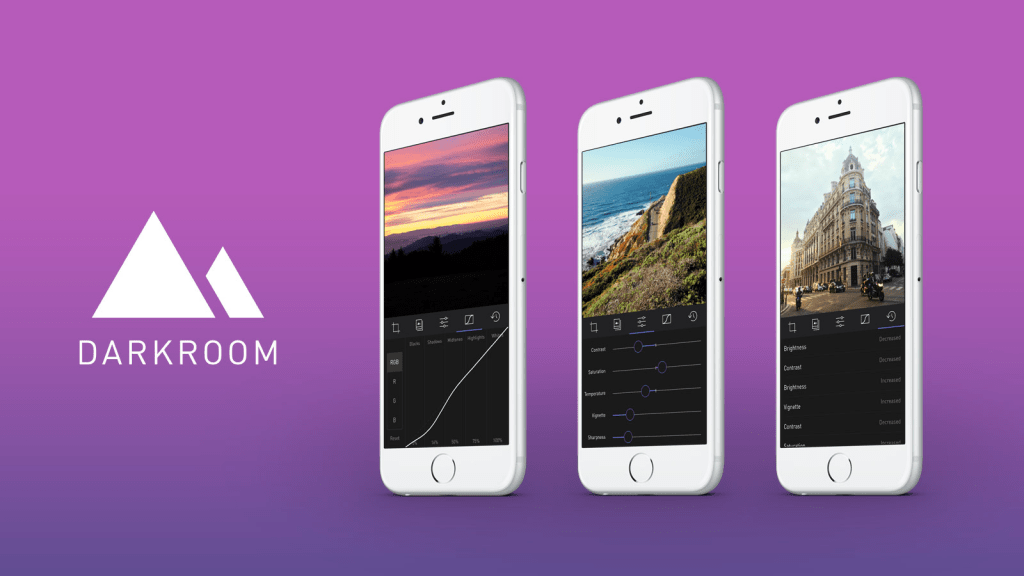
    A new photo editor for iOS launched today, and it’s called Darkroom (free, with a $2.99 in-app purchase to unlock Curves).

    “Another photo editing app? What does this one bring to the table?” I’ve seen a few early reviews of Darkroom begin along those lines. It seems a sense of fatigue has set in amongst people watching this space, and it interests me to find that I don’t feel the same way. I’ve dived into every new release with optimism, because there are still so many ways to improve upon what we can currently do on our mobile devices.

    The Verge mentions Darkroom in the same breath as VSCO Cam, suggesting that the latter has a new challenger. That’s somewhat wrong-headed; they aren’t anymore alike than, say, how Super Mario Bros. and The Legend of Zelda are as ways of passing time. Both apps allow you to tune the look of a photo, and apply presets, but it’s how they’ve been engineered to do it that counts.

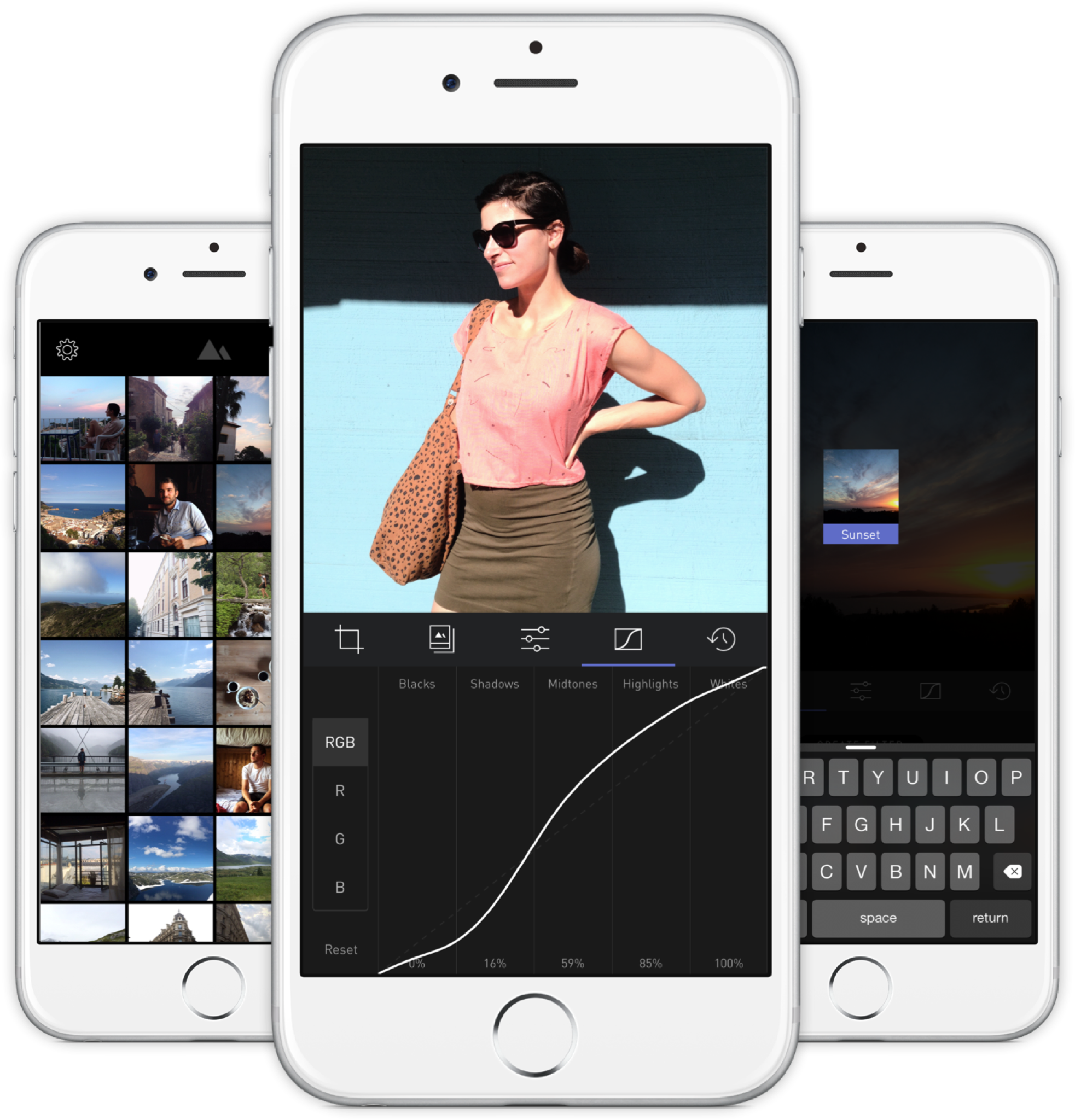
    Darkroom’s most exciting development, if you listen to what people are saying, is that it allows you to edit photos by adjusting RGB curves. Except that’s not especially new in the iPhone app space — Photoforge did it years ago, Filterstorm has that and much more in the way of professional tools, and there are others. The next feature to get attention is that you can save any of your adjustments as a custom preset, ready for future photos, and it’s like making your own filters. Again, this is territory that Mattebox, PicTapGo, Mextures, et al pioneered awhile ago.

    The reason Darkroom is exciting, is that it seems to have absolutely nailed the UX of these features, and made them feel manageable, comfortable, and pleasurable to use as a whole. I want to emphasize that this is hard, and that their solutions are so subtle and executional, they might not have convinced anyone of their worth if presented as bullet points on a slide at some early point in the process.

    Using other apps with curves and pro adjustments can feel claustrophobic and stressful on a small screen. I’ve hated almost every single one (Adobe’s own Photoshop Touch is so awful at it) and keep them on my phone as last resorts. If I’m on holiday and take a problematic photo with potential, I’m more likely to wait till I get home just so I can do it on a Mac than try to fiddle with it on the go. Snapseed is one powerful exception, but that uses its own control metaphors, not curves.

    Darkroom’s UI is blissfully open in design. It will likely get more complicated as they add more promised features, but I’m hopeful the team finds a way to keep this incredible simplicity. As you page through its 5 key sections (composition, filters, adjustments, curves, history), you never lose your place in the mental model. Nothing is buried in a submenu or out of sight.

    You don’t have to click a checkmark to save an adjustment before tapping another, because everything can be undone to an infinite degree, and one can undo hundreds of minute actions back to the beginning of an edit if necessary. Because that step (so annoying in apps like Afterlight, Faded, and VSCO Cam) has been eliminated, using Darkroom’s tools feels close to direct manipulation of the colors and pixels on your screen. One more nice touch: you can tap to the left or right of a slider knob to nudge it in that direction. Simple, but I can’t remember the last time a photo app let me do that.

    Loading up a photo is seamless. The app starts with a view of your entire photo library. Tapping a photo pulls it forward, straight into editing mode. At this point, you can swipe to either side to start editing adjacent photos in your library. Flicking a photo down tosses it back into the pile, and you’re looking at all your photos again. In use, it feels gloriously fast and uncomplicated. As that bullet point on a slide, “Seamless browsing and editing flow” wouldn’t have done it justice. This is the kind of feature that needs to be designed, prototyped, tweaked, and tuned over and over to create something subtle, but innovative. A team rushing their project out would have missed the opportunity.

    The difference between Darkroom and apps that require stepping in and out of different editing modes, especially when the placement of those modes is obscured, is like Apple’s own (now discontinued) iPhoto for iOS and the new built-in photo editing options in Photos.app. The former was a confusing mess with plenty of user-undiscoverable gestures and submenus, while the latter gives most users all the power they need in a more approachable UI.

    iPhoto Photos

    I’ve stopped using half of the other apps I’ve listed above as problematic, and forgotten the names of twice as many more. The ones I remember tend to be the ones I really wanted to succeed; I’ll unfairly single out Mattebox as an app with great technology and features, but suffered from confounding UX design. Countless times, I actually got lost inside the mess of buttons and menus that were hidden at the “back” of its camera mode. Thinking about the Darkroom icon sitting on my homescreen now doesn’t fill me with the same dread. I’m dreaming about using it later tonight, and tomorrow, and anticipating what will be new in the first update. Although its name is generic, I don’t think I’ll be forgetting it soon. I imagine it’s the beginning of a new phase of using my iPhone as a camera, one in which I can send better photos home while still on holiday.

  • Singaporean Telcos and Their Chinese Mobile Gambit

    One of the immutable truths of living in Singapore and reading our national broadsheet, The Straits Times, is that your Saturday morning news will be interrupted by three large and distinctly color-coded blocks of full-page advertising taken out by the major telcos: red for Singtel, green for StarHub, and orange for M1.

    In the late 90s, the brands advertised consisted mainly of Nokia, Motorola, Alcatel, Sony-Ericsson, with a few models from minor players like Sharp, HTC, and Panasonic. You’ve probably recognized the ones still around. Apart from a few new entrants like Apple, Samsung, and LG, the Saturday ad landscape was quite stable for over a decade.

    Something started happening this year, around the time Xiaomi launched local operations — their first market outside of the Chinese territories. New brands have started to share space alongside the established premium brands. Oppo/OnePlus. Huawei. Asus. ZTE. All very competitive spec for spec, dollar for dollar.

    It’s significant that these Chinese-designed products now share equal space with the Samsungs and LGs in expensive telco media buys, in one of the world’s most saturated and advanced smartphone markets.1 There are similar products coming out of other Asian countries2, but the Chinese brands have far more visibility here.

    I won’t go into how Xiaomi employs a differentiated, social media-driven sales model, but I will say that they got a lot of positive press at the start, driving home the idea that they offered comparable quality and reliability at a fraction of the cost. But they’ve been the only ones to get such an image in the mainstream mind, to my knowledge.

    The rest are coming into town aggressively — Oppo opened a flagship store at Suntec City, a central mall, and I swear I’ve seen a Huawei store along Orchard Road — but their cachet seems strongest amongst the small group of tech and Android enthusiasts attracted to low-cost, high-value devices, which are replaced frequently.3 These are not mass market items yet, and I wonder when their moment will come, if at all.

    What interests me is why the telcos are throwing their weight behind these entrants. Are they a bargaining chip to negotiate better hardware prices with the others, regardless of sales? Or do the postpaid 4 margins on selling already-cheap Chinese phones to consumers just look that much better? Or could it be driven by actual market demand?

    My leading theory is that it’s simply a reactionary move that doesn’t consider the longer-term effects of promoting these price-disruptive products. Why? Because telcos are instinctively programmed to serve products at every available price point.

    But the low price, contract-free nature of how consumers can otherwise obtain these devices is a threat to the lucrative business of locking people into contracts. Including such devices alongside premium devices in weekly advertising validates them. In the past, doing the same with a $50 Alcatel featurephone and a $500 Nokia “multimedia computer” was apples and oranges. Now, the products at both price points are much more similar, and one of them doesn’t need to be paid off in monthly installments. Legitimising cheaper smartphones inspires potential postpaid customers to simply buy a contract-free phone online (or pick one up in a store), and then save with a prepaid mobile line instead. At least that explains why Oppo is paying downtown rent on a flagship store. The telco strategy, though, that isn’t so clear.


    1. As of January 2014, Singapore had 87% smartphone penetration, with 29% of people owning more than one device. Anecdotally, the vast majority are on subsidized/contracted premium devices: iPhones, Galaxy S and Note models, etc. 
    2.  Joi Ito has a post about visiting Shenzhen that may be enlightening. 
    3. I think of this one friend as an edge case, but it’d be interesting if there were more like her: a former iPhone user, she found herself too clumsy to trust with expensive phones (they were smashed, stolen, or fell into toilets), and now uses Xiaomis because they are pretty much disposable at around USD$140 a pop. 
    4. Singapore has a bit in common with the U.S. phone market, in that only a minority pay full price or even know what the actual prices of their phones are. Everyone else pays a smaller sum upfront, with the rest of the device cost bundled into monthly fees. Some of the new Chinese phones are free/virtually free at their subsidized prices, but so are older iPhones and Samsungs, and it’s hard to see the price advantage lasting. For any brand that doesn’t enjoy the recognition of a Xiaomi, that window may close when current large-screened iPhones get priced down. 
  • LINE Pop-Up Store Singapore, May 2014

    LINE Pop-Up Store Singapore, May 2014

    Japanese-Korean messaging app LINE has opened their first pop-up store in Singapore, on a prominent stretch of the core shopping boulevard of Orchard Road. It will run for a month and reap immeasurable marketing value from the high visibility and sure-to-grow lines of fans eager to buy their cleverly designed character merchandise.1

    I dropped by on its first evening tonight with some colleagues, and we spent between $20–60 each. I would have spent $100, but put down a pack of 100 art postcards ($55) at the last minute. This is on top of the $40 I’ve spent on in-app purchase stickers over the last year or two of being on the platform. I don’t think any other messenger currently comes close in terms of having built brand loyalty or monetization potential that doesn’t involve serving ads or selling personal data.

    Standing outside and watching the crowd, I remarked to a UX designer colleague that no other messaging app could pull off something like this in the middle of town, not WhatsApp, not WeChat. He correctly observed that none of the others have strong IP from which to make their own merchandise to even sell in a store.

    “And it’s all this bloody kiddy stuff!”, I said, clutching a plastic bag filled with stickers and a pair of mugs that look like the faces of a bear and a bird. “It’s not kiddy,” he started to protest before going, “Oh alright, I guess it is.” Takeaway: “Kiddy” is largely irrelevant in Asia.


    18-to-29-year-old females are its “core target,” says (U.S. CEO Jeanie) Han, explaining that in Asia, once girls were using Line, boys followed – and then this young “hip” user base helped bring in older users “like a domino effect.”

    “People, especially young folks, are really adopting our stickers,” she says. “The ratio of people who are buying things online like our stickers is actually quite high in the U.S., as well as the people who are using our games inside our platform relative to the total number of users, so we’re quite optimistic in terms of our market in the U.S.” — Techcrunch, March 2013


    The crowd lining up tonight was about 2:1 female to male, which seems in line with LINE’s targeting strategy. There were a few people who definitely looked over 40, and everyone present was walking out with stuffed toys, diaries, notebooks, plastic folders, tote bags, mugs, badges and the like, all emblazoned with Brown, Cony, Moon, Leonard, Sally, James, and other characters I can name because I see and employ their images in chat conversations on a daily basis. LINE is lovable, obsessionable. Few others are by design.

    Against Facebook Messenger’s 200M monthly active users, LINE is said to have virtually the same MAU (out of 400M registered accounts). In comparison, WeChat (dominant in China) has 355M MAU, and WhatsApp has over 500M. I don’t consider WhatsApp and Facebook Messenger users to be the same thing2, and LINE has the greatest growth potential outside of its home country, especially in Asian countries with an affinity for Japanese culture, whereas the Chinese WeChat is likely to have a harder time. I’m pretty bullish about LINE’s success, even if their apps have a lot to improve on. For the record, LINE also reports significant revenues — $338M in 2013 — versus about $200M for KakaoTalk and $20M for WhatsApp.


    1. Within minutes of our arrival, I overheard a mom asking her two teenaged daughters, “What’s this about?”, to which they replied, “it’s kind of like WhatsApp.” 
    2. For one thing, WhatsApp is not functionally part of a platform, and probably won’t be merging with Facebook’s in the near future for various reasons. All the other messaging networks are at some stage of offering content, ecommerce, games, and enhanced communication services such as video-calling. 
  • Cortex Camera is your best bet for quality iPhone photos

    Cortex Camera is your best bet for quality iPhone photos

    Original iPhone capture
    Original iPhone capture
    IMG_0506
    Cortex Camera capture

    It’s hard to believe that you can get different results from the same hardware—the same smartphone camera—just seconds apart. The first photo was taken with the iPhone 5S’s built-in camera app, which employs some impressive software techniques to improve most photos. In this case, a low-light scene forced an ISO sensitivity of 1000.

    The second photo was taken with Cortex Camera, which takes a series of images over 2 seconds or so (you don’t have to keep your hands perfectly still, but still-as-possible helps). These are then combined for far less noise, more accurate colors, and higher resolution (12mp on the iPhone 5/5S, which normally take 8mp images). The default Camera.app also combines up to four captures for better photos, but is optimized to work for all situations. For any scene without moving subjects and where you have the luxury of time, Cortex delivers better results.

    Camera.app 100% crop
    Camera.app 100% crop
    Cortex Camera 100% crop
    Cortex Camera 100% crop

    The shots above are 100% crops from the same scene. Note that the Cortex Camera version is both larger and more detailed. It has more potential for processing, and beats a fair few prosumer point and shoot cameras at the pixel level.

    The first app to do this “supersampling” was Occipital’s ClearCam, which I used to swear by. However, like their other app 360 Panorama, ClearCam hasn’t received any updates in the wake of iOS 7, and appears to have been abandoned as the company pushes their new Kickstarter-backed project, the Structure Sensor. At this time, ClearCam makes you wait longer and has a cumbersome alignment and enhancement process. Cortex Camera just takes the picture and saves it all in one step. It’s a damn shame, because both Occipital apps were among the first and best of their kind, enabling users to do things with their iPhones that seemingly defied the capabilities of the hardware. They clearly have a knack for clever imaging technology; I just hope they take a longer view of supporting their products some day.

    If you’re in the market for a new app to take and share those 360-degree panoramas, Sphere (formerly Tour Wrist) does a good job and is free. Bubbli is also promising, but captures video instead of photos to stitch a scene together, which means you have to pan slowly to get an even exposure. If you’ve got the cash and a love of new gadgets (mustnotbuymustnotbuy) Ricoh’s new Theta camera does the trick in a single click. It’s the first consumer-ready spherical capture camera and looks like a presentation remote. Simply hold it above your head and hit the button, and it takes in the entire scene. What’s more, the $400 device has built-in wifi and beams photos over to your iPhone for instant sharing. It’s not hard to imagine this feature on an iPhone a decade from now.