Tag: Social Web

  • Week 15.22: Location apps

    I’ve been a user of Foursquare, and then Swarm, for many years. Since November 2009, says my profile page. I know that I’m giving an advertising company too much information about my location, movements, and preferences. But there’s definitely a value exchange here. Without this “lifelog”, I couldn’t remember everywhere I’ve been, or the last time I was at such and such a place. And there have been occasions where I was able to, quite magically, summon the name of a great restaurant in another city and immediately see how it’s been doing since, so that I could recommend it to a friend.

    I’ve been a fan of location-based apps and social networks since maybe 2006 or 2007, when I got my first Nokia that qualified as a smartphone. I especially recall an app named Brightkite that existed briefly. It allowed for serendipitous moments like going to a foreign country and seeing tips and reflections left around the city (maybe in your hotel!) by a friend who’d come the same way years before. Swarm still allows for this experience today, and it evokes a kind of love.

    One day, Brightkite malfunctioned and read my GPS location as being in Tokyo, just for a moment. I think it allowed me to see people and their check-ins in the mistakenly assumed area, and so I interacted with some of them… giving them stars or a follow or whatever. One such stranger became part of my permanent friends’ list, and when I migrated to Foursquare, she ended up on my list there too. It’s now over a decade later, and we are still weirdly and peripherally aware of each other’s lives, on Swarm and Instagram, without ever having spoken. It’s a distanced closeness that could only happen with the internet. Once, when I happened to be visiting Tokyo on holiday, we were both checked in around the Ginza area at the same time. We may have crossed paths; I’ll never know.
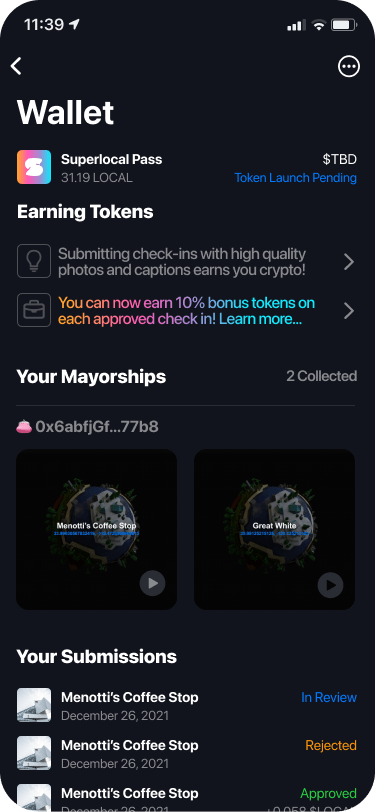
    Screenshot of the Superlocal app, taken off their website

    This week, an app called Superlocal came to my attention via a crypto/web3 newsletter called Milk Road that’s worth subscribing to, if that’s your thing. Suoerlocal seems like an attempt to remake Swarm with a new revenue model. Like many web3 ventures, instead of selling your data to advertisers, it tries to support itself by being intrinsically financial: checking in and providing quality photos earns you tokens called LOCAL (which may someday have value), and being the mayor of a place doesn’t only earn you derision/respect, but also some LOCAL whenever people check in. How does money enter the ecosystem? Becoming the mayor of a place means minting an NFT for it. It’s currently in an early access phase, which also requires an NFT (or invite from a friend) to gain entry.

    I have mixed feelings about all this, as I do with NFTs and web3 in general. We should definitely explore new business models and build services that don’t rely on users making a privacy compromise. If a small group of super engaged users can fund the experience on behalf of everyone, and be happy doing it, all the better. But at least in this iteration, we’re just trading one problem for another. For instance, holding a bunch of mayorship NFTs in your Ethereum wallet doxxes your location and behaviors too, and probably in a worse way because they’re public for anyone (instead of just Foursquare Inc. and a couple hundred of their favorite clients) to see. This stems from the poor privacy design of Ethereum, of course, but it’s now the biggest smart contract blockchain so what are gonna do? There are still so many things that need to be done differently for this technology to scale and be safe and easy enough for everyone to use. That means I don’t believe Superlocal is going to become ubiquitous any time soon, but hopefully we’ll all learn what and what not to do as they keep building.

    Until then, I’ll still be checking in on Swarm.

    PS: I’ve been told about the virtues of using Google Maps’ Timeline, which also lets you keep a log of your movements each day, but without the social and gamey elements. I tried it briefly, but it was less fun, and I’ve been quite successful so far in cutting all the Google out of my life. Yes, I’m aware my rules seem arbitrary and illogical.


    Media activity:

    • Finally finished the book How To Do Nothing after about two months, which isn’t the positive review it appears to be. I found it such a joyless and obtuse slog that I fought myself every time I thought to pick it up and finish it. And because I have a dumb rule about not reading two books at the same time, that blockage has fucked up my Goodreads annual challenge for the year. A lot of catching up to do and I don’t think I will.
    • Started a new book anyway, Grace D. Li’s Portrait of a Thief, which is billed as Oceans Eleven meets The Farewell.
    • Watched Kenneth Branagh’s Death on the Nile. Dreadful. He’s done some work in the past that I truly loved, but this has little to recommend it. The art direction is slipshod, with CGI background compositing that looks straight out of the CD-ROM FMV games era, and the radioactive Armie Hammer is in one of the lead roles. Branagh’s Poirot is also mysteriously unlikable and inconsistent, with a couple of rude and temperamental outbursts that feel like if Superman suddenly gave someone on the street a middle finger.
    • Severance on Apple TV+ is not dreadful. Mild spoilers follow. I wasn’t expecting to be impressed, and the first episode takes awhile to get going, but it’s really excellent. This despite veering a little close to corny with some scenes on the “severed floor”. The sinister, faux 70s megacorp with forced cheerfulness felt copped from the environmental storytelling of games like Portal, Fallout, and Bioshock, and maybe the Dharma Initiative out of Lost.
    • Now out on Apple Arcade is Gear.Club Stradale which was teased during their last online event, and I’m very much enjoying it with my Backbone One gamepad. The original Gear.Club was an okay free-to-play racer on iOS which was later released on the Nintendo Switch as a premium game (no in-app purchases). It also got a sequel on consoles, but I don’t know how that went. This new iteration is streamlined: it’s all set in Italy, and the UI lets you move quickly around the workshop and upgrade your cars without having to fiddle around in too many submenus. Instead of the usual giant catalog with tons of cars to swipe through, a small selection of up to three cars for sale, refreshed daily. This is a superior design for a game intended to be played in short bursts over a period of time. Ping me if you want to join my crew!
  • Week 29.21

    • Don’t try this at home: Kim is away in the UK this week; not the most advisable travel idea. Cases there are rising sharply and I oop, I suppose the same could be said for Singapore. A couple of clusters have formed around illegal KTV operations (the comedy of that phrase!) and a fisheries port, which has led to fishmongers and wet markets across the country becoming danger zones. We had 88 local cases on Sunday, the highest since August last year. For the record, the UK had about 56,000 cases on Saturday alone. The mind boggles.
    • So until she gets back and clears the quarantine process 🤞, I’m on a sort of Sabbatical+, where I have more freedom to eat junk food and play games well into the night. I didn’t leave the house all weekend and it was the best.
    • I finished Root Film on the Switch, and while I still enjoyed it on the whole, it became needlessly convoluted and improbable in the final acts. Pick it up on sale maybe, but bear in mind it offers no challenge whatsoever. In any case, Root Film was always going to be the appetizer for the two games under Nintendo’s Famicom Detective Club banner, which I’ll try to buy and play next.
    • Thanks to the NYT’s SF Summer reading list curated by Amal El-Mohtar, I discovered the joys of the CatNet series (just two books at the moment). Catfishing On CatNet is the first, essentially about teens hanging out in online chat rooms and getting pulled into an adventure, and it was so much fun that I blazed through it in about a day.
    • I then missed hanging out in chat rooms so much I decided to give Discord another try and joined a few servers. The quality of conversation in most was a step down from what I remember of IRC in the early days of the net. Then, spending time in chats was a main attraction, not an alleyway off the main boulevard of social media. So I was disappointed until I found a server dedicated to older people, a distasteful category I now find myself in. Ah! There, I found people speaking in complete sentences and actually communicating with one another. I may continue this.
    • I saw Black Widow and felt it unnecessary and stupid. I’m kinda over Marvel the way I’m over Star Wars, except the first episode of Loki on Disney+ worked well with the pairing of Tom Hiddleston and Owen Wilson — I thought I’d be annoyed by his usual mannerisms but it’s actually been a long time and we’re in a pandemic, so you do your thing Owen, we’re here for it.
    • Installed iPadOS 15 Public Beta 3 on my main iPad. Haven’t run into any issues yet, and I’m relieved at finally being able to customize my home screens with only the icons and widgets I want, leaving everything else in the App Library. You can also have two of the same app icons up as well, so I have Photos on my first Home Screen but also on the page I’ve dedicated to photo editing apps a few swipes away. It’s the little things!
    All in a day’s work with Dreams
    • A feeling of being useless, sitting around consuming all the time without making anything, has been fermenting and I’ve consciously allowed it. Over the weekend, I made it my mission to begin prototyping a game I’ve had in mind for awhile, let’s give it a code name… Feline Fiddler? Nintendo’s Game Builder Garage was going to be where I’d learn the basics and try to start, but upon investigation, you have to use its built-in asset library, and if you can’t find what you need in there, too bad. So I ultimately went with Dreams on the PS4, and oh boy, is it a stupendously powerful tool for 3D modeling, animation, and visualization.
    • On Saturday, I started playing the demo game project that comes as part of it, Art’s Dream, which showcases what you can do with it. And then started doing a few tutorials. By Sunday afternoon, I was able to assemble something close to the scene I had in my head using models others have built and shared on the platform, light it, and walk around in it with a character. And it’s all achievable on a PS4! I don’t see any reason why there couldn’t be something like this on iPads, apart from the App Store rules. Maybe Roblox is something like this? I should check it out…
  • Week 27.21

    Mon, 28/6, 9:31 PM

    Today’s the 28th day of my sabbatical, so I guess it qualifies as a full month now. It may be premature to declare, but guys, I’m sure I could do this for a year or two, no sweat. If I didn’t have a fixed period planned, I wouldn’t even be counting the days.

    But since I am, it feels like the first phase is over. As occupied as I’ve felt, it’s only been the equivalent of lying about listlessly, eating empty calories, and falling asleep in the sun. There’s a feeling beginning to stir that I should be doing more. That a pen should be on paper, a sprite on screen, or a running shoe on pavement. Okay definitely not the last one.

    Am I being too ambitious? Wasn’t the point to do nothing? I’d better let this creative despondency build up a little bit more just to be sure.

    Tue, 29/6, 3:02 PM

    My iPhone 12 Pro is less than a year old and its peak battery capacity has already dropped to just 90%. For comparison, my iPhone X still retained 97% after more than a year of service. I’m wondering if it’s because I almost exclusively charge wirelessly these days? In any case, I don’t seem to be alone in this.

    7:15 PM

    Have I always had such noticeable mood swings? Stupid question. If they were noticeable before, I’d have noticed them. Now I’m keenly aware of how I can go from low-energy miserable to happily fascinated and back again in one afternoon.

    As the saying goes, “the devil makes work for idle thumbs”. I potted around my finances for a little bit and realized StashAway’s cash management offering performed abysmally in June against already low expectations, like 0.8% APR. For small amounts of emergency cash, I don’t see why one wouldn’t just employ stablecoins and yield farming to get closer to 10%. So that’s what I’ll focus on doing next.

    Earlier today I had a chat with an old friend that I haven’t talked to in probably a decade. But we’ve known each other for… 25 years? Long enough that memory is less like a map and more like a stack of snapshots of road signs. But of course we live in the post-Facebook days, so I often see updates on Instagram or Twitter. Quite recently, I clicked on a link in one of her tweets. Then last week as I was going through my blog archive and saw her name come up, it seemed natural and easy to just reach out and say hi. Then she tells me she’s also seen my online activity lately, and even came by to read this blog. Huh.

    Listen, I believe there are no coincidences when marketing algorithms are involved. Someone you know checking something out on a platform is quite likely to put it in your feed as well. As unintended consequences go, I’m really happy with this one. But if they can prime my antisocial brain to reconnect after years and years, you’d best believe they can make you buy that Cheesy Zinger Double Down meal from KFC.

    Wed, 30/6, 6:19 PM

    I’ve spent the last four hours playing Call of Duty Mobile and absolutely slaughtering what I hope were other players half my age. Two people checked in with me today and asked how things were going. I told them I was basically larping as the deadbeat, couch-dwelling boyfriend they probably had in college. I have FPS headache now, but god it feels good.

    Fri, 2/7, 4:07 PM

    I’ve done little else but Call of Duty since Wednesday and am now Level 80 in the game, which sounds like a big deal. Only now that I’ve hit this watershed achievement, the game is exposing me to other players up to Level 150. They keep moving the goalposts.

    I’ve even ended up paying real Singapore Dollars for the current season’s (really just a month-long themed event) Battle Pass, which gives me all sorts of useless gear as I keep progressing. Other games’ in-app purchases give you collectible characters and items that impact gameplay. In Call of Duty Mobile, you get outfits and wacky paint jobs for your guns (!) that no player will ever see except if you shoot them in the face from two feet away. When I saw this before I got addicted, I thought skins for guns was the pinnacle of dumb. Now I’m Level 80 and won’t be caught dead with a plain black assault rifle.

    Sat, 3/7, 5:48 PM

    I’ve just been dosed with the second shot of the vaccine and am now waiting in the observation room. I don’t know if I’m imagining the slight lightheadedness.

    Almost everyone I know has had side effects after the second dose, some quite vicious. I’m already expecting to spend the next two days in bed with a fever and headaches. I wonder if I can still play Call of Duty Mobile in that state.

    When I did some quick maths to estimate how much I’m spending per day on this sabbatical, that is to say net outflow on housing and taxes and expenses not being offset by income, it was a slight shock. While I was always fine with the idea of effectively paying for this break, I hadn’t framed it as “pay $x daily to play Call of Duty Mobile”.

    Epilogue

    OOF. That second dose of Moderna hit hard. I wanted to post on Sunday but I couldn’t even bring myself to look at a screen all day. It started 9 hours after the shot with chills in the middle of the night. All day I had a high fever, headaches, an elevated heart rate of 110–120 bpm for about 18 hours, and all the delirious dreams that come with those. It was extremely stressful trying to sleep but being plunged into a maze of nonsensical images and incompletable tasks instead. At one point I woke up and tried to explain what I had been seeing, and it felt like I had brain damage because the words just weren’t available.

  • The Trouble with Instagram Stories

    I enjoyed reading this TechCrunch interview with Kevin Systrom where he openly gave credit to Snapchat for their ‘Stories’ feature, and talked about how copying it for Instagram inevitably created something different.

    What I’ve observed matches much of what’s been said: it gives most people a much larger starting audience compared to what a new Snapchat user has, which increases the likelihood of success; it’s really well implemented (I especially like that switching from one user’s Story to the next has a different transition animation than skipping a scene, making it much clearer that you’re on another person now); and it makes Instagram a more complete place to look into the two sides of a person’s life: the imperfect moment and the photograph worth sharing.

    BUT one early side effect has also materialized, and it’s already changing the way I use Instagram. In short: I don’t want to see many of these Stories! I follow a variety of different accounts, from brands, obvious social media influencers/shills, dogs, cats, interesting strangers, and friends. It’s Day 2 since the launch, and many of them have flooded my feed with too much uninteresting stuff. For many of these accounts, I want their photographs worth sharing, but not their imperfect moments. And there doesn’t seem to be a way to only follow one type of content on a per user basis.

    So I’ve started to unfollow people. Which I’m sure Instagram doesn’t want.

    In fact, the last major feature they added (an algorithmically sorted timeline) was probably aimed at getting people to follow more accounts. It let me add people without cluttering up my feed to the point where I’d miss posts from those I really really liked. For example, I could follow Canon cameras’ account for their occasional spectacular photos, but still see more personally interesting updates from my friends first. No problem. This morning, I unfollowed Canon because their chatty video Stories were getting in the way of my seeing life updates from friends.

    There isn’t this problem right now on Snapchat, which makes me think it might eventually win out if people want to keep these separate. I’m not sure how Instagram might resolve this, but there’s definitely a difference here. Namely, not all social content is created equal.


    The one other reason why I’ll continue to use Snapchat is their new Memories feature. Instagram Stories doesn’t let me do the same things.

  • LINE Pop-Up Store Singapore, May 2014

    LINE Pop-Up Store Singapore, May 2014

    Japanese-Korean messaging app LINE has opened their first pop-up store in Singapore, on a prominent stretch of the core shopping boulevard of Orchard Road. It will run for a month and reap immeasurable marketing value from the high visibility and sure-to-grow lines of fans eager to buy their cleverly designed character merchandise.1

    I dropped by on its first evening tonight with some colleagues, and we spent between $20–60 each. I would have spent $100, but put down a pack of 100 art postcards ($55) at the last minute. This is on top of the $40 I’ve spent on in-app purchase stickers over the last year or two of being on the platform. I don’t think any other messenger currently comes close in terms of having built brand loyalty or monetization potential that doesn’t involve serving ads or selling personal data.

    Standing outside and watching the crowd, I remarked to a UX designer colleague that no other messaging app could pull off something like this in the middle of town, not WhatsApp, not WeChat. He correctly observed that none of the others have strong IP from which to make their own merchandise to even sell in a store.

    “And it’s all this bloody kiddy stuff!”, I said, clutching a plastic bag filled with stickers and a pair of mugs that look like the faces of a bear and a bird. “It’s not kiddy,” he started to protest before going, “Oh alright, I guess it is.” Takeaway: “Kiddy” is largely irrelevant in Asia.


    18-to-29-year-old females are its “core target,” says (U.S. CEO Jeanie) Han, explaining that in Asia, once girls were using Line, boys followed – and then this young “hip” user base helped bring in older users “like a domino effect.”

    “People, especially young folks, are really adopting our stickers,” she says. “The ratio of people who are buying things online like our stickers is actually quite high in the U.S., as well as the people who are using our games inside our platform relative to the total number of users, so we’re quite optimistic in terms of our market in the U.S.” — Techcrunch, March 2013


    The crowd lining up tonight was about 2:1 female to male, which seems in line with LINE’s targeting strategy. There were a few people who definitely looked over 40, and everyone present was walking out with stuffed toys, diaries, notebooks, plastic folders, tote bags, mugs, badges and the like, all emblazoned with Brown, Cony, Moon, Leonard, Sally, James, and other characters I can name because I see and employ their images in chat conversations on a daily basis. LINE is lovable, obsessionable. Few others are by design.

    Against Facebook Messenger’s 200M monthly active users, LINE is said to have virtually the same MAU (out of 400M registered accounts). In comparison, WeChat (dominant in China) has 355M MAU, and WhatsApp has over 500M. I don’t consider WhatsApp and Facebook Messenger users to be the same thing2, and LINE has the greatest growth potential outside of its home country, especially in Asian countries with an affinity for Japanese culture, whereas the Chinese WeChat is likely to have a harder time. I’m pretty bullish about LINE’s success, even if their apps have a lot to improve on. For the record, LINE also reports significant revenues — $338M in 2013 — versus about $200M for KakaoTalk and $20M for WhatsApp.


    1. Within minutes of our arrival, I overheard a mom asking her two teenaged daughters, “What’s this about?”, to which they replied, “it’s kind of like WhatsApp.” 
    2. For one thing, WhatsApp is not functionally part of a platform, and probably won’t be merging with Facebook’s in the near future for various reasons. All the other messaging networks are at some stage of offering content, ecommerce, games, and enhanced communication services such as video-calling. 
  • One Week with the Jawbone UP: How its Design Inspires Behavioral Change

    up-by-jawbone-lowres-015

    I bought one of the newly revised Jawbone UP wristbands a week ago. For those not following the rise of wearable activity trackers such as the Nike+ FuelBand, they are essentially pedometers you put on your wrist as you go about your business each day (and wear to sleep at night, in some cases), that connect with your PC or smartphone to give you more insight into your health. The UP was one of the first products on the market, but suffered from design and manufacturing defects that led to a hasty recall and another year on the drawing board before it was finally re-released last Christmas.

    It all started with using the free Moves iPhone app (by the Finnish company ProtoGeo) for about a week, during which I got a taste for recording and quantifying my movements. When I saw the UP on sale locally, it was an easy purchase. It’s only been a week, but it has been a behavior-altering experience for me so far. Along with its companion app, the UP provides a couple of key features.

    • Activity reports
    • Food logging
    • Sleep quality tracking
    • Social network awareness
    • Fiddle-free design
    • Comfort and style

    Activity reports

    carousel-2-3

    Open up the app and you’ll see at a glance how you’re doing against your set objectives. A healthy target is 10,000 steps a day, but few sedentary workers can meet that. Because UP is an internet-connected service, it’s able to tell you what others like you (in age, gender, height, and weight) are averaging. In my case, the average most do is about 5,500 steps a day. I decided to set myself a high but achievable goal of 8,000 steps.

    What’s happened since? I’ve found myself striving to reach that by alighting one bus stop ahead of my destinations, taking the long way around the office, and going for more short walks whenever I can.

    It translates your activity into calories burnt, which it shows you alongside an estimate of how many calories you burn just resting, and a total for each day. Every now and then, the application shows you “Insights”; pre-written facts and advice tailored to your own performance. Examples include deciphering hidden patterns in your behavior and mood, and helping you understand terms like “you walked 8,000 steps” with statements such as “equivalent to walking across the Golden Gate Bridge and back”.

    Food logging

    This part is optional, but you can enter your meals (or just photos of them) to keep a record of what you’ve eaten. If they’re available in the online database, nutritional information is attached. It has the same effect as using an expense tracking app: it makes you acutely aware of every little bit you put into your body, and alerts your conscience to the unnecessary.

    In practice, having a vague idea of how many calories I’m consuming, coupled with the knowledge of how much I’m burning (or NOT burning, on idle days) has been powerful. If I know that I’ve only moved a minimal amount all afternoon, any random urge to snack quickly meets a mental roadblock — “Why would I need more calories?”

    Sleep quality tracking

    Like the popular Sleep Cycle app, the UP band can monitor your movements in the middle of the night, and map out your light vs. deep periods of sleep on a graph. And then at the best possible time close to your intended waking hour, it will silently vibrate in the morning.

    You are asked to set a sleep goal for yourself, and along with all the other data it collects, this is plotted over a timeline of days, weeks, and months, which illustrates how good you’ve been at getting the sleep and exercise you need.

    Social network awareness

    carousel-2-1
    This is easily one of the best features of the UP. Other people can be added as “teammates” and their activities populate your Home screen, turning it into an Instagram of physical activity. You’re encouraged to inspect their details, leave comments, or react with a small selection of emoticons. You might see that a friend had a healthier lunch, or walked far more than you, or slept better than you. These events nudge you into behavior change.

    When I started, one of the only people it found for me to add to my “team” was someone living in Japan that I only follow on Twitter and YouTube. I asked, she said ‘Sure’. I don’t know her personally at all, but I’ve found that reading UP’s activity feed is a unique interaction different from regular status updates. Being able to correlate your own physical state with another person’s through shared metrics, leads to a different sense of awareness; any encouragement you receive resonates that much more. Her most active day blew me away at over 24,000 steps, followed by 11 hours of sleep. It really spurred me on to try and find the time for activity. Multiply that by the number of people you follow, and the social features become an extremely compelling component.

    On my second day, two more people I interact with online bought their own. On the third, my girlfriend joined in.

    Fiddle-free Design

    While the UP is not designed to be worn and forgotten — its constant presence serves to remind you of your goals — it is designed to be worn and left alone. Its long battery life (about 7-10 days) is one of the ways in which this is obvious. Charging via USB only takes about 80 mins, which you can easily do while idle.

    In chasing this long battery life, the UP eschews Bluetooth syncing, which other products like the Fitbit and Nike+ FuelBand have. To sync the UP, one must remove it and plug one end into a smartphone’s headphone jack. Jawbone recommends doing this about twice a day to keep up with your own stats and update your team. On the other wristbands, one only has to start the app, and they sync wirelessly.

    I actually think this omission is a strength.

    Like how shooting on film frees you from constantly checking how the photo came out on the little digital screen, thereby letting you take more photos and experience the scene you’re in, not continuously syncing the UP creates mystery, anticipation, and actually lets you get on with it and not fiddle with tracking apparatus every spare minute.

    In his excellent essay about using a FitBit, Paris and the Data Mind, Craig Mod described looking at the LED display and seeing that he had climbed 96 flights of stairs one day. The next thing he did was walk halfway across the flat town of Palo Alto to the nearest flight of stairs he knew of, so that he could shift that number to read 100. It sounds like great exercise, but I don’t want to obsess over live numbers or end up conducting accuracy tests each day over how many steps it’s counting.

    The UP way, you’re wondering things like “will I break my record today?”, and if you’re extra competitive, “I hope I don’t lose to so-and-so,” as you go about your business. Sometimes, by not knowing, you exceed your targets. And then you sync at the end of the day, and it’s like waiting for lottery numbers to be called out. It’s its own kind of fun.

    Comfort and style

    up-by-jawbone-lowres-016

    The UP is available in 8 colors, of which 3 are available here in Singapore right now. I got the Black (sorry, Onyx), and it’s pretty nondescript and unlikely to draw attention. The brighter colors pop more, and show off a subtle zig-zag texture that identifies it as part of the company’s product range under design chief Yves Béhar. None of them are what you’d expect a “wearable computing device” to look like. The only button is cleverly hidden, looking like an integrated design feature. Two LED lights are embedded beneath the hypoallergenic rubber surface, and only visible when lit. It’s much thinner than the FuelBand, and could easily be mistaken for one of those Livestrong-type charity support wristbands from a few feet away.

    These things help with making the UP an invisible part of daily life, which gives it potential to succeed at being adopted by more. But as the wearer, I always feel its presence (at least in this first week). The routines I’m developing around the app, around thinking about moving more, burning more, eating less, around how my teammates improve themselves, are the very definition of behavior change.

    If having visualized, connected, and actionable data on your own body and movements sounds interesting to you, the UP will probably be a great addition to your life.

  • Finding a Home for Your Copywriting Portfolio or: How I Learned to Stop Channeling an Art Director and Love the Words

    Finding a Home for Your Copywriting Portfolio or: How I Learned to Stop Channeling an Art Director and Love the Words

    Lots of portfolio tools advertise the ability to create a gorgeous website online within minutes, but how many are suited to showcasing a copywriter’s work? This post covers getting a basic presence up for a handful of your projects. More comprehensive site builders are only briefly mentioned.

    It’s often said that people only look into their CVs between jobs, but taking stock of what you’ve accomplished on a regular basis is a really good practice. But with a standard resumé, updating a paragraph about your current employment several times a year isn’t attractive. Fortunately for people in the creative industries, there’s the portfolio, which can be very satisfying to compile, if only to remind ourselves how little victories on a project tend to make up a bigger result.

    Not Your Creative Director’s Portfolio

    Over the last few years, I’ve seen a fair few creative portfolios, and increasingly, when one asks to see some work, a URL gets sent instead of a PDF. When I was starting out in advertising about 8 years ago, we routinely brought physical folders of printouts to interviews. If you wanted the job, you might make an extra copy to leave behind. If you’ve heard some creatives calling their folios “books”, it’s because that’s what they really were.

    Another thing that’s changed since the mid-noughties is how the presentation of a copywriter’s work has gone from showing a few ads and/or documents with long-form writing samples, to being very close to how the art guys do it. Big, colorful pictures that would reel even an illiterate eye in. Some writers’ books now haven’t got a word in them.

    Carbonmade
    Carbonmade: Your online portfolio, the door to a bright future in children’s illustrations

    Most of the people I’ve met showed off work on portfolio cum social networking sites for creatives. Places with start-uppy Web 2.x names like Carbonmade, Krop, the Behance Network, Cargo, Coroflot, and to some extent, Dribbble. Some respectable, shirt-wearing creatives had portfolio sites on their own domains, and the ones who didn’t return their pencils used blogging services like Tumblr.

    What I’ve noticed is that very few of these solutions are suited to the needs of creatives who self-identify as copywriters.

    Copywriters Are A Needy Bunch

    Designers, illustrators, and art directors are well served by the many visual portfolio tools out there. Flip through a few examples and you’ll notice a tendency to not explain the images — when it comes to showing off craft, the work often speaks for itself. Maybe it’s because most tools just don’t allow text at all, but I’ll come to that later.

    I think a writer needs a little room to take his viewer through the work. So much of what we do is problem solving and just not visible in the finished consumer-facing work (nor should it be). Some of the things a writer could supply to complement a piece of work are: some background info, a project or team story, the strategic line between proposition and product, an elucidation of the idea (if one exists), how the piece works with a wider campaign or positioning that the brand has pursued, and any measured results that came out of it. Touching on just a little of the above, versus a caption reading “Banner Execution #2” on a photo of a toothpaste tube telling a joke, can help explain yourself come Judgement Day.

    Five Steps to Happier Portfolioing

    The more I saw, the more I started to wonder, where should a copywriter put their work online? To answer that question, I signed up for a bunch and put them through their paces, and also asked colleagues and industry friends for their (possibly subjective) opinions on the leading ones. Here’s what I know, filtered through what I didn’t like.

    1. Keep Good Company

    Maybe this won’t apply where you are, but Cargo (or CargoCollective) ostensibly carries a reputation for being full of student work. I don’t know where that comes from; too many cans of Heinz baked beans styled like Warhol prints? That said, there’s probably nothing wrong with using Cargo if you ARE a student. Coroflot seems to be another good place for junior creatives to get their work in front of recruiters and large brands. DeviantArt was ranked below the two, because your application will disappear into an HR drawer labeled ‘Slashfic Writers’.

    Krop
    Krop: Your killer headlines will need killer headlines

    For professionalism, I was advised to try Krop. It charges a not-insignificant monthly price of US$10, in the league of premium site-building services like Squarespace. I didn’t see anything that justified the price against Krop’s drawbacks. Amongst those I asked, Behance enjoys a neutral to positive reputation that will not stand in the way of your looking righteous.

    As far as domains and URLs are concerned, it’s also about the right associations. If you’re on a site built for creative work, then piggybacking on their domain isn’t an issue. For example, having “behance.net/name” is okay, but “name.tumblr.com” looks like a collection of meme gifs. Using a “name.com” is great as long it’s not the “best-name-online.com” that GoDaddy recommends when your name of choice is taken.

    2. Know the Tools You’ll Need

    Behance
    Behance: Owned by Adobe now, so you’ll have to hit refresh for minor HTML updates every 10 minutes

    Plenty of sites simply don’t let you annotate or supply a paragraph of text beside your large and beautiful images. It’s practically textist. Krop is a major offender. And since we’re talking your garden-variety copywriter here, and not those mystical hybrid writer-designers who can tastefully superimpose text within their images, an ideal tool would allow writers to enter text on the page itself. In that regard, Behance trumps Krop, which only allows a short caption for each image. Not only is Behance free, it allows the mixing of as many images, embedded videos, and text blocks on a project page as needed.

    Most importantly, if you’re going to be uploading work where you’re especially proud of the writing, make sure it can be read! Being able to click and zoom in (or load the original image) is table stakes, but plenty of sites I’ve seen don’t do it. This is the point where your portfolio’s tab gets closed and your reader goes back to a ‘Hunger Games Wedding Ideas’ board on Pinterest.

    For this reason, I do not recommend using ‘free’ services that reserve this ability for paying customers, e.g. Carbonmade. Behance won’t zoom either, but you can at least reproduce your copy on the page using a text block.

    3. Create a Gallery, Not a Blog

    Your Tumblr should look like this
    If you must Tumblr, your portfolio should look a lil’ sumthin like this wicka wicka

    When a portfolio site is built on a blogging CMS, and looks like a linear blog, expectations are set for a diary of constantly evolving works-in-progress. Visitors will be less impressed by your last post being 18 months old, even if it was ahead of its time.

    Of the sites I’ve seen built on simplistic platforms like Posterous, Tumblr, Blogger, Pinterest (you gotta see this Hunger Games wedding), too few employ themes with a static front page serving as a table of contents. If your platform of choice doesn’t let you do that, find a new one. A scrolling page of entries without proper navigation is counterintuitive to your purpose: showing your recent work at a glance, and putting more details one click away.

    Some sites will also format and present a version of your resumé in addition to your portfolio. Behance and Coroflot are two that stood out for me.

    4. Decide If You Want Feedback with That

    Socially enabled sites like Behance are proud of their communities. You can follow people doing interesting work, and browse a stream of their recent work right from your front page. Gold stars, comments, resharing; all that stuff. But there’s a real need for portfolios that don’t talk back, and if you’re familiar with the teen movie trope of parents embarrassing their sons with baby stories whenever a girl comes over, you’ll understand not letting a potential mentor or employer see the “helpful” suggestions you’ve been given by others. Or your witty mom-centric replies.

    Moreover, as we’ve already covered, many of these sites are for designers and not copywriters. I’ve heard this sentiment several times: “Designers have Dribbble, but where do copywriters go to share their work and get constructive feedback from peers?” It’s a gap that no one has filled. Until then, my advice would be to keep the two as separate as you can. Find an avenue for copy feedback that works for you, and display your work on a pedestal where it belongs.

    5. Keep Open Secrets

    Another feature that’s rather important but not always available: the ability to secure projects with a password. Some client work can never be fully public, but if there’s a story in there worth telling, you might open it up to select viewers. Please don’t set your password to “password” or your first name, or have no password at all and instruct the HR person to ‘just press Enter’, because that just makes it look like passwords are a new concept to you.

    Choose Your Own Ad Venture

    The first conclusion I drew is that you’ll want to spend some money to get this right, although it doesn’t have to be a lot. Whatever your choice, make sure it looks good on mobile devices and doesn’t rely on Flash.

    Squarespace theming
    Squarespace: Can you handle this much customization? Find out with a free 14-day trial.

    My preferred solution has always been to create pages on a personal site, using whatever CMS you’re comfortable with, but that involves a fair amount of set-up and manual work. In contrast, the allure of these modern portfolio services is undeniable. Most come with the promise of page views from fellow creatives baked in, and who doesn’t like getting ‘Liked’? The drag-and-drop features and professionally designed templates are also particularly good for copywriters. Uploading a bunch of comps and artwork almost always results in a presentable page.

    Of all these services I evaluated, the only free one that would meet the needs outlined was Behance. Their paid option is called ProSite, but its fancy templates frustratingly strip away the extra text that makes their free pages compelling for writers. If that gets fixed, it would be a complete winner.

    If you’re willing to get your hands a little dirty, then Squarespace, Breezi, Virb, and WordPress are sound bets. The first two have no free options and start at around $8/mo for a standards-compliant, responsive design site. With templates as starting points and pixel-level control over every detail, they are suited to people with knowledge of web design but who don’t want to code.

    Virb
    Virb: If it’s good enough for a coffee bar in Portland, why not your portfolio?

    Virb is another all-in-one hosted site & blog solution that costs the same as Krop ($10/mo) but lets you do more. There are templates that let you bundle images and text together quite simply and beautifully.

    The open-source WordPress.org software is pretty much the gold standard for consumer CMS on the web, and if you don’t want the hassle of installing it on your own servers, WordPress.com has an ad-supported “hosted service” that takes care of everything for you, with few compromises. A number of portfolio-ready themes are available, but do pay for the domain mapping upgrade, because “name.wordpress.com” looks almost as bad as it would if it said Tumblr. Almost.

  • [Branch] Do we still need to physically experience music shopping?

    [Branch] Do we still need to physically experience music shopping?

    I thought I was perfectly fine with digital discovery, Spotify-style apps and the iTunes Store, but at the risk of losing the last big retailer in town (HMV), and remembering how one could wander for hours and come out with armfuls of new music, I think I’m going to miss the tactile/spatial experience of old. There’s something about walking in and seeing with your own eyes a handmade display promoting an album you’d never heard of, and becoming curious. A thumbnail doesn’t do that.

    Branch is a relatively new startup and service that allows anyone to set up ad-hoc, public discussion spaces. The person who sets the topic (or question) can invite others over Twitter or email, and any other viewer can ask to join in by simply writing what they would say if they were already part of the discussion. After that’s approved, they’re in. It’s an elegant and well-designed system, but still relatively unfriendly to some.*

    For my first attempt, I asked the question that came to mind after a late visit to the local HMV last night, after the news broke that their UK offices are now in receivership (broke ass). I’ve already enjoyed the experience immensely, even with just two other participants, and look forward to using this more.

    As for the topic of discussion, it’s something I want to think about more. I still believe in the power and value of music discovery outside of clickable lists and webpages. Creating a different sort of physical music retail presence is something I’d love to work on for a future client.

    * One friend who I invited balked at the standard Twitter authorization screen that said ‘this app is asking for permission to “See who follows you on Twitter” and “Tweet on your behalf”‘ — pretty standard and harmless stuff that most frequent Twitter users don’t even blink at, but frightening language for others all the same.