Tag: Video

  • Week 4.25

    Week 4.25

    The cool rainy days continued for another week.

    • Before diving into the deeper end of Japanese literature as previously mentioned, I thought I should warm up with at least one Haruki Murakami novel first. My gut said that it’d been maybe a year or two since the last one I’d read, but no, Goodreads informs me that I finished 1Q84 in May 2020! So I picked up Norwegian Wood from the library and finished it in a few days. I now want to watch the 2010 film adaptation because there’s so much spicy dialogue in this that I can’t imagine them using. Also, Rinko Kikuchi and Kiko Mizuhara play the two female leads, and that is the most 2010 Japanese casting ever.
    • My new Kobo Clara Color started acting up during this, freezing and needing to be rebooted, losing my current progress, and draining its battery rapidly overnight. I have a post from 2013 about how I fixed similar battery issues on my Kindle, and it’s one of the most visited pages on this site. Sadly, I didn’t find any tips online about battery problems with this Kobo model, so I just did a factory reset and things seem to be going okay so far. I suspect it has something to do with using Calibre to load EPUB files on it, if said files were not perfectly formatted.
    • My friend Cong is always saying Singapore lacks authentic Vietnamese food, specifically pho, but he recently found a place that he found good enough and that’s generous with the herbs and vegetables that are hard to find here. I went with him, Mavis, and Jose to check it out for lunch on Friday, and I can say that it was a fine bowl of noodles (but can’t speak to its authenticity). No gatekeeping; it’s called Lang Nuong 1980’s on Hamilton Road near Jalan Besar.
    • I’ve never put in the time to get good at shooting video and mastering all the techniques that go into making little films, so I rarely post video ‘stories’ on social media and vacations are only documented through stills in my photo library — isn’t it funny that we still call them photo libraries (e.g. iCloud Photo Library, Google Photos) even though they contain videos? This week I found myself experimenting a little with the form, thinking I might try to make myself what people used to call a “home movie” (before sharing your life with strangers was a thing) during my time in Japan.
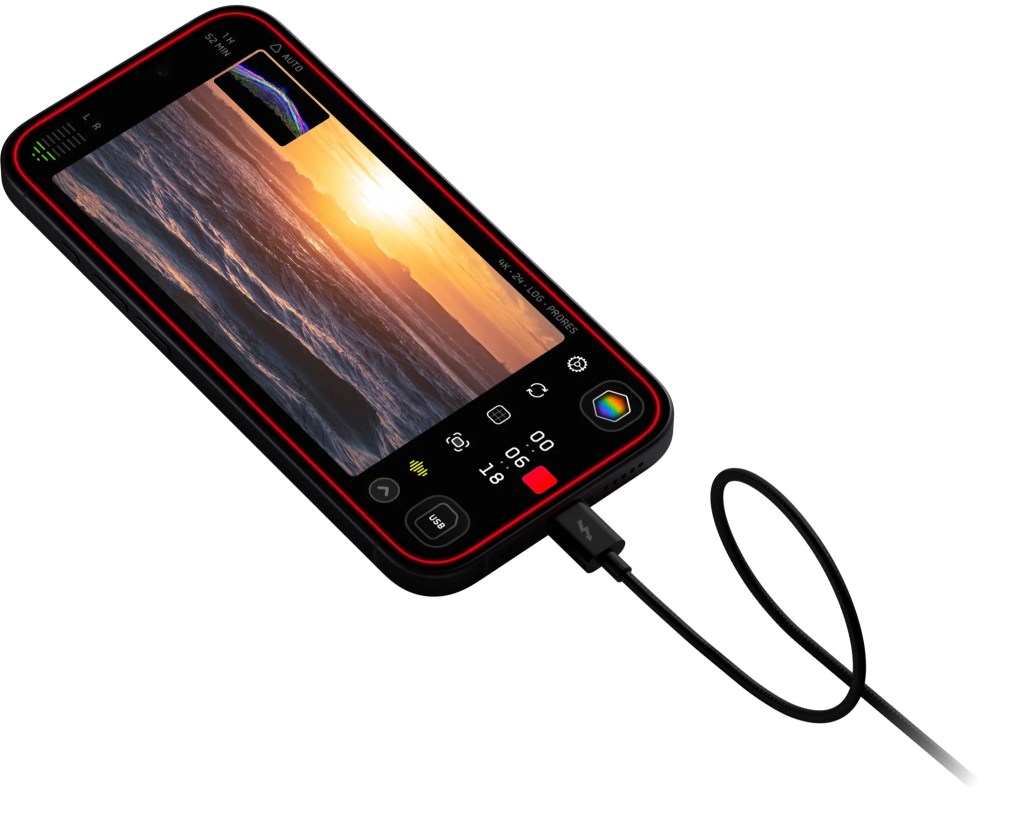
    • When it comes to shooting footage, I’ve found Kino and Blackmagic Cam to be the best. They let you record 4K video in Apple Log, process the video in real-time using color-grading LUTs, and save them in a standard color space in compressed HEVC files. This is much better for almost anyone than using the default iPhone camera which saves Apple Log videos using ProRes, which results in massive files. I prefer Kino a little bit more because it includes a bunch of LUTs out of the box. It also has a more beginner-friendly UI, and takes care of most things automatically to get you more cinematic results.
    • One thing it doesn’t do, that I don’t think any app does, is use your location to influence your video settings. What do I mean? I may be oversimplifying, but here in Singapore (where PAL is the broadcast standard), you get flickering lights when shooting at the common 24/30 FPS speeds because our electricity grid operates at 50hz instead of 60hz. This causes lightbulbs to pulse at 100 times a second, and you see it happening at 24fps because 100 does not divide as cleanly by 24 as it does by 25. You can apparently counteract this through some combination of shutter speed/angle, but that’s beyond me. I just know I shot a bunch of footage at 24 FPS and there was flicker all over it. It’s 2025 and it sure would be nice if an app just knew what to do!
    • When it comes to editing, I played with a bunch of the most popular apps, including the super popular CapCut by ByteDance that I believe most IG/TikTok influencers use. It’s definitely a comprehensive tool, but wants you to pay a subscription for many of its most useful features — S$105.98/yr is a little steep for amateur dabblers like me imo.
    • I hadn’t fired up iMovie in a long while, and was surprised to discover a “Magic Movie” mode was added two years ago, and it’s not bad if you’re happy to give up fine-grained control. Just select a heap of clips, and it’ll string them together with a dynamic soundtrack (the music ends naturally when your video does), transitions, and a smattering of fonts and title styles you can choose from. Being a free Apple app, I think this is probably enough for most amateur dabblers… except it doesn’t support 9:16 videos. It’s an app for boomers.
    • That restriction probably won’t affect me as I intend to shoot my videos in traditional landscape orientation anyway, but it’s nice to have options. That’s when I discovered LightCut, a completely free Chinese app that looks suspiciously like CapCut and tries to opt you into a data-sharing program (you can say no, and also deny it Bluetooth permissions while you’re at it), but is otherwise a very attractive and powerful tool for the price! Like with CapCut’s paid AI features, it can drop your clips into suitable pre-made templates and make a pretty professional-looking video with little effort on your part. I think it’s a good alternative to iMovie if you need the flexibility of freely placing text on screen, adjusting the brightness/color of individual scenes, and so on.
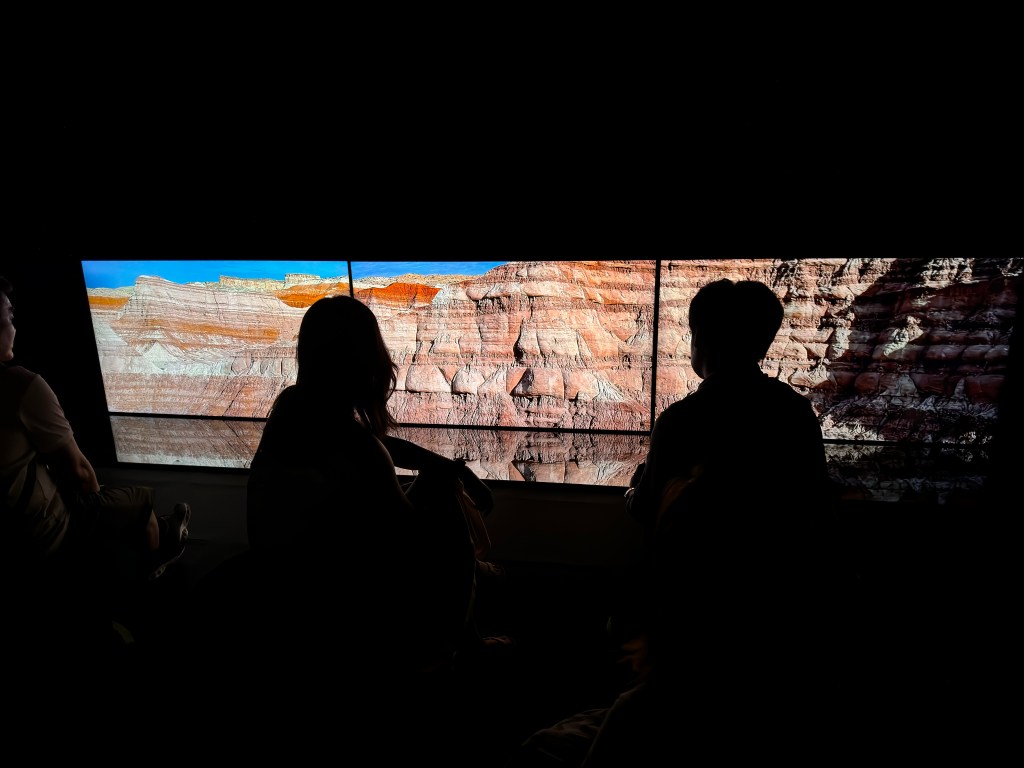
    • On Wednesday, I decided to visit the National Gallery again and see the special exhibitions leaving next week. Here’s a low-effort “Magic Movie” of my visit, just a heap of random clips shot with Kino and assembled by iMovie. I finished the whole thing on my phone over a cup of tea at the café afterwards.
    • One thing I don’t like about being in a ‘video mode’ while walking around is that it takes you out of being in ‘photo mode’. I probably took just three photos that day, and don’t know if there’s any way around it except practice.
    • I still can’t decide what the best way to shoot photos on an iPhone is right now. I vacillate between shooting Bayer RAW with an app like Halide, shooting ProRAW with the Leica LUX app, ProRAW with the default camera app, and just embracing the iPhone’s “Photonic Engine” and getting 24MP HEIF files with the default camera app.
    • Bear with the neurosis, but as part of obsessing over the above question, I’ve been testing Nitro Photo, the new-ish pro photo editing app by former Apple Photo Apps group CTO Nik Bhatt. His last app was RAW Power, which I’ve owned for years but haven’t used that much, partly because I rarely shot RAW and partly because its UI is a little clunky. Nitro is a re-imagining of RAW Power, built from the ground up with modern frameworks and a redesigned UI. From a functional and technical perspective, I think it offers a level of control that no other app, short of Adobe Lightroom, does on iOS. Neither Darkroom nor the recently acquired-by-Apple Photomator have the ability to tune RAW/ProRAW images like Nitro. You can do things like adjust the tone mapping on ProRAW photos, for instance, to get a more natural look without Smart HDR effects, or control how the Apple RAW engine renders sharpness. I’ve ported over a few of my own presets over as LUTs, and am getting into it to the point that I might plonk down $100 and make it my main photo editor. The worst thing about it is still the UI, which I must stress is not bad; just a tad dated as touch UI conventions go. Darkroom is much more pleasant to use on a small screen, but the broken state of preset syncing there has really turned me off lately.
    • This is where you say, “But Brandon, if you shoot everything in ProRAW, doesn’t that take up a ton of storage? Especially if you don’t have an iPhone 16 Pro that can employ JPEG XL compression?” Well, yes, and that does bother me. So imagine my excitement when I discovered the NO RAW app, which claims to strip out the RAW data from photos that are RAW+JPEG bundles in the iOS file system, once you’re done with editing and know you won’t go back again. I knew deep down that it’s not possible for an app to do that on iOS, but had to pay S$3 to find out how it worked. The answer? It’s essentially a solution you can build on your own in Shortcuts.app: make a new copy of your image as a HEIC file (retaining metadata), and then delete the original bundled file. Boooo! My free HEIFer shortcut does exactly this, but for JPEGs. And NO RAW has the same “flaw” as my shortcut. Namely, that the correct chronological order will only be retained if you sort your photos by Date Captured. If you sort by Recently Added, then all of these former-RAW photos will appear at the bottom. I should have known, but I’ll still use NO RAW as it gets the job done and has a date picker UI that beats any shortcut, but I might update HEIFer to do the same if anyone wants it.

    Media activity:

    • I finished watching the anime series Dead Dead Demon’s Dededede Destruction. I’d heard about it before, and then when Dandadan came out, I mistook it for this and only realized they were separate shows like many episodes later. They are eerily similar in name and synopsis: school kids dealing with an alien invasion. But Dededede is much less kinetic/comedic/wacky. 3.5/5 stars.
    • We finished Squid Game 2 and despite initially liking how it was handled, I got a little bored towards the end as the slow, dramatic deaths started to pile up. When will we get a third season, and will I care? Probably not.
    • I watched The Gleaners and I (2000) Because it’s leaving MUBI. It’s the kind of documentary you get when an experienced director picks up a novel tool (a digital video camera, in this case), and starts messing about around a topic that interests them. Here, Agnès Varda starts by interviewing people who still practice the lost art of gleaning — picking through recently harvested fields for uncollected produce — and ends up doing a cross-country investigation of waste and poverty. 4/5 stars.
    • I discovered the American YouTuber and illustrator Linh Truong aka @withlovelinh through a Japan travel/haul video she made last spring and found myself binging the last couple years of her content creator journey. She started doing vlogs in high school and has kept going with cozy life updates that interior decoration tips and other sorts of young adult life-hacking. She recently graduated from college, and it’s extremely sweet how many of her commenters say they’ve grown up with her over the years and are proud that she’s making it (1.2M subscribers and making sponsored content for Nintendo, Notion, et al).
  • Week 23.24: Chilling with Sony’s Reon Pocket 5, New Camera Apps, and a Playlist

    Week 23.24: Chilling with Sony’s Reon Pocket 5, New Camera Apps, and a Playlist

    Sony Reon Pocket 5

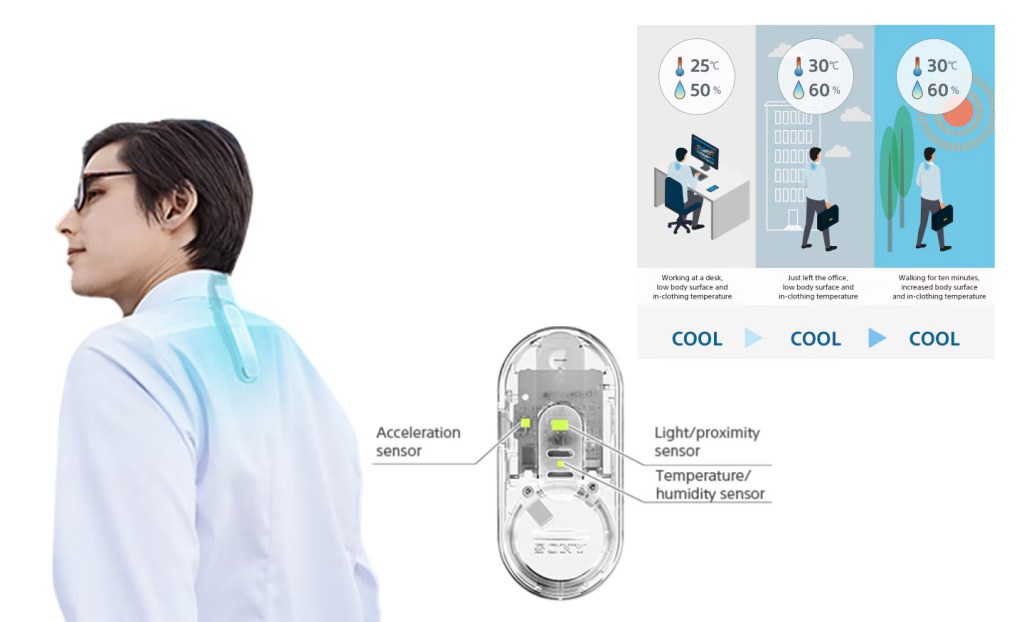
    I discovered the existence of a cool new device this week when a Sony catalog wound up in my trad-mail inbox. After some online research, I visited the nearest Sony store for a demo of the Reon Pocket 5 device and ended up buying one for S$249. Okay, what is a “Reon Pocket” and why is this the fifth version? The four previous iterations were only sold in Japan, but the tech is now mature enough that Sony is launching it in the UK, Hong Kong, Singapore, and Thailand this year.

    It’s best described as a wearable gadget for helping you feel more comfortable by fooling suggesting to your body that the temperature is more bearable than it thinks. It does that by cooling or heating a small metal plate pressed against your skin (in this case, at the base of your neck), which contrasts with the environment and changes your perception of it. Surprisingly, it works with just a difference of a few degrees.

    I first learnt about this effect a decade ago from a Wired article about an MIT prototype and have been eagerly awaiting a commercial product ever since. I had no idea until after buying the Sony version that the researchers mentioned in that article have actually shipped their own wrist-worn product called the Embr Wave. It resembles a smartwatch and is more discreet than the bulkier Reon Pocket 5 which sticks out from beneath your shirt collar like some kind of life support system. However, since I already wear an Apple Watch, I don’t know if I’d wear an Embr Wave too.

    In some ways, I seriously see this device as a “life support” technology. I think I’ve struggled with heat regulation all my life — always feeling warmer and sweatier than everyone else; most days you can hold your hand over my head and feel the heat radiating off it. I read that our bodies’ core temperature doesn’t actually change much (when it does, that’s hypothermia or heatstroke), so how comfortable we feel is all down to skin temperature, which this sort of thing hacks.

    After a couple days of testing, I’ve found the Reon Pocket 5 doesn’t perform miracles but offers a different sort of relief than a handheld fan (though one could use both). But it’s like constantly holding a cool can of soda against your neck in hot weather, which is welcome! It’s a glass of ice water for someone in hell. Even when the temperature isn’t that high but it’s stuffy and humid, this takes the edge off. If you’re the sort who’s always feeling cold in Singapore’s air-conditioned spaces, it also heats up and offers the opposite effect.

    There’s a lot I could say about the app, and how it’s another example of Sony’s generally poor UX design, but once you figure out what settings you like, you can lock them in and operate the device without it. It also comes with a separate “tag” that you can attach elsewhere on your body, which monitors the external temperature and humidity so the device can automatically switch modes, but I haven’t bothered to take it out of the box at all. All they needed to do was put a button on the thing to switch between hot and cold, just like the Embr Wave does.

    Building a separate piece of hardware instead… reminds me of how Sony headphones try to “intelligently” adjust noise cancellation levels by guessing whether you’re commuting, or working, or lazing about, by using GPS location and accelerometer data from the smartphone app — an absolutely mental and roundabout solution to replace the user pressing a button. Incidentally, Apple’s Adaptive Audio mode on AirPods Pro is a much better take: they dynamically adjust the balance between noise canceling and transparency based on environmental noise, letting you be aware but not annoyed.

    The battery, if you’re wondering, should last an entire day out. At Level 1 cooling power it’s rated at 17 hours; at Level 3, 10 hours; and at Level 5, 4 hours. Operating on Smart Cool mode, it switches between them as necessary. There’s also a “wave” feature that I recommend turning on, which follows the same core principle as Embr’s device where cooling power fluctuates so you don’t become desensitized to it. If you need even longer performance, you can plug it into a power bank and it will work on direct power without charging. Imagine using it at the same time as Apple Vision Pro, with two power banks in your back pockets. That’s living in the future, baby.

    In conclusion, wearing the Reon Pocket 5 around your neck makes you look dorky or hooked up to some medical device, but when it’s over 30ºC in the shade, who gives a damn?!

    ===

    New camera apps

    I’ve been using two new camera apps: Kino, from Lux Optics who also make the Halide app, and Leica LUX (no relation).

    Kino is a logical move. Halide was a “pro” app focused on bringing intuitive manual controls for still photography. Kino does the same for video. Unlike Halide, it’s a one-time purchase ($20 USD) and a big part of its functionality is the ability to apply different looks (color grading via LUTs). I’ve always wished Halide would do something similar, to help lazy shooters get the most out of RAW captures. I hardly shoot any video but I thought Kino was worth buying, especially since I’ve let my Halide subscription lapse for lack of use.

    One of the best things Kino does is allow the system to shoot in Apple LOG but write the files in HEVC format instead of ProRes, which saves a lot of space but still conveys some of the benefits. You can also shoot in LOG, apply a color grade preset in real time, and save the baked file in HEVC. That’s awesome.

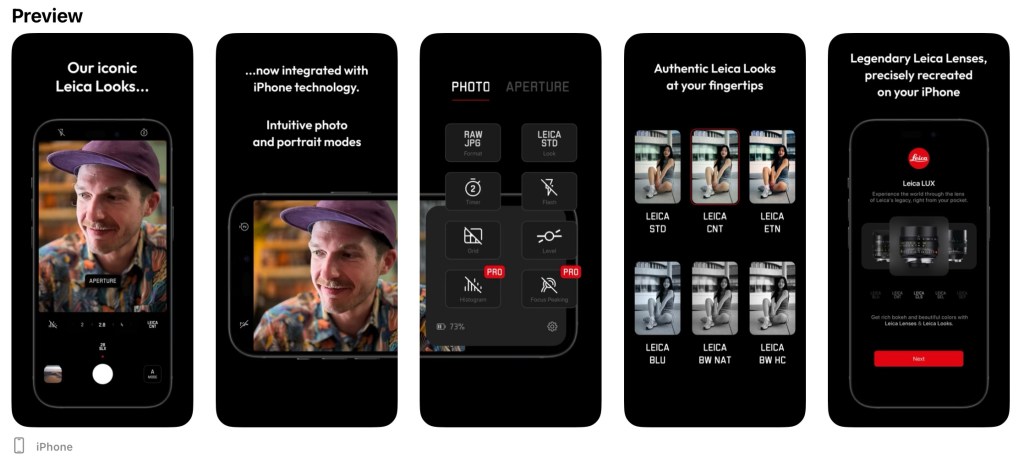
    Leica LUX is not so logical and I’ve been puzzling over why a company with their luxury brand equity would take a risk like this. On the page linked above, they’re saying the app “lets you capture the iconic Leica Look with your iPhone” using their “deep color science” and digital simulations of “legendary lenses”, like the Noctilux-M 50mm f/1.2 ($7,895 USD), and claiming it “reproduces” its “signature aesthetic bokeh”.

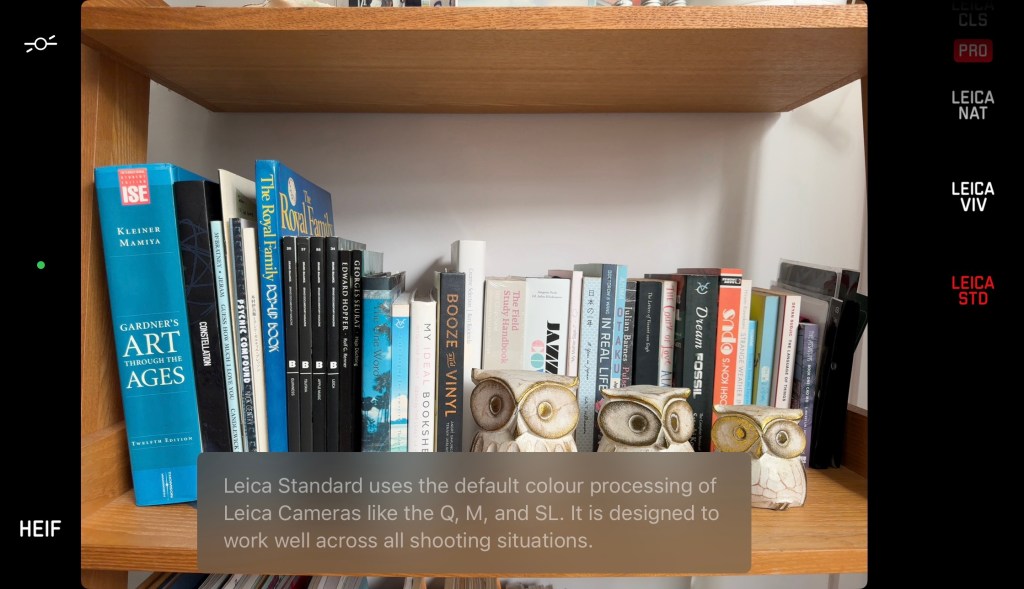
    I present two exhibits. The first (below) is what you see when selecting the “Leica Standard” profile: a statement that it handles color the same way as their cameras that cost upwards of $6,000 USD do, using your iPhone’s sensor. Whether it’s true or not is beside the point; Leica is saying you can enter their world with a free app and the phone you already own. To my eyes, it’s not far off from the iPhone’s default color handling, and looks like some gentle H/S/L shifts. The other Leica Looks are a mixed bag: I like the Leica Natural one, but some others are heavy and feel like “filters”. I’d hoped these would be more like Fuji’s in-camera film simulations, which are more like “color profiles”.

    The secret sauce is leaking out!

    The second shows how their implementation of a depth effect is inferior to Apple’s own Portrait Mode, with rough edge artifacts, despite the hyperbolic claims of giving your iPhone the “unique aesthetic of Leica’s legendary M-lenses” with their “distinctive look and beautiful bokeh”. If it did, that dark shot of my Misery Men mug would look like it came from a 28mm Summilux f/1.4 lens, and I can assure you it does not. Moreover, their digital depth effect only adds background blur, not foreground blur, which makes for a less realistic result that Apple’s own Portrait Mode which your iPhone already does for free.

    One nice feature is the photo library viewer they’ve built into it, which lets you switch between seeing All photos and Leica photos only, including ones taken with your Leica cameras. And photos taken with this app sit alongside them as equals! In the field where the camera model is specified, it simply shows “Leica LUX”.

    What are they getting out of this brand dilution? Well, the app is subscription-based and asks for S$99.98/yr to unlock more Leica Looks and lenses. They claim new ones will be added monthly. I think perhaps anyone who owns or intends to own a physical Leica camera will not bother with this, and it’s a move to grab all the aspirational customers who want to touch the brand — including a bit of overlap with the market they tried to target with their Huawei and Xiaomi smartphone collaborations. The question is whether this will do any significant reputational damage, and so far all the comments I’ve seen on Leica blogs and communities have been negative. Could they stand to make more on app subscriptions than they’d lose from upset camera buyers? Maybe! Is that capitalization model the right way to run a company? Maybe not?

    I’m still optimistic because I’m not emotionally or financially invested enough in the brand to care how they destroy themselves, and will wait to see if they update the app to improve edge detection and add some better Leica Looks. If it ever gets good enough to be my primary iPhone camera app, a hundred bucks a year is steep but not out of the question.

    Before: iPhone defaults. After: Custom Photographic Style

    Meanwhile, I’ve found the following settings get me calmer and more natural photos out of the default iPhone camera app. First, go to Settings > Camera and make sure you turn on “Exposure Adjustment” under the “Preserve Settings” section. Then in the camera app, set exposure to -0.3ev, and using one of the Photographic Styles as a base, change its values to -20 Tone and +5 Warmth. Note: If you have a 14 Pro, the only way you’re getting less crispy shots is to use an app like Zerocam or Halide and disabling smart processing.

    ===

    Media activity

    • Started playing Spider-Man: Miles Morales on the PS5. It feels just like the first game I played on the PS4 years ago and I can’t say I’m getting next-gen from this, but it’s good fun.
    • Finally got Balatro on the Switch, the highly acclaimed indie poker roguelike game. It reminds me so much of Solitairica, the indie solitaire roguelike game on iOS. That’s a good thing. It’s the kind of game you can play for a few minutes, or hours on end.
    • Started watching season 2 of Link Click, a Chinese-made “anime” series with a cool ‘catch a serial killer through time’ kinda story. I saw season 1 a couple of years ago and was impressed by how well executed it was.
    • Saw Still of the Night (1982), starring a young Meryl Streep and Roy Scheider. It’s a Hitchcock-inspired psychological thriller with Fatal Attraction vibes. 3/5
    • Saw The Ministry of Ungentlemanly Warfare, a Guy Ritchie WWII joint that feels like if Inglourious Basterds was a Jason Statham vehicle. Except he’s not in this, Henry Cavill is, as well as Alan Ritchson (of Reacher fame) who plays a gay Dane (Swede?) who loves killing Nazis almost a little too much. Quite a bit of fun. 3/5
    • Saw The Fall Guy, a movie I’ve been anticipating for a long time on the strength of its trailer and what little I’d assumed about its story. I didn’t know it was based on an old TV show. But it was a messy, empty disappointment of a blockbuster that even Ryan Gosling and Emily Blunt couldn’t save. 2/5
    • Saw Carnival of Souls (1962), a cult classic surrealist quasi-horror film on Kanopy, a video streaming service that’s free if you connect your library account. It’s got Ed Wood B-movie vibes and special effects, a lot of rough edges, but still manages to be a compelling work that I’ll probably remember for a long time. 3.5/5
    • Saw To Have and Have Not (1944) in which Lauren Bacall plays a character who is stated as being 22 years old, to which I thought “she’s gotta be a lot older than that”. I looked it up and she was probably 19 💀. So that’s proof that people really used to look older, and you’d be forgiven for assuming it was the copious smoking (on display in this film). It’s a weird one, almost a musical showcase for Hoagy Carmichael who shows up as the hotel bar’s piano man. Doesn’t quite have that Casablanca magic yet. 3/5
    • Saw Dream Scenario in which Nicolas Cage convincingly plays a loser who suddenly becomes famous due to an unexplained phenomenon (he starts appearing in people’s dreams). Towards the end, it pivots from uneasy mystery to comical cultural commentary. That’s not a complaint though. 3/5

    A playlist for you

    As reward for making it this far, here’s the next installment in my Blixtape playlist series, covering music I listened to from January to May this year. Hope you find something to like.

    Add BLixTape #4 on Apple Music

    The tracklist:

  • An Old Man Tries Snapchat

    If you have even a passing interest in social media and haven’t seen Casey Neistat’s video on how “Snapchat Murders Facebook”, you should.

    Like my friend Vicki notes in this post, Snapchat wasn’t something that I immediately saw any value in. I installed it once ages ago, didn’t have any friends on it (a combination of age and geography), and promptly left. Then Instagram’s Bolt soft-launched in Singapore and got some interest going around ephemeral photo messaging, but it still isn’t something that friends in their 30s seem to want.

    We’re a generation of digital hoarders; the people who abandoned other providers for Gmail en masse because it promised never having to delete an email again. Cleaning out my harddrive the other day, I found a folder of interesting photos I’d saved off the net in the early 2000s: movie posters, album cover art, photos of global landmarks, and the like, simply because the sight of them were scarce and valuable pre-internet! You have to imagine what it was like to live in that time. I ended up deleting almost all of them because these days, if you can put a name to it, you can find it online.

    So behavior is changing slowly amongst older people, and much faster amongst those in their teens, but photo messaging still wasn’t something I needed Snapchat for. Every messaging app offers it now. The ephemeral twist is a footnote.

    Snapchat’s Stories feature changed the way I look at the product. It turns it into something of a lifelogging and broadcast platform. I can’t name another app (still) on the market that lets you grab video snippets of your life, and share them in a stream that your friends can tune in to. The fact that clips disappear after 24 hours is actually the part I like LEAST. It seems Vicki’s with me on this, as she’s set up a YouTube channel to archive these Stories to after they’ve been erased. I may soon do the same1.

    There are some other nascent thoughts I have on Snapchat’s bizarre UX; the more I think about it, the more brilliant it is — breaking many of the rules we use to design interfaces for users of all ages, in order to create an exclusive, obtuse, game-like experience (inviting the spreading of knowledge by word of mouth) that seems intended to make it a success with a younger crowd. I may be wrong, and it may simply be like this as a result of being designed by a younger team. Additionally, its overall visual clumsiness (check out that ghost icon) encourages you NOT to take it seriously, which makes it totally okay to fire off imperfect, portrait-oriented, poorly-shot, but authentic moments without too much thought.

    If you’d like to follow me, I’m on there as “sangsara”.


    1. Sharing these vertical videos on another platform poses a slight challenge. I tried every video editing app on my iPhone, and just about all of them failed to stitch the short clips together without cropping, unexpectedly rotating, or distorting the videos. Even Apple’s own iMovie produced only a black screen with audio playing, probably because Snapchat’s video encoding/metadata in non-standard in some way. Amusingly, the app that finally managed to do the job perfectly was YouTube’s own Capture app
  • ➟ How Netflix Reverse Engineered Hollywood

    Alexis Madrigal, for The Atlantic:

    What emerged from the work is this conclusion: Netflix has meticulously analyzed and tagged every movie and TV show imaginable. They possess a stockpile of data about Hollywood entertainment that is absolutely unprecedented.

    Using large teams of people specially trained to watch movies, Netflix deconstructed Hollywood. They paid people to watch films and tag them with all kinds of metadata. This process is so sophisticated and precise that taggers receive a 36-page training document that teaches them how to rate movies on their sexually suggestive content, goriness, romance levels, and even narrative elements like plot conclusiveness.

    The data can’t tell them how to make a TV show, but it can tell them what they should be making. When they create a show like House of Cards, they aren’t guessing at what people want.

    What a huge undertaking, and a demonstration of Amazon-like patience for a company like Netflix—slowly, quietly, build a long-view competitive advantage in technology and process that becomes impossible for others to copy, and that eventually enables a whole new range of products that are themselves hard to compete with.

    This sort of rich metadata is what I’d expect IMDB to have, but a categorization exercise of so much subjective material benefits from the guidance of a single hand, while self-policing committees take much too long.

  • Tricks & Cider

    About two weeks ago, I kinda realized that two people I knew online were in a band together, and preparing to put out their first EP. I visited their website, bought the record when it came out, and ended up seeing them live at the Esplanade last Friday. Hear for yourself through the embedded player below.

    In addition to Bandcamp, you can get the 5-song collection on iTunes and Spotify.

    IMG_7333
    At the Esplanade Outdoor Theater

    IMG_7530

    IMG_7516
    Lunchtime concert on Raffles Green

  • ➟ Brian Regan: The Epitome of Hyperbole [Netflix]

    ➟ Brian Regan: The Epitome of Hyperbole [Netflix]

    Really great, profanity-free stand-up comedy. He brings a lot more energy to the stage than Jim Gaffigan, whose shows we also watched a couple of nights ago. They’re both great acts and worth looking up, but Regan’s older material is rock solid, while you can jump straight to Gaffigan’s newer stuff and not miss much.

  • ➟ "The Rent Is Too Damn High" Party’s Jimmy McMillan

    If only all politicians were Jerry McMillan’s cross between insane and awesome.
  • ➟ Oracle Japan Hires Dog

    I wonder what Larry Ellison has to say about this.

    Link