Year: 2012

  • ➟ Brian Regan: The Epitome of Hyperbole [Netflix]

    ➟ Brian Regan: The Epitome of Hyperbole [Netflix]

    Really great, profanity-free stand-up comedy. He brings a lot more energy to the stage than Jim Gaffigan, whose shows we also watched a couple of nights ago. They’re both great acts and worth looking up, but Regan’s older material is rock solid, while you can jump straight to Gaffigan’s newer stuff and not miss much.

  • Windowsill (Pies) in the Woods

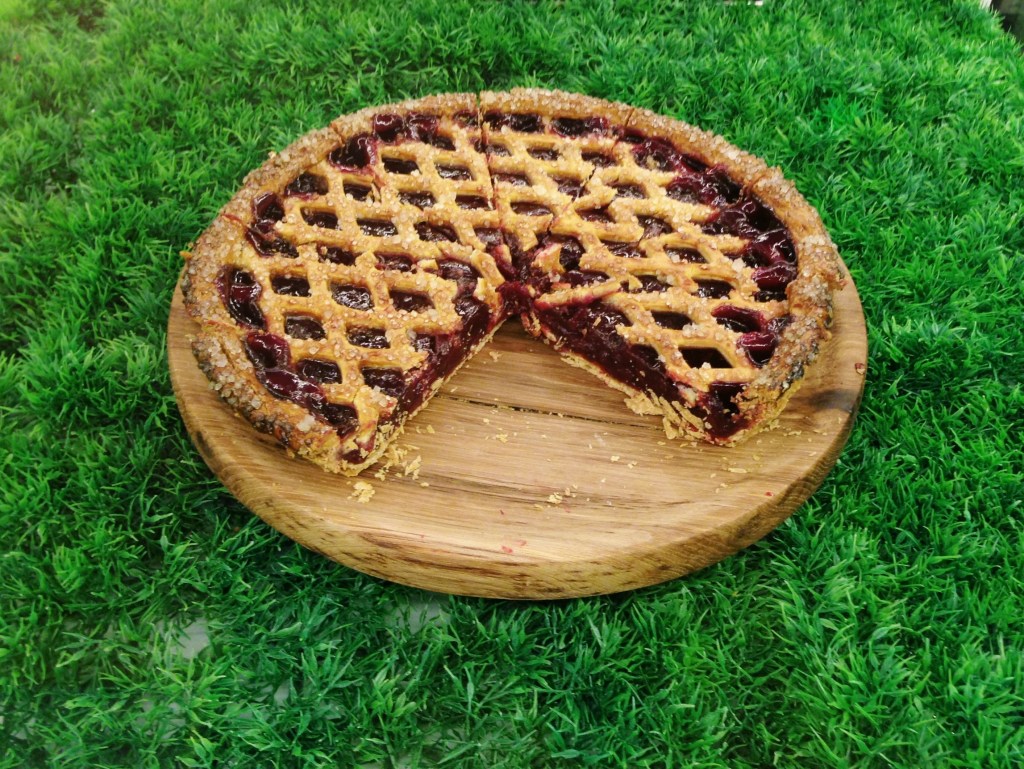
    We’ve been fans of Windowsill for awhile, although I’ve only eaten their pies on two occasions before this. They had a tiny outlet in Pandan Valley before, which we didn’t have a chance to visit before they closed down.

    Since then, they’ve been operating a delivery business which we recently had a chance to use when an American friend was missing traditional dessert pies (like pumpkin) on Thanksgiving.

    This new place is called Windowsill in the Woods, probably because it’s outside of town in Lavender (78 Horne Road), and has a wood cabin theme going on. The pies are still fantastic, but we didn’t have a chance to try the coffee because they were having electrical issues, and the interiors could do with some acoustic dampening. It looked like they were still sorting some stuff out, but in all, a nice enough place for a quiet Sunday.

    20121230-220947.jpg 20121230-221043.jpg 20121230-221036.jpg 20121230-221029.jpg Cherry pie 20121230-221010.jpg 20121230-220957.jpg

  • Write Moves

    Was time for a new logo too
    Was time for a new logo too

    After 11 years of blogging on what is now Google Blogger, I’ve exported everything and moved to a WordPress-powered site. It didn’t go all that smoothly and may still screw up, but so far I’m enjoying the platform, its modernity, and the apps/services I can now use with my blog.

    During the process, I looked back on a couple of old posts and a few abandoned other blog projects, and discovered a younger, different sounding me. I suppose that was a time when everyone kept a blog instead of a Facebook page – but it all starts the same way, nobody thinks anyone important is ever going to read their nonsense or see their silly behavior.

    But every time I read old writing, the same thing happens, and I’m sure you’re all familiar with the phenomenon: amidst the disposable are pieces you can’t believe you wrote; thoughts you could hardly string together today in quite the same way. Which is why I’m inclined to value these posts more than easy and fleeting social network updates. It seems the purpose of blog archives is to simultaneously inspire and shame our creative selves with examples of what should still be possible, and how far we have yet to go if we’ve discovered that the last few years were spent going the wrong way.

  • Essential iPhone Camera and Photo Apps

    Essential iPhone Camera and Photo Apps

    img_5642

    I sometimes get asked to suggest camera apps to new iPhone users, and often fall into the trap of recommending ones I’m in love with at the time, but aren’t necessarily good for everyone or indispensable.

    I’ve bought and put every major release through their paces over the last four years, and although some start off impressively, they turn out not to be suitable for everyday use and soon find themselves forgotten in a folder, never to be used again. One common reason for this is the production of looks that are too distinctive or recognizable. Imagine a library of photos taken over a year, all with the same fake light leak in the top-left corner. Pretty unacceptable. Some all-in-one jobs let you “fix” photos with a few presets, but if your problem falls somewhere in between, the inability to fine-tune can be a deal-breaker.

    So here are my more considered picks for the best camera and editing applications on the iPhone. Over time, I cleared out my entire screen of folders filled with photo apps, and now only keep a few essentials handy. You’ll be in good hands with any of these, as they tend to do a single thing well, or many things more than adequately.

    (more…)

  • A Sudden Crop of New iPhone Photo Apps

    iPhone photography apps hit a sort of peak with Hipstamatic, Instagram, Camera+, 645 Pro, and Snapseed. The past few months have seen a few quirky apps being released (Gridditor being one that comes to mind), but most have been crappy knockoffs of the very successful but sadly neglected Camera+*, or silly ones for decorating your shots with candy-colored doodles or cartoon stamps.

    Very little for the serious photographer determined to replace a compact camera with an iPhone… until these came along!

    •••

    Blux Camera: The first app I’ve seen to offer the equivalent of what’s called “Auto Scene Mode” on most point-and-shoot cameras. The app applies a compensation scene mode based on what it thinks you need (taking local weather into account too). I’ve been waiting for someone to do this, but Blux seems to go even further with 14 filters, tilt-shift effects, and a futuristic, customizable UI that might prove too fiddly in actual use. Still, it looks very good and it’s free for a couple of days.
    Edit: Having tried it now, it’s not worth the trouble. Too much high-tech flash, not enough substance and usability. I’d put this at the top of the cheesy knockoff category.

    Alt Photo: This one has some real pedigree, like VSCO Cam, coming from maker of pro Photoshop plugins, Alien Skin Software. It has one of the best-looking brightness adjustment algorithms I’ve seen in an iPhone app (Mattebox has another great one), not to mention some nicely tuned filters designed to emulate film looks.

    Perfectly Clear: This just got a big 3.0 update today, with a fully redesigned UI and higher quality results. This is a one-function app — it tunes up lackluster photos with more clarity, color, and brightness — and it does it well. There’s now also the ability to remove noise for no extra charge; it used to be an in-app purchase. It even claims to recognize and brighten eyes, smoothen skin, and whiten teeth. That last one sounds like a joke, but there it is on the page.

    Scout Camera: A camera replacement app with a few nice filters, and the welcome ability to see and shoot in 1:1, 4:3, 3:2, and 16:9 aspect ratios, all live. It’s a shame you can’t change filters on a photo after you’ve shot it, and that you can’t import your own photos into its lightbox for editing. Hopefully the developer is looking into these things, because you can get those aspect ratios from 645 Pro too, and there’s little reason to make this your first choice in a pinch.

    Beamr: From the makers of JPEGmini, one of the best photo technologies I’ve seen in awhile (it crunches down high quality JPEGs to half their size, and your eyes won’t see the difference) comes this new photo sharing app. The app description is a bit confusing, but I think it uploads your full-size photos using the aforementioned tech, and then creates a flippable online magazine — oh god, those are back? — that you can send as a link to friends and family. The selling point here is high quality photos, not the recompressed junk you see on Facebook or other sharing sites.

    Photoset: Another sharing app, this one from Tumblr. It lets you very quickly create a layout of several photos by dragging them around, and then publish them to a webpage on Photoset.com or to an existing Tumblr blog. Pretty cool, and much more versatile than using something like, say, Twitphoto for impromptu sharing.

    • I say Camera+ has been neglected despite having recently been updated because of how unusable its filters look these days on brighter iPhone 5 photos, and because other much needed refinements never materialized. It’s like there’s nobody there looking out to keep it #1.
  • MacHeist 4 ends today

    MacHeist 4 ends today. The annual bundle has gotten bigger and better — just US$29 for a ton of apps and services worth 20 times more — but they’ve struggled to reach the minimum target of 25,000. That was how many needed to be sold before the premium bonus apps became unlocked for everyone. After 8 days into the 10-day window, they gave up and opened them anyway. Now they’ve finally crossed the mark (26,053 at time of writing) with hours left to go.

    There’s probably a longer article in here about why this is the case. Bundles like these used to make a much bigger splash, and I remember a period where Groupon-like daily deal sites for Mac applications were like… daily deal sites for free iOS applications. I guess that’s where the attention has gone now, and much of the spending intent has followed the growth in mobile platforms. Prices there are generally lower too, and I wonder if this means independent Mac apps have to start charging less, or more, to keep profits up.

    Anyway, I highly recommend you look into MacHeist while it’s available. 25% of the money goes to charity, and you get a 15-month subscription to Evernote Premium as part of it. I usually pay US$45/year for Evernote and find it immensely useful as a place to store all the webpages I see and want to have searchable, shopping and reading lists, wholesale documents for safekeeping, and snippets of data in an offline notebook whenever I go on a trip. It’s essentially a digitized version of your memory for sanity. There are also great games like Braid, Bioshock 2, and the episodic adventures of Sam & Max, Jurassic Park, and Strong Bad, from developer Telltale Games. That’s like… a hundred hours of gameplay.

    One great utility was added this morning: Bartender. It’s not a cocktail recipes app, the world hardly needs more of those, but a tool that sits in your Mac’s menu bar and subsumes all the other menu bar items into it. I’ve greatly cleaned up the visual clutter on mine (made somewhat worse by recent versions of OS X preferring to show menu bar icons in monochrome only), moving things like Bluetooth status, Volume, Dropbox, and my Jawbone status monitor into Bartender’s “bar menu”. Good stuff, and normally sells for US$15.

  • Ashes out to sea

    Today we got on a little boat and went out halfway to Pulau Ubin, to release the ashes of four grandparents and great-grandparents. I am assured we had the necessary permits for this. Two of the oldest (from way before my time) were recently exhumed from a cemetery that was being decommissioned and reclaimed, and we’ve had the urns about for a few years, in anticipation of this moment. In the end, it was a drama-free affair that was over before sentiment could occur to anyone. Before he began, the man handling everything asked us, in Mandarin, if there was anything we wanted to say to them. But what can you say?

    As a person still alive, the idea of being dispersed to nowhere in particular seems strange. I think I would like to be kept around the house when my time comes. I’m not fond of the sea, or swimming. On top of the holographic quantum fiber modem would be fine.

  • The Round Down, 8 Weeks In

    I started The Round Down on a bit of a whim two months ago, armed only with the conviction of knowing that I’d long wanted to do an email newsletter of human-approved articles and links for like-minded people. The idea of writing/commissioning original content for such a vehicle was definitely on my mind, but seemed secondary and much harder to get started with, and getting started was priority one.

    Getting YJ Soon and David Liu onboard to share editorial and news gathering duties, with David focusing on games (check out his gaming podcast, Staring at Screens), has made it possible to keep up.

    Eight weeks and as many issues is enough time to get settled. We noticed an unconscious trend towards quantity, and the last few that went out had a touch too many things to look at. The initial goal was a small and unintimidating selection of links for weekend reading, nothing that feels like work, and we will be trying hard to steer that course from now on.

    Thanks for supporting this project (no one has unsubscribed, yet) and if you would like to sign up to receive it every weekend, it’s free at TheRoundDown.com.