Category: Videos

  • Week 11.26

    Week 11.26

    If you thought I was going to stop after last week’s two apps, I wouldn’t blame you. I’ve been having poor luck staying focused on new hobbies and pursuits over the past year; they all just seem like too much work for too little payoff and I drift off. Vibe coding seems different so far because it lets me start making weird things that I want to see, without being dependent on anyone else’s time or generosity.

    If you think in terms of music albums/careers, then Collagen was the mixtape that I put together to see if I could be a real musician. Urban Jungles was a big leap forward, the debut album, if you will. It had way more polish and was usable by almost anyone (whereas Collagen had what you might call a niche audience).

    Which brings us to the sophomore curse or slump. The second album tends to be over-ambitious, myopically conceived, and underwhelms audiences looking for more of what made the debut good. There are exceptions to this mythical rule, like Radiohead’s The Bends, Lorde’s Melodrama, and D’Angelo’s Voodoo. By this logic, my next app was statistically going to “fail” by being a harder one to get into.

    I ended up making two apps again this week: SkySpotter and Library Supercollider. Each one has a separate page on this site that shows and explains what they are, so you should stop here and go read them before coming back.

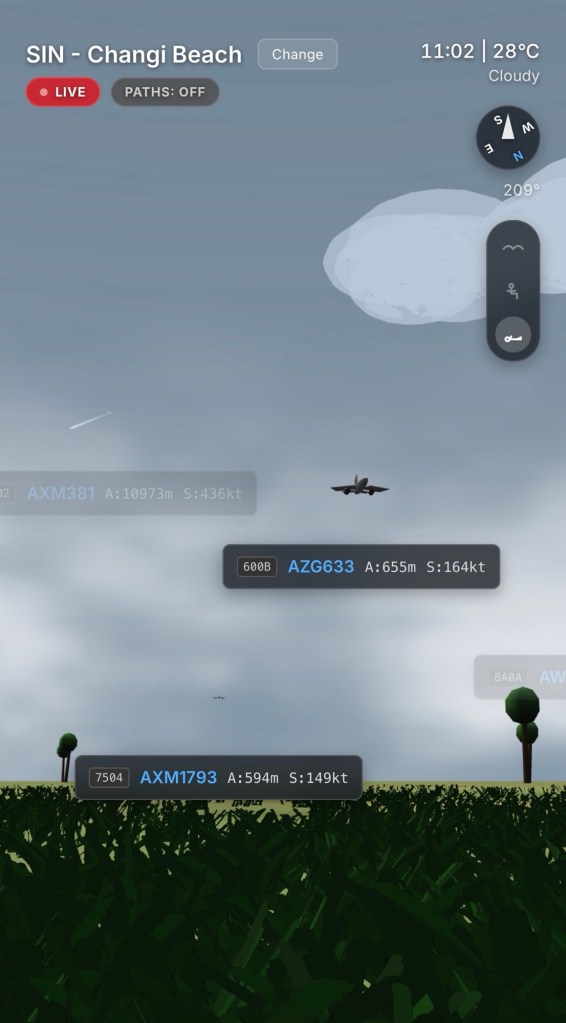
    Like a sophomore album, SkySpotter probably reached a little too far. It took the real-time weather data angle from Urban Jungles, added the more complex dimension of real-time air traffic data, and then threw in rendering a first-person 3D world as a bonus challenge. I started refining the concept and prototyping it on Sunday afternoon, and then worked on it for two full days on Monday and Tuesday. I literally forgot to eat lunch, and was still messing with it at 11pm both nights. It was like a job.

    Gemini 3 struggled. The Canvas chat became so long and convoluted that it won’t even load now in the iOS apps — I have to use the web interface. It hallucinated making changes, and introduced new bugs each time I made an improvement. It built planes with reversed wings and nose cones pointing backwards. Working with bugs in a 3D app was so blood-boilingly frustrating that I wanted to give up.

    I actually did give up… on implementing a VR mode for Apple Vision Pro. We got it to half work but the skybox sphere was too far away and would keep turning black. Rather than risk corrupting the working regular version any further, I decided to cut it.

    I’m proud of SkySpotter because it’s pretty damned cool to lie in the virtual grass and watch real planes go by. Even as someone who doesn’t care about planes more than the average person! But it was a technical challenge first and a passion project second. So if that was my over-produced sophomore studio album the label breathed down my neck for, then the next release would be its opposite: a scrappy, self-funded back-to-roots project recorded directly to tape in a Nashville studio over an inspired couple of days.
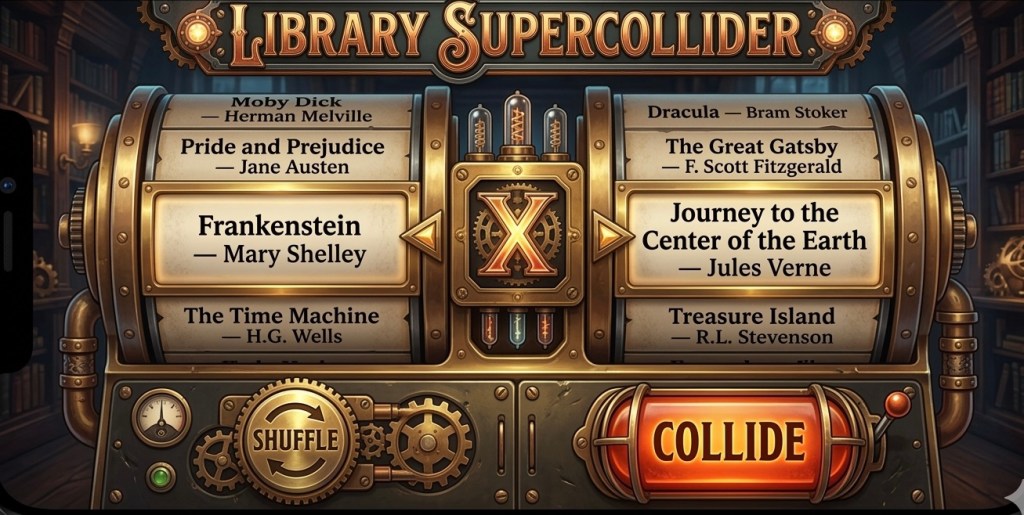

    Library Supercollider was an idea that came to me all of a sudden after I’d finished SkySpotter. I’d been interested in the concept of cut-up poetry since I was in university (popularized by Brion Gysin and William Burroughs around the 1960s), and I believe it occurred to me back then that someone could make a computer program to cut up and mash two classic texts. I just didn’t know it would be me, twenty years later.

    I expected it would take me the next couple of days to get working, being that it requires the somewhat complex-sounding downloading and processing of entire ebooks in the background of a web app. I didn’t know if it could even be done. So imagine my surprise when I had a working prototype by lunchtime on Wednesday. But between polishing the experience and overcoming download limits with Project Gutenberg servers, I wouldn’t be done until Saturday morning, making it a longer project with different challenges — comparatively less frustrating, more educational.

    I understand that it’s not an app for everyone — you might read a page and conclude that it’s worthless gibberish. Maybe it takes the sort of person who likes abstract art and free jazz. But personally I’m so pleased with this project that I’ve bought two domain names to go with it: librarysupercollider.com and the superior smashmybooksup.com, which I’ll retain for a year as a ‘marketing URL’.

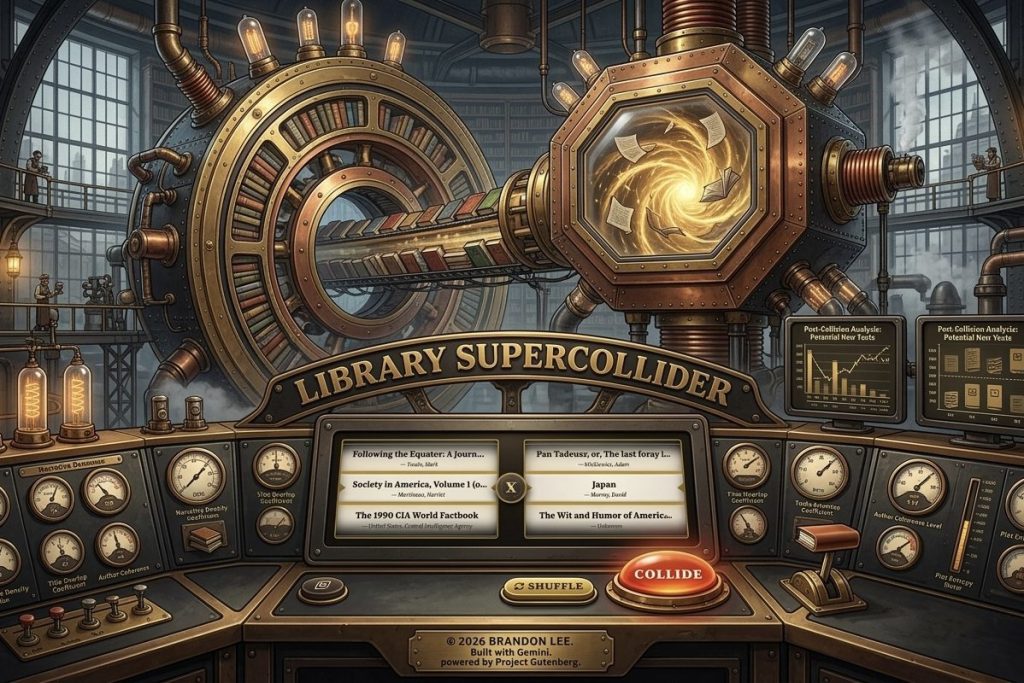
    In all seriousness, I think this is the finest work of my two-week career as a builder of software! The user experience for remixing and reading the resulting texts is brilliant, if I do say so myself. The steampunk UI and animations are completely unnecessary but bring me joy (notice the moving gears in desktop view). I had to come up with caching and proxy solutions to make the app more reliable under load. I even got a little into the weeds: installing node.js and Vite on my Mac, running scripts in the terminal, trying to compile a macOS port to get around problems (eventually unnecessary).

    Even if I were a skilled and experienced developer, I can’t see how I would have made these apps in two weeks; from writing to designing and coding them up, plus preparing documentation and website copy (plus one very dubious video ad). Deploying Library Supercollider to its own domain made the reality click for me, a feeling kinda like publishing your first thing on the App Store. It says: this thing is now real and can be used by real people.

    Then I came across this article in the NYT Magazine, entitled “Coding After Coders: The End of Computer Programming As we Know It”. It notes an interesting inversion of what we’re seeing in other fields — AI is taking away the drudgery of programming and leaving the human, soulful (and fun) parts.

    “The work of a developer is now more judging than creating.”

    In that way, I may not have magically joined the ranks of coders overnight, but I could probably say I’m developing. At my job, I used to direct the form of apps in a way so removed that I could only claim the role of design, but not the larger making. Part of the handwringing in design circles today is precisely about how designing and developing are merging, and soon only making will remain.

    Not everyone will bother to turn their ideas into reality, and fewer still have the experience and vocabulary to prompt polished apps distinct from the models’ averaged-out defaults, but those who persevere will be bringing tools and toys into existence the likes of which you may have been waiting decades to see.

    What’s next? Well, I might have a couple of ideas…

    One thing all this app-making has done is bring me back to my Mac. I usually spend most of my computing time on my iPhone and iPad, but there’s no substitute for a Mac when it comes to managing local files, running scripts and compiling code. I’ve had coders like Michael make this point to me before, but I never got it because I never needed to sync a local repo with GitHub or anything before.

    So a side effect of spending long stretches of time on my five-year-old and long-neglected M1 MacBook Air is that I’m wondering “Why did I ever stop? This thing is great!”

    It’s worth noting that this week Apple’s newly released MacBook Neo has been getting a ton of praise on my social feeds for being an affordable and all-round capable machine at an unbelievable $599 price point. I got a tear in my eye as I read this essay by Sam Henri Gold: “This Is Not The Computer For You” — it perfectly encapsulates what it was like to grow up on computers and teach yourself things, even on PCs.

    Too much screen time is awfully bad for you, so on the weekend I touched some metaphorical grass by taking our niece out to Disney on Ice at the Singapore Indoor Stadium. It’s extremely well-timed, with the world still coming down from Alysia Liu’s gold medal, and Singapore being in the midst of a Disney craze — a Disney Cruise offering has launched after delays and is now at the local docks, with fireworks and drone shows along the bay at night.


    These were Live Photos of some stunts

    I have no deep affection for Disney IPs but appreciate the amount of effort and coordination that goes into making magic, and it clearly works with so many adults into this stuff. What’s interesting is that while ice-skating can get pretty boring after awhile — it’s all the same moves over and over, around a static rink — adding a layer of characters and storytelling works to keep it fresh over an hour and a half.

    Oh, and our niece is 9, and by way of introducing her to the MacBook Neo, I asked her what computer she uses. I swear, her response was not far off the punchline in that Apple ad that everyone but me seems to hate, in which a girl who’s been using her iPad all day for creative things is asked what she’s doing on her computer, and she responds “What’s a computer?” Will iPads become open enough to support kids learning to (vibe) code? Or will nature heal in a post-post-PC revival led by the MacBook Neo? In any case, that ad was prescient.

    Bonus: Steve asks the same question in a different context (around 1:30). You must watch this video, it’s breathtaking. He’s 28 at this point. In addition to confidently describing things like Street View, mobile wireless computing, LLM chatbots, and the App Store, there’s a part near the end where he says “What we need to do is get away from programming. People don’t want to learn programming, they want to use computers.” He was talking about providing more finished software products to customers, because writing custom software was the norm then, but it’s an eerily relevant quote!

  • Library Supercollider

    Library Supercollider

    Go to SmashMyBooksUp.com or LibrarySupercollider.com

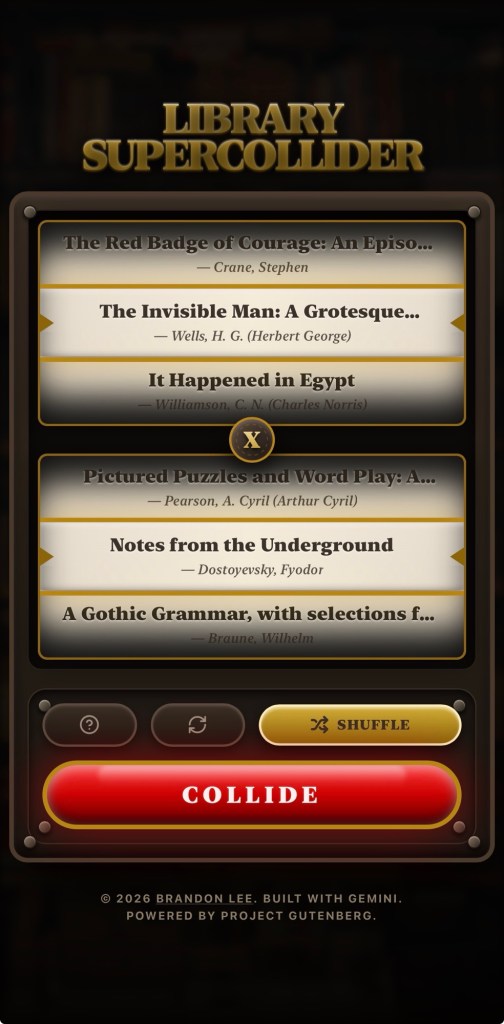
    In 1959, William S. Burroughs took a pair of scissors to a page of text, rearranged the pieces, and taped them back together. His argument was that linear language was a control system — that by cutting it up, you could slip between the lines and find what was actually being said. Library Supercollider is the logical conclusion of that idea, scaled to over 10,000 books from the Project Gutenberg archives. CERN could never imagine.

    Pick any two public domain texts and collide them. The engine samples a selection of pages and forces two authors who never met into a shared narrative space they never consented to. How it’s taped back together is up to you:

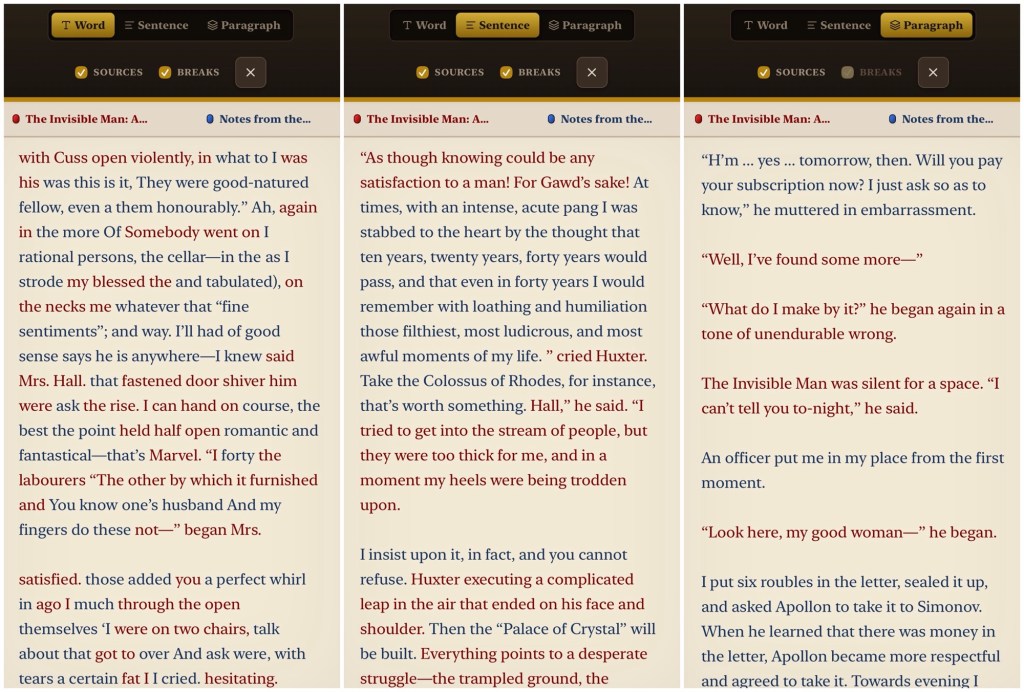
    • Paragraph level: Preserves some structural dignity.
    • Sentence level: Grammar survives, but sequence does not.
    • Word level: Sweet, nonsensical poetry.

    A source tracking mode colour-codes the wreckage by origin, in case you need to know who to blame for a particular sentence. The interface is intentionally a slot machine, and what emerges is not literature, exactly. It is also not not literature — which puts it in good company with many award-winning books! Burroughs believed the cut-up revealed hidden structures beneath the surface of language. Library Supercollider gives you the tools to find them for yourself.

    Desktop view
    Mobile view
    Mobile reading view with three modes

    And just because I had some time and Veo credits to spare, I thought I’d try my hand at making an over-the-top video ad to show it in motion on social media. Which meant a portrait video. Definitely stepping out of my comfort zone here.


    Disclaimer: I made Library Supercollider with the help of Google’s Gemini 3/3.1 Pro LLM. The authors of Project Gutenberg’s texts were not consulted, but they are hardly in a position to object.

    Related blog post: Week 11.26

  • SkySpotter

    SkySpotter

    Try it at useskyspotter.vercel.app

    GitHub page here

    Lie back in the grass and watch planes fly over. That’s it, that’s the idea.

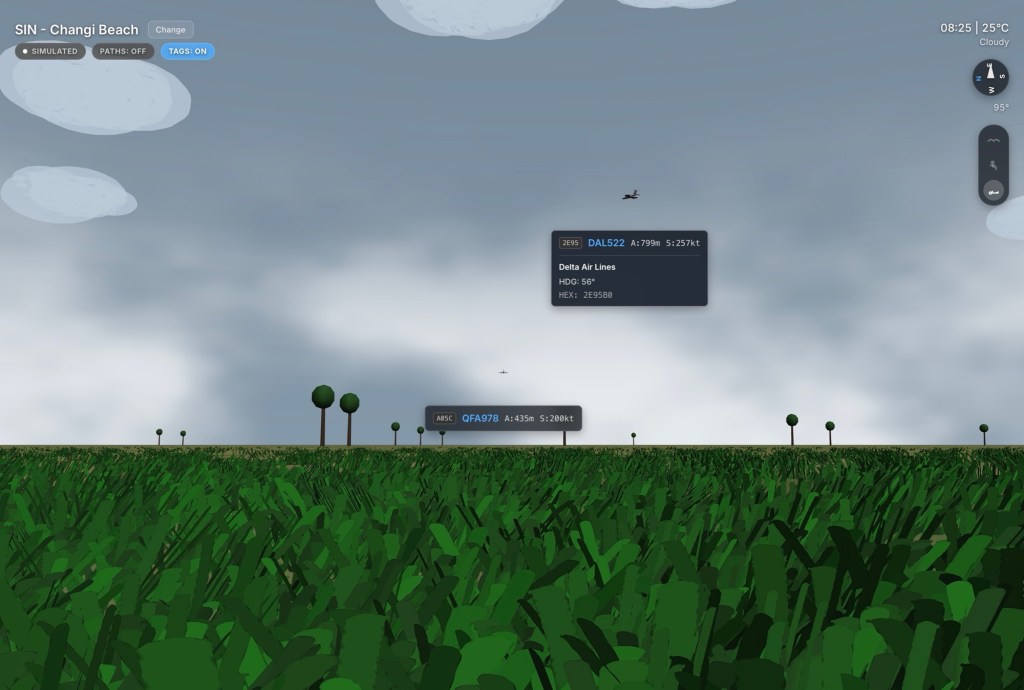
    Every other flight tracker gives you God’s view — cold and omnipotent, a screen full of blips moving across a flat map from thirty thousand feet above the action. Detached from the thrilling hum of jet engines and the sizzle of rain. SkySpotter puts you at ground level, either laying with your head down, or seated comfortably for a bit of plane-spotting. Watching real aircraft crossing real weather, in a 3D world designed at human scale.

    Screenshot

    It pulls live ADS-B data and renders it against procedurally generated airport runways anchored to real-world coordinates, in weather matching current conditions out there — fog, storms, clearing skies, stars coming out after midnight. Five vantage points are available: Changi Beach (Singapore), the TWA Hotel (New York), Myrtle Avenue (London), Jonanjima Seaside Park (Tokyo), and Al Garhoud Park (Dubai).

    Climb to bird’s eye height if you want the lay of the land. But the view worth staying for is flat on your back, watching the underside of something enormous drift silently overhead while the sound catches up.


    Disclaimer: I made SkySpotter with the help of Google’s Gemini 3/3.1 Pro LLM and take no responsibility for any damage or missed connections.

    Related blog post: Week 11.26

  • Week 4.25

    Week 4.25

    The cool rainy days continued for another week.

    • Before diving into the deeper end of Japanese literature as previously mentioned, I thought I should warm up with at least one Haruki Murakami novel first. My gut said that it’d been maybe a year or two since the last one I’d read, but no, Goodreads informs me that I finished 1Q84 in May 2020! So I picked up Norwegian Wood from the library and finished it in a few days. I now want to watch the 2010 film adaptation because there’s so much spicy dialogue in this that I can’t imagine them using. Also, Rinko Kikuchi and Kiko Mizuhara play the two female leads, and that is the most 2010 Japanese casting ever.
    • My new Kobo Clara Color started acting up during this, freezing and needing to be rebooted, losing my current progress, and draining its battery rapidly overnight. I have a post from 2013 about how I fixed similar battery issues on my Kindle, and it’s one of the most visited pages on this site. Sadly, I didn’t find any tips online about battery problems with this Kobo model, so I just did a factory reset and things seem to be going okay so far. I suspect it has something to do with using Calibre to load EPUB files on it, if said files were not perfectly formatted.
    • My friend Cong is always saying Singapore lacks authentic Vietnamese food, specifically pho, but he recently found a place that he found good enough and that’s generous with the herbs and vegetables that are hard to find here. I went with him, Mavis, and Jose to check it out for lunch on Friday, and I can say that it was a fine bowl of noodles (but can’t speak to its authenticity). No gatekeeping; it’s called Lang Nuong 1980’s on Hamilton Road near Jalan Besar.
    • I’ve never put in the time to get good at shooting video and mastering all the techniques that go into making little films, so I rarely post video ‘stories’ on social media and vacations are only documented through stills in my photo library — isn’t it funny that we still call them photo libraries (e.g. iCloud Photo Library, Google Photos) even though they contain videos? This week I found myself experimenting a little with the form, thinking I might try to make myself what people used to call a “home movie” (before sharing your life with strangers was a thing) during my time in Japan.
    • When it comes to shooting footage, I’ve found Kino and Blackmagic Cam to be the best. They let you record 4K video in Apple Log, process the video in real-time using color-grading LUTs, and save them in a standard color space in compressed HEVC files. This is much better for almost anyone than using the default iPhone camera which saves Apple Log videos using ProRes, which results in massive files. I prefer Kino a little bit more because it includes a bunch of LUTs out of the box. It also has a more beginner-friendly UI, and takes care of most things automatically to get you more cinematic results.
    • One thing it doesn’t do, that I don’t think any app does, is use your location to influence your video settings. What do I mean? I may be oversimplifying, but here in Singapore (where PAL is the broadcast standard), you get flickering lights when shooting at the common 24/30 FPS speeds because our electricity grid operates at 50hz instead of 60hz. This causes lightbulbs to pulse at 100 times a second, and you see it happening at 24fps because 100 does not divide as cleanly by 24 as it does by 25. You can apparently counteract this through some combination of shutter speed/angle, but that’s beyond me. I just know I shot a bunch of footage at 24 FPS and there was flicker all over it. It’s 2025 and it sure would be nice if an app just knew what to do!
    • When it comes to editing, I played with a bunch of the most popular apps, including the super popular CapCut by ByteDance that I believe most IG/TikTok influencers use. It’s definitely a comprehensive tool, but wants you to pay a subscription for many of its most useful features — S$105.98/yr is a little steep for amateur dabblers like me imo.
    • I hadn’t fired up iMovie in a long while, and was surprised to discover a “Magic Movie” mode was added two years ago, and it’s not bad if you’re happy to give up fine-grained control. Just select a heap of clips, and it’ll string them together with a dynamic soundtrack (the music ends naturally when your video does), transitions, and a smattering of fonts and title styles you can choose from. Being a free Apple app, I think this is probably enough for most amateur dabblers… except it doesn’t support 9:16 videos. It’s an app for boomers.
    • That restriction probably won’t affect me as I intend to shoot my videos in traditional landscape orientation anyway, but it’s nice to have options. That’s when I discovered LightCut, a completely free Chinese app that looks suspiciously like CapCut and tries to opt you into a data-sharing program (you can say no, and also deny it Bluetooth permissions while you’re at it), but is otherwise a very attractive and powerful tool for the price! Like with CapCut’s paid AI features, it can drop your clips into suitable pre-made templates and make a pretty professional-looking video with little effort on your part. I think it’s a good alternative to iMovie if you need the flexibility of freely placing text on screen, adjusting the brightness/color of individual scenes, and so on.
    • On Wednesday, I decided to visit the National Gallery again and see the special exhibitions leaving next week. Here’s a low-effort “Magic Movie” of my visit, just a heap of random clips shot with Kino and assembled by iMovie. I finished the whole thing on my phone over a cup of tea at the café afterwards.
    • One thing I don’t like about being in a ‘video mode’ while walking around is that it takes you out of being in ‘photo mode’. I probably took just three photos that day, and don’t know if there’s any way around it except practice.
    • I still can’t decide what the best way to shoot photos on an iPhone is right now. I vacillate between shooting Bayer RAW with an app like Halide, shooting ProRAW with the Leica LUX app, ProRAW with the default camera app, and just embracing the iPhone’s “Photonic Engine” and getting 24MP HEIF files with the default camera app.
    • Bear with the neurosis, but as part of obsessing over the above question, I’ve been testing Nitro Photo, the new-ish pro photo editing app by former Apple Photo Apps group CTO Nik Bhatt. His last app was RAW Power, which I’ve owned for years but haven’t used that much, partly because I rarely shot RAW and partly because its UI is a little clunky. Nitro is a re-imagining of RAW Power, built from the ground up with modern frameworks and a redesigned UI. From a functional and technical perspective, I think it offers a level of control that no other app, short of Adobe Lightroom, does on iOS. Neither Darkroom nor the recently acquired-by-Apple Photomator have the ability to tune RAW/ProRAW images like Nitro. You can do things like adjust the tone mapping on ProRAW photos, for instance, to get a more natural look without Smart HDR effects, or control how the Apple RAW engine renders sharpness. I’ve ported over a few of my own presets over as LUTs, and am getting into it to the point that I might plonk down $100 and make it my main photo editor. The worst thing about it is still the UI, which I must stress is not bad; just a tad dated as touch UI conventions go. Darkroom is much more pleasant to use on a small screen, but the broken state of preset syncing there has really turned me off lately.
    • This is where you say, “But Brandon, if you shoot everything in ProRAW, doesn’t that take up a ton of storage? Especially if you don’t have an iPhone 16 Pro that can employ JPEG XL compression?” Well, yes, and that does bother me. So imagine my excitement when I discovered the NO RAW app, which claims to strip out the RAW data from photos that are RAW+JPEG bundles in the iOS file system, once you’re done with editing and know you won’t go back again. I knew deep down that it’s not possible for an app to do that on iOS, but had to pay S$3 to find out how it worked. The answer? It’s essentially a solution you can build on your own in Shortcuts.app: make a new copy of your image as a HEIC file (retaining metadata), and then delete the original bundled file. Boooo! My free HEIFer shortcut does exactly this, but for JPEGs. And NO RAW has the same “flaw” as my shortcut. Namely, that the correct chronological order will only be retained if you sort your photos by Date Captured. If you sort by Recently Added, then all of these former-RAW photos will appear at the bottom. I should have known, but I’ll still use NO RAW as it gets the job done and has a date picker UI that beats any shortcut, but I might update HEIFer to do the same if anyone wants it.

    Media activity:

    • I finished watching the anime series Dead Dead Demon’s Dededede Destruction. I’d heard about it before, and then when Dandadan came out, I mistook it for this and only realized they were separate shows like many episodes later. They are eerily similar in name and synopsis: school kids dealing with an alien invasion. But Dededede is much less kinetic/comedic/wacky. 3.5/5 stars.
    • We finished Squid Game 2 and despite initially liking how it was handled, I got a little bored towards the end as the slow, dramatic deaths started to pile up. When will we get a third season, and will I care? Probably not.
    • I watched The Gleaners and I (2000) Because it’s leaving MUBI. It’s the kind of documentary you get when an experienced director picks up a novel tool (a digital video camera, in this case), and starts messing about around a topic that interests them. Here, Agnès Varda starts by interviewing people who still practice the lost art of gleaning — picking through recently harvested fields for uncollected produce — and ends up doing a cross-country investigation of waste and poverty. 4/5 stars.
    • I discovered the American YouTuber and illustrator Linh Truong aka @withlovelinh through a Japan travel/haul video she made last spring and found myself binging the last couple years of her content creator journey. She started doing vlogs in high school and has kept going with cozy life updates that interior decoration tips and other sorts of young adult life-hacking. She recently graduated from college, and it’s extremely sweet how many of her commenters say they’ve grown up with her over the years and are proud that she’s making it (1.2M subscribers and making sponsored content for Nintendo, Notion, et al).
  • LifeWear Music

    If you’re lazing about/working/reading in front of a TV and want some music with visuals, Uniqlo’s series of LifeWear Music compilations is pretty good! I’m now watching the one set in a cafe and they’ve left mics on so you get little hints of conversation and movement in the mix.

  • Backbone One unboxing

    As mentioned yesterday, I’ve been waiting for the arrival of my Backbone One controller. It was dispatched at the end of October but took ages to leave the USPS, probably because they had some important envelopes to deliver at the same time. It arrived last night after about 10 days, and I’ve gotta say, first impressions are good.

    It’s a good size and feels very nice in the hands, with my only concern being that the er… spine of it cuts directly across the lowest of the camera lenses on my iPhone 12 Pro, and it looks like the lens rests against that bit of plastic. I doubt it’ll cause any damage; those lens covers are sapphire crystal, but it looks a little odd. I’m not sure that it will fit an iPhone 12 Pro Max, but their site claims that it will.

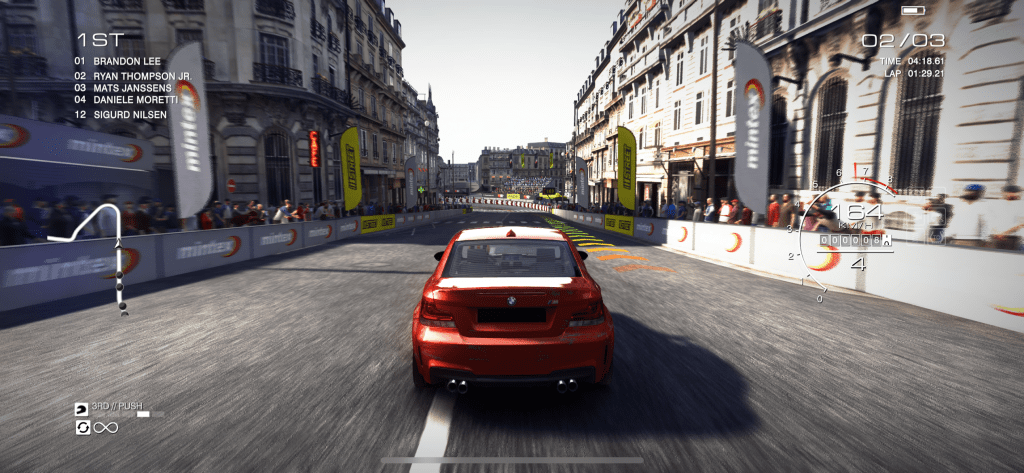
    It beggars belief that I could kill 16 people in CoD Mobile without dying once, but that’s just what happened the first time I snapped this thing on. It’s also transformed GRID Autosport from a game that I bought once and regretted immediately into something that feels truly console-like, and I don’t mean a Nintendo Switch. The graphics and haptics on this thing are way ahead of any racing game I’ve seen on that system.

  • Toilet day vlog — April 14 2018

    We went to Ferrara Homestyling to pick out some toilets and sinks. Beer and burgers were the reward.

    Shot these clips in Instagram for some reason and assembled them in Quik. Also cut them up for sharing on Instagram Stories. I don’t know if I’ll make vlogging a regular habit, but I’d love to? Just can’t see portrait video being the way to go. Might switch to landscape for the next one.

  • 2017 Japan Snack Reports

    2017 Japan Snack Reports

    Continuing a Japan holiday tradition… making videos of my daily konbini snack raids.

    Recently a few colleagues found these on my YouTube and thought it’d be funny to put them up on the giant Microsoft Surface Hub we have. I don’t know why I found that a problem, when I’m uploading them onto my own public website. I suppose because probably no one sees these?