Category: Reviews

  • Really Nice Images (RNI) Photo App for iOS


    I came across this app a couple of weeks ago but can’t remember how, and since then it’s struck me as somewhat criminal that more people aren’t talking about it. So this is just a quick post to help you, my reader, discover a new app that brings realistic analog film simulation to your iPhone photos.

    Sure, we already have VSCO, Rebelsauce, Faded, Afterlight, Litely, Priime… but there’s always room for one more if it does the job really well; the job being accurate reproduction of film characteristics. Then it’s a much shorter list. Mattebox (when it was for sale and updated) did a marvellous job of handling exposure adjustments in a very film-like way, VSCO Film in their desktop products are designed to emulate certain classic stocks, and a couple others like PicTapGo come from companies that also produce pro-grade Lightroom presets for a day job.

    RNI Films falls into this general category easily. Their Lightroom presets are based on close study of classic films, they use real film grain scans and simulate old lenses with blurring, individual packs retail for $49 each (there are 5?), and online chatter from professionals indicate that their work is well-regarded as being competitive with and maybe even better than VSCO Film, now the biggest player thanks to the profile of their iOS app.

    Unlike VSCOcam, which intentionally avoids naming its iPhone filters to match/cannibalize their more expensive Lightroom presets, RNI’s new app offers the same film simulations by name: Kodak Gold 200, Fuji Velvia 100, etc. I haven’t compared them, but I’ll guess that the iOS app produces results very close to the desktop product, at a fraction of the cost. Perhaps they have been tuned to the qualities of the iPhone’s camera for best results. At about $3 per in-app purchase pack, they are more expensive than those in most other filter apps on smartphones, but come on. In comparison to $49, we’re talking about a near giveaway.

    I’ve been very pleased with the presets, and they look the way I expect them to. The app could use a few more features and a streamlined editing UX that allows for people who’d want to save versions, for example, but as of right now it gets the basics done about as well as the earlier generations of iPhone filter apps. Load > Stage 1 Edits > Stage 2 Edits > Save as new copy. It’s still faster at this workflow than VSCOcam! Hopefully the team at RNI are still iterating on it right now, although I sort of doubt it.


    RNI Films by RNI (Free, with IAP)

    https://appsto.re/sg/Wg7N8.i

  • Beats Solo2 Headphones (Space Gray) Unboxing

    I haven’t made a video in ages and wasn’t planning to, but my colleague Jose suggested today that since I was about to open my new headphones, we make an unboxing video of it. The coolest thing was that I was able to make the whole thing from start to publish without leaving my iPhone 6 Plus (okay, I looked for music while on my MacBook Pro).

    The headphones themselves sound about as good as my Beats Studio 2 (2013), which is to say good enough for daily listening and most modern music types. But they’re nowhere near as comfortable as those, which along with the Beoplay H6, are my favorite pair of headphones to wear for hours at a time. Granted, those are both over-ears, and I guess that’s my personal preference. Still, the clamping force is significant, and is probably best for smaller, non-glasses-wearing heads.

    Disappointingly for the price these go for, my pair also has a defective hinge on one side, so I’ll be returning these to Apple next week. These new colorways are interesting though. It reminds me of Nintendo putting out new shades on an old handheld before they launch the next generation. Here’s hoping we’ll see a new Jony-designed model in June alongside the new Beats Music service.

  • Darkroom Photo App Shows Why UX Details Are Everything

    Darkroom Photo App Shows Why UX Details Are Everything

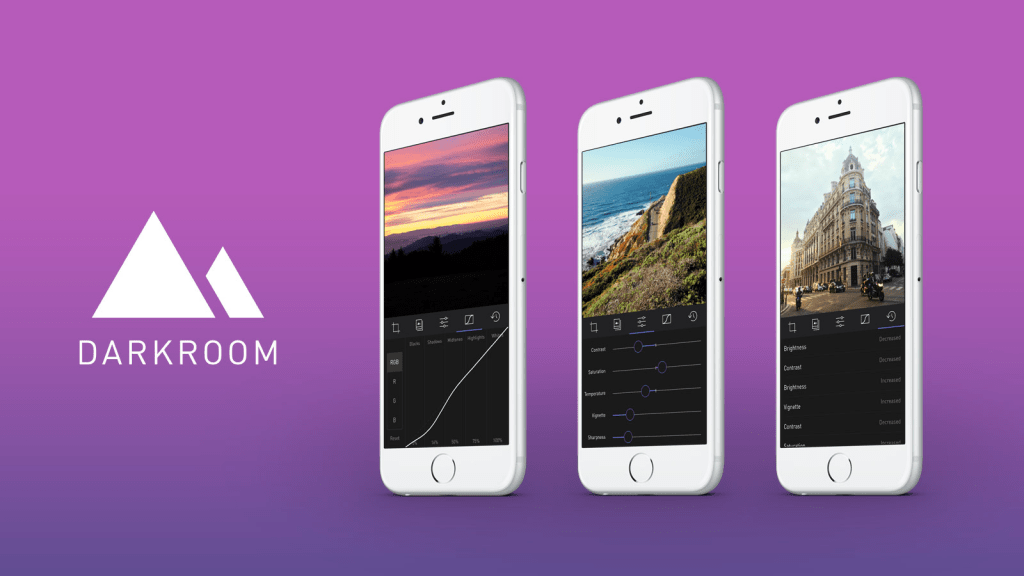
    A new photo editor for iOS launched today, and it’s called Darkroom (free, with a $2.99 in-app purchase to unlock Curves).

    “Another photo editing app? What does this one bring to the table?” I’ve seen a few early reviews of Darkroom begin along those lines. It seems a sense of fatigue has set in amongst people watching this space, and it interests me to find that I don’t feel the same way. I’ve dived into every new release with optimism, because there are still so many ways to improve upon what we can currently do on our mobile devices.

    The Verge mentions Darkroom in the same breath as VSCO Cam, suggesting that the latter has a new challenger. That’s somewhat wrong-headed; they aren’t anymore alike than, say, how Super Mario Bros. and The Legend of Zelda are as ways of passing time. Both apps allow you to tune the look of a photo, and apply presets, but it’s how they’ve been engineered to do it that counts.

    Darkroom’s most exciting development, if you listen to what people are saying, is that it allows you to edit photos by adjusting RGB curves. Except that’s not especially new in the iPhone app space — Photoforge did it years ago, Filterstorm has that and much more in the way of professional tools, and there are others. The next feature to get attention is that you can save any of your adjustments as a custom preset, ready for future photos, and it’s like making your own filters. Again, this is territory that Mattebox, PicTapGo, Mextures, et al pioneered awhile ago.

    The reason Darkroom is exciting, is that it seems to have absolutely nailed the UX of these features, and made them feel manageable, comfortable, and pleasurable to use as a whole. I want to emphasize that this is hard, and that their solutions are so subtle and executional, they might not have convinced anyone of their worth if presented as bullet points on a slide at some early point in the process.

    Using other apps with curves and pro adjustments can feel claustrophobic and stressful on a small screen. I’ve hated almost every single one (Adobe’s own Photoshop Touch is so awful at it) and keep them on my phone as last resorts. If I’m on holiday and take a problematic photo with potential, I’m more likely to wait till I get home just so I can do it on a Mac than try to fiddle with it on the go. Snapseed is one powerful exception, but that uses its own control metaphors, not curves.

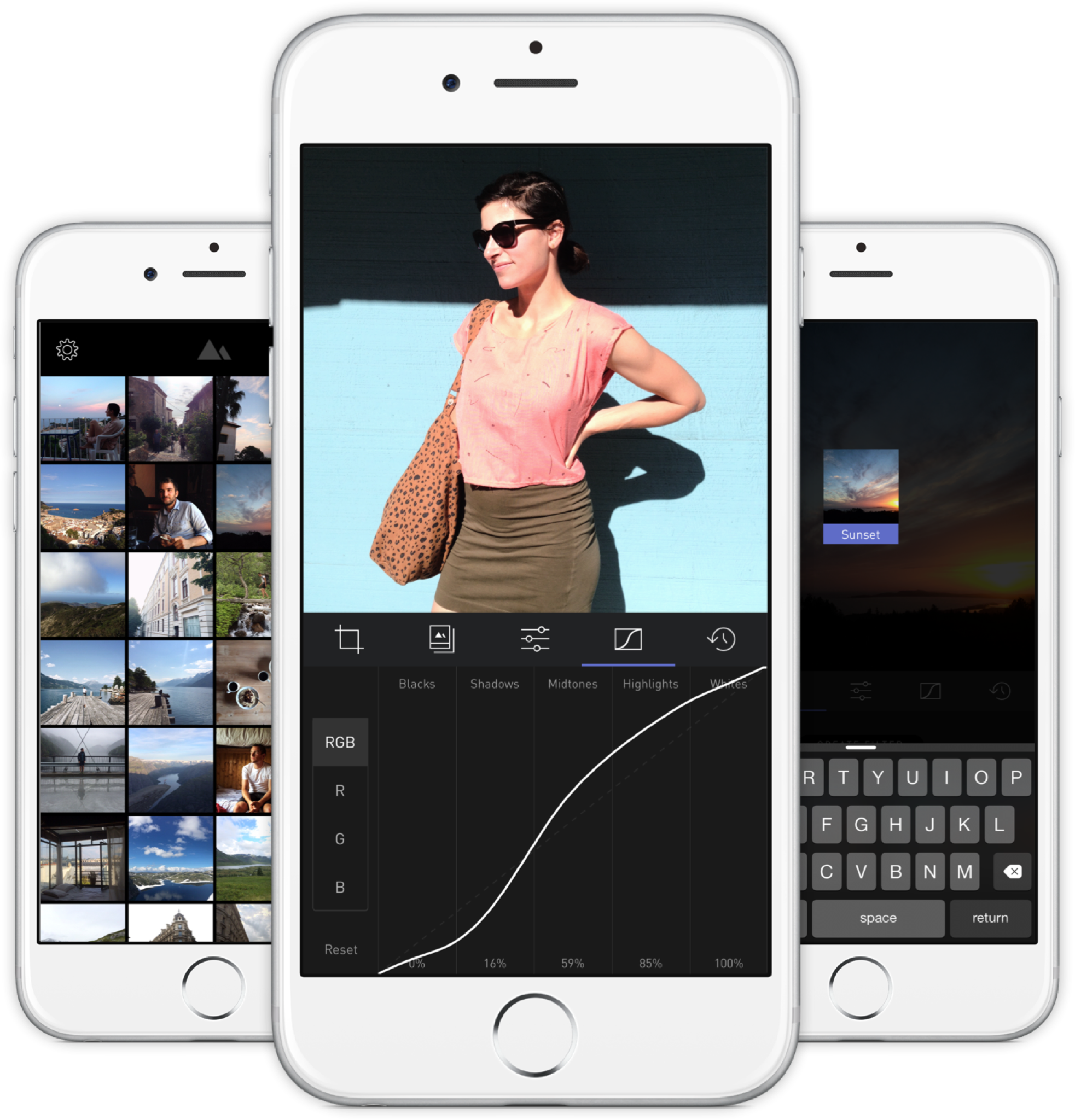
    Darkroom’s UI is blissfully open in design. It will likely get more complicated as they add more promised features, but I’m hopeful the team finds a way to keep this incredible simplicity. As you page through its 5 key sections (composition, filters, adjustments, curves, history), you never lose your place in the mental model. Nothing is buried in a submenu or out of sight.

    You don’t have to click a checkmark to save an adjustment before tapping another, because everything can be undone to an infinite degree, and one can undo hundreds of minute actions back to the beginning of an edit if necessary. Because that step (so annoying in apps like Afterlight, Faded, and VSCO Cam) has been eliminated, using Darkroom’s tools feels close to direct manipulation of the colors and pixels on your screen. One more nice touch: you can tap to the left or right of a slider knob to nudge it in that direction. Simple, but I can’t remember the last time a photo app let me do that.

    Loading up a photo is seamless. The app starts with a view of your entire photo library. Tapping a photo pulls it forward, straight into editing mode. At this point, you can swipe to either side to start editing adjacent photos in your library. Flicking a photo down tosses it back into the pile, and you’re looking at all your photos again. In use, it feels gloriously fast and uncomplicated. As that bullet point on a slide, “Seamless browsing and editing flow” wouldn’t have done it justice. This is the kind of feature that needs to be designed, prototyped, tweaked, and tuned over and over to create something subtle, but innovative. A team rushing their project out would have missed the opportunity.

    The difference between Darkroom and apps that require stepping in and out of different editing modes, especially when the placement of those modes is obscured, is like Apple’s own (now discontinued) iPhoto for iOS and the new built-in photo editing options in Photos.app. The former was a confusing mess with plenty of user-undiscoverable gestures and submenus, while the latter gives most users all the power they need in a more approachable UI.

    iPhoto Photos

    I’ve stopped using half of the other apps I’ve listed above as problematic, and forgotten the names of twice as many more. The ones I remember tend to be the ones I really wanted to succeed; I’ll unfairly single out Mattebox as an app with great technology and features, but suffered from confounding UX design. Countless times, I actually got lost inside the mess of buttons and menus that were hidden at the “back” of its camera mode. Thinking about the Darkroom icon sitting on my homescreen now doesn’t fill me with the same dread. I’m dreaming about using it later tonight, and tomorrow, and anticipating what will be new in the first update. Although its name is generic, I don’t think I’ll be forgetting it soon. I imagine it’s the beginning of a new phase of using my iPhone as a camera, one in which I can send better photos home while still on holiday.

  • The Druggists Craft Beer Bar

    The Druggists Craft Beer Bar

    The Lavender/Jalan Besar area has been a little too hip lately, and walking down the streets you’ll see several cafes with all too twee decor, or preserved signboards from the Chinese businesses that were previously there (the new stores incongruently named the same thing; the coffee place named Chye Seng Huat Hardware an obvious example), with many prices on the new menus a few zeroes removed from the hawker stalls they coexist with.Druggists is one such new factor in the gentrification of an area that houses the undertaking facilities of Singapore Casket, a small stadium, Hong Kong-like shophouses with murky windows through which racks of hanging clothes can be seen, and furniture shops where the products are still made on site and spill out onto the road. It is guilty of all the aforementioned crimes: it’s a craft beer joint with an interior made to look like a traditional Chinese diner, complete with marble tabletops and mosaic flooring; the sign above the front door reads “Chinese Druggists Association”, looking straight out of 60s Chinatown; and a pint will run you up to $21 while bottles of Tiger at the kopitiam across the street can’t be more than $5.But who cares, because you’re there for 23 taps of craft beers imported from across the globe, and they don’t take your VISA at the hawker centers anyway. There’s no way this stuff was going to come cheap, but I’ll tell you what, they make it easy to try a bunch of them. You can get any beer in a half-pint size that’s reasonably priced at about 53% of a full pint. I never understood those bars where the two sizes are something like $12 and $15, and happily, that’s not a problem at Druggists. (What a name! I can’t stand typing it.)If you go to the bathroom, you’ll find the tap over the sink is an actual beer tap, which is a clever touch. The airconditioned interior is enclosed and all hard surfaces, which makes it noisy and difficult to have a conversation, which isn’t so clever. The two tables outside fare much better, and you can enjoy your imported IPAs with the cultural dissonance of a nearby Chinese banner ad (yes, the offline kind) advertising a dodgy sounding sleep/health service for $10-40. It’s delicious.119 Tyrwhitt Road
    Singapore 207547

    Facebook Page

  • An Old Man Tries Snapchat

    If you have even a passing interest in social media and haven’t seen Casey Neistat’s video on how “Snapchat Murders Facebook”, you should.

    Like my friend Vicki notes in this post, Snapchat wasn’t something that I immediately saw any value in. I installed it once ages ago, didn’t have any friends on it (a combination of age and geography), and promptly left. Then Instagram’s Bolt soft-launched in Singapore and got some interest going around ephemeral photo messaging, but it still isn’t something that friends in their 30s seem to want.

    We’re a generation of digital hoarders; the people who abandoned other providers for Gmail en masse because it promised never having to delete an email again. Cleaning out my harddrive the other day, I found a folder of interesting photos I’d saved off the net in the early 2000s: movie posters, album cover art, photos of global landmarks, and the like, simply because the sight of them were scarce and valuable pre-internet! You have to imagine what it was like to live in that time. I ended up deleting almost all of them because these days, if you can put a name to it, you can find it online.

    So behavior is changing slowly amongst older people, and much faster amongst those in their teens, but photo messaging still wasn’t something I needed Snapchat for. Every messaging app offers it now. The ephemeral twist is a footnote.

    Snapchat’s Stories feature changed the way I look at the product. It turns it into something of a lifelogging and broadcast platform. I can’t name another app (still) on the market that lets you grab video snippets of your life, and share them in a stream that your friends can tune in to. The fact that clips disappear after 24 hours is actually the part I like LEAST. It seems Vicki’s with me on this, as she’s set up a YouTube channel to archive these Stories to after they’ve been erased. I may soon do the same1.

    There are some other nascent thoughts I have on Snapchat’s bizarre UX; the more I think about it, the more brilliant it is — breaking many of the rules we use to design interfaces for users of all ages, in order to create an exclusive, obtuse, game-like experience (inviting the spreading of knowledge by word of mouth) that seems intended to make it a success with a younger crowd. I may be wrong, and it may simply be like this as a result of being designed by a younger team. Additionally, its overall visual clumsiness (check out that ghost icon) encourages you NOT to take it seriously, which makes it totally okay to fire off imperfect, portrait-oriented, poorly-shot, but authentic moments without too much thought.

    If you’d like to follow me, I’m on there as “sangsara”.


    1. Sharing these vertical videos on another platform poses a slight challenge. I tried every video editing app on my iPhone, and just about all of them failed to stitch the short clips together without cropping, unexpectedly rotating, or distorting the videos. Even Apple’s own iMovie produced only a black screen with audio playing, probably because Snapchat’s video encoding/metadata in non-standard in some way. Amusingly, the app that finally managed to do the job perfectly was YouTube’s own Capture app
  • Ten Days with the iPhone 6 Plus

    Ten Days with the iPhone 6 Plus

    Moving from any of the earlier iPhones to the new 6 Plus is challenging, even if you’re acquainted with one of the larger smartphones on the market. In part, this is because it won’t feel like an iPhone when you first start. Of course, I’m talking about the larger screen and the digital gymnastics required to operate it, although the way it fits in your clothing (you actually notice it for once) will also give you pause. My first experience with a larger phone was in 2012 when I bought (and eventually sold off) a Samsung Galaxy S III.

    At the end of that 10-day experiment, I concluded:

    I don’t want to mess with battery settings and tweaks. I don’t want the ‘freedom’ to spend hours scouring the web for ways to make my phone better. I want a phone made by a solid company that I trust, optimized to the best of their ability in a combination of software and hardware design, so that I cannot possibly believe that I could do better myself. Because that frees me to do everything else. But I also want that phone to have a larger screen.

    I went back to my comparatively tiny 4S, and upgraded to the slightly better iPhone 5 when it came out. But now, with the new 2014 iPhones, I’ve finally gotten what I wished for: A great phone. A big screen. And not as two separate things.

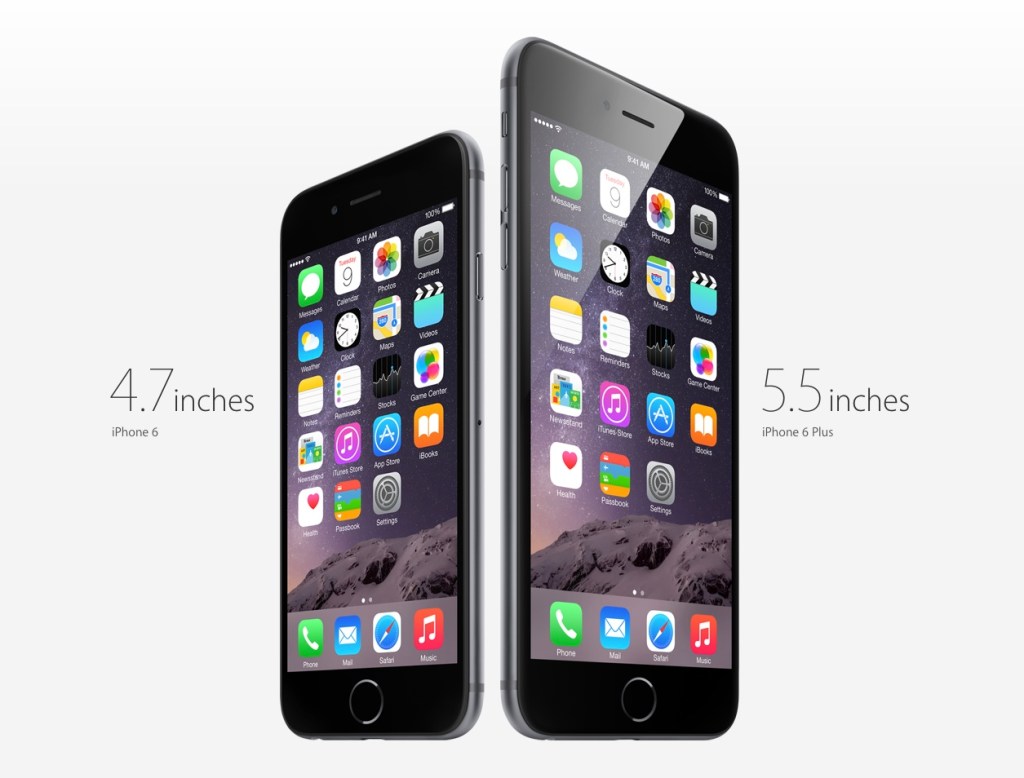
    Why the Plus and not the regular 6? Fear of missing out, really. It’s funny how the Samsung’s screen felt gigantic at 4.8” back then, but now Apple’s 4.7” seems so conservative; too small a leap for all the time I’ve waited for them to do this. The iPhone 6 was perfect for 2012, but we live in extreme times, us 2014-ers.

    Handling and Design

    So, the challenges. It’s been an uncertain 10 days. My theory is that the 6 Plus is a polarizing device if you are a smaller person/have smaller hands. You either know whether you’re okay with the compromises or not. I’ve spoken with women who use Galaxy Note phones, and a common sentiment has been “I can’t use most of the other large phones one-handed anyway (or put them in a pocket), so I just went for the biggest one”. It seems that if you have small hands, you either want a really small phone (iPhone 4-5 series), or go all the way with a 5”+ display and hold it all the time or stow it in a bag.

    But if you have larger hands like me (I can just about hold a basketball with one hand), you could technically use the thing one-handed, but that doesn’t mean you should. It’s still a dangerous balancing act each time, and I swear I’m using muscles I haven’t before, causing a slight ache in the forearms. I’ve read laments that you can’t use it one-handed while lying in bed. Untrue; I’ve done it for hours at a time, hence the pain. Deciding whether one should do all the things one technically could is the hard stuff life is made of. Most people aren’t ready for decisions like this until they’ve had a few kids.

    And remember how the iPhone 5 looked “terrible” when it first leaked online, and many wished it wasn’t real? The odd two-toned back, the suboptimal placement of the camera lens against the rounded corner and, later, the broken look of an inevitably dinged-up chamfered edge? Now those same people look back and consider it, all in all, a handsome design. I was one of those people, and this makes me feel unqualified to comment at length on the iPhone 6 family now. But damn if it ain’t ugly with that protruding camera module and those fat, rubbery antenna lines!

    But the phone’s roundness serves a functional purpose that I appreciate. Many sleek, obsidian phones appeal visually, but don’t feel right in the hands. Sony and other manufacturers have put out a bunch of very nice slabs, but nestle their bottom corners into the fleshy pad under your thumb for a 20-minute news reading session and you’ll see. The iPhone 4 was a similarly beautiful device. It felt pretty good too, but that design wouldn’t hold up when enlarged to accommodate a 5.5” screen. I’d say the iPhone 6 and 6 Plus are the “right” shape for what they need to do.

    Nevertheless, I very much disagree with the smoothness of its back, coupled with such a thin body. Once you add one of the Apple leather cases, it becomes much easier to pick up, hold securely, and use comfortably. It’s a case that fixes just about all of the phone’s superficial design flaws. Leather’s tactility and softness actually allows you to feel more of a connection to the device.

    Others have noted Apple’s adherence to the classic iPhone look for the 6 Plus, with thick top and bottom borders despite the larger screen. This of course allows for a large physical Home/TouchID button, and visual balance. Held in the hand, the phone seems comically tall, and if you can only grasp it below the midpoint, its weight distribution wants to tip itself forward and outward. But use the phone in landscape, and the need for symmetrical weight distribution is obvious. The same goes for the borders: many Android phones have a “right” way to hold them in landscape; merely touch the wrong edge and you’ve accidentally hit a hidden capacitive button that takes you back to the Home menu. I much prefer Apple’s grabbable safe zones.

    Give It Time

    In the first week, I was completely undecided. I looked at the smaller iPhones my friends and colleagues had ordered, and wondered if I’d made a mistake I would have to live with for a whole year. #Bendgate/#Bendghazi didn’t help, but that worry passed within a couple of days. It’s a strong phone, my tight jeans from Uniqlo have a bit of stretch to them, and most importantly, I have AppleCare+ and faith in their customer service.

    I found myself fondling other people’s iPhone 6s, and remembering the times when I could enclose an entire phone in my hand. They grow up so fast! And then at some point after the first week, it just clicked. Somewhat unbeknownst to my conscious brain, it became the perfect size for an iPhone. Later that day, I picked up a friend’s iPhone 6 and waited for the regret to kick in. Nada.

    Switching to an inherently inconvenient form factor that prevents you from carrying and interacting with your most-used computer in the ways that you’re accustomed to is bound to be uncomfortable. I figure even if you’ve made rational peace with all the factors you’re well informed about, it takes a little bit of time for the heart to come around. That’s a problem for Apple in the showroom. I wonder how many people immediately chose the 6 when they might have been happier with a 6 Plus. Next year’s 6S Plus sales will tell the story.

    Off-Screen Considerations

    Battery Life

    The second-biggest new feature for many is the 6 Plus’s enhanced battery life. During the final weeks of my old iPhone’s tenure, its inability to stay functional from morning to night was a bigger annoyance than the small screen. Finally, that problem has also been licked.

    So far, it’s been tremendous1. Also, if you imagine that you may someday be unhappy enough with the iPhone 6’s battery that you’ll buy a Mophie battery case or similar, remember that it will essentially make for an overall bigger and heavier device than the iPhone 6 Plus, which probably won’t need one. That makes for a pretty clear choice. My best example to recall is one particularly busy day with lots of messaging, photo sharing, a 20-minute phone call, GPS directions for a short trip, playing a 3D racing game for a bit, and streaming Spotify music at “Extreme” quality over 4G during my commute, and still making it home 12 hours later with 20% to spare.

    Gaming

    If you play games, you’ll find the 6 Plus an amazing machine. Its screen is bigger, brighter, and better than that of any portable on the market, including Sony’s PS Vita and Nintendo’s 3DS XL. There’s a common argument against the smartphone as a challenger to these systems, and it involves the lack of physical controls. I won’t get into that discussion here; suffice it to say I’ve played hours of Real Racing 3 (free) on my phone and never missed the joystick. Also, if you’ve ever squinted at tiny enemies in an FPS on your old iPhone, and struggled with having two thumbs blocking the action, you’ll recognize that the 6 Plus has the potential to help some genres take off on mobile. I’m planning to give X-COM another go now that everything will be more discernible, and keep in mind that was a console game ported over from the Xbox 360.

    As I understand it, iOS 8’s “Metal” graphics architecture also allows game developers to squeeze more of the kind of performance out of Apple’s chips that they’re able to on dedicated gaming machines, which don’t have to worry about accommodating many of the other features that a general purpose ~~phone~~ computer supports. Games are going to look ridiculously good.

    Photography

    It’s better. It’s astoundingly good for a smartphone. Yes, the optical image stabilization gives you an extra f-stop in low light when photographing still scenes, but you shouldn’t be using the default Camera.app for those anyway. The Cortex Camera app takes longer exposures with very good software stabilization, and supersamples/averages out sensor noise in dark scenes almost completely.

    Productivity

    Everybody talks about landscape mode, but the benefits are still questionable to me, 10 days in. Fire up Mail.app and you’ll see that it’s a little too cramped to be more useful. The information density improves if you turn your system-wide dynamic text size down to one of the lowest settings, which takes more advantage of the HD resolution and 400ppi display. But it’s not for everyone, and I suspect that for a good chunk of people (for example, those over 40), the 5.5” display is best employed as a big screen, not a dense screen.

    Typing is a mixed bag because I’d gotten really good at the old iOS keyboard. In apps that haven’t been updated for the new phones, the default keyboard appears larger, which messes with your muscle memory. Since iOS 8 launched, I’ve mostly used SwiftKey (it beat out Swype in accuracy). Its swipe mode helps with one-handed input when that’s necessary — having a thumb in continuous contact with the screen just feels more stable than lifting and tapping.

    I think the most productive thing about the bigger screen will be the ability to sketch things of moderate complexity. In the past, you might get some basic shapes down before having to pinch-zoom around a lot to create anything useful. Usually I’d feel stupid within 20 seconds of trying, and give up. Now, I think you might be able to sketch a decent wireframe on your phone. No more napkins.

    In particular, I can’t wait for a version of Paper by FiftyThree, or Penultimate, that takes advantage of the 6 Plus. I’d love to complement my Evernote and Moleskine notebooks with some quick and editable digital drawings. I have to mention that every time I’ve tried out a Galaxy Note and stylus, the software has been the most terrible part of the experience. Samsung bundles some in-house notes app with an incomprehensible and dated-looking UI when they really should have partnered with an established third-party app to provide one. I don’t know that there are any on Android, though. Seems like a real miss that they’ve had these larger devices on the market for so longer and didn’t nail the sketching use case.

    Conclusion

    After 10 days, I’m definitely bullish on this form factor. It took awhile to get over the hump, and if we enjoyed the generous return policies that customers in the U.S. seem to have, I might have been tempted to trade it in for the more familiar iPhone 6. But quite a few pundits have called the Plus a new kind of device (for Apple), one that asks you to reset your expectations of an iPhone in exchange for a more capable companion, and they’re quite right2.

    In the years between the iPhones 4 and 6, I was often beguiled by larger devices (in spite of the Android OS), and bought the Galaxy S III, Nexus 4, and XiaoMi RedMi and Mi3 phones for research/secondary phone purposes. Each time, I went back to the iPhone in relief — seeing its small screen as the weakest link in a strong Mac and iOS product ecosystem — and cursed the seeming necessity of compromise in every aspect of this mortal coil. Now at last, that itch is dead.

    1. Although iOS is meant to prevent apps from misbehaving and sucking your battery dry, there are exceptions. Some take every opportunity to wake up in the background, using location data for geofencing and refreshing streams. I’ve found Normal: Battery Analytics to be a useful app, even with iOS 8’s new ability to show which apps use the most power. Normal goes a step further, comparing your battery stats with other users to let you know if your problems are in the minority, and predicting how many hours of standby time you’d claw back by forcing those apps to quit instead of just leaving them in the background. I’d always believed that a backgrounded app couldn’t abuse your battery in iOS, but from the sounds of their literature, I might have been wrong. 
    2. Apart from sketching, writing and editing text on the 6 Plus is itself a very different experience. It’s liberating to see a taller expanse of your document rising above the keyboard, especially in full-screen capable apps like iA Writer Pro, which I used for this post, switching between Mac and iPhone. It feels less like you’re wrestling your phrases into place, and more like they can come out and lie anywhere they want on the floor and it’s exactly what you wanted. 
  • Cortex Camera is your best bet for quality iPhone photos

    Cortex Camera is your best bet for quality iPhone photos

    Original iPhone capture
    Original iPhone capture
    IMG_0506
    Cortex Camera capture

    It’s hard to believe that you can get different results from the same hardware—the same smartphone camera—just seconds apart. The first photo was taken with the iPhone 5S’s built-in camera app, which employs some impressive software techniques to improve most photos. In this case, a low-light scene forced an ISO sensitivity of 1000.

    The second photo was taken with Cortex Camera, which takes a series of images over 2 seconds or so (you don’t have to keep your hands perfectly still, but still-as-possible helps). These are then combined for far less noise, more accurate colors, and higher resolution (12mp on the iPhone 5/5S, which normally take 8mp images). The default Camera.app also combines up to four captures for better photos, but is optimized to work for all situations. For any scene without moving subjects and where you have the luxury of time, Cortex delivers better results.

    Camera.app 100% crop
    Camera.app 100% crop
    Cortex Camera 100% crop
    Cortex Camera 100% crop

    The shots above are 100% crops from the same scene. Note that the Cortex Camera version is both larger and more detailed. It has more potential for processing, and beats a fair few prosumer point and shoot cameras at the pixel level.

    The first app to do this “supersampling” was Occipital’s ClearCam, which I used to swear by. However, like their other app 360 Panorama, ClearCam hasn’t received any updates in the wake of iOS 7, and appears to have been abandoned as the company pushes their new Kickstarter-backed project, the Structure Sensor. At this time, ClearCam makes you wait longer and has a cumbersome alignment and enhancement process. Cortex Camera just takes the picture and saves it all in one step. It’s a damn shame, because both Occipital apps were among the first and best of their kind, enabling users to do things with their iPhones that seemingly defied the capabilities of the hardware. They clearly have a knack for clever imaging technology; I just hope they take a longer view of supporting their products some day.

    If you’re in the market for a new app to take and share those 360-degree panoramas, Sphere (formerly Tour Wrist) does a good job and is free. Bubbli is also promising, but captures video instead of photos to stitch a scene together, which means you have to pan slowly to get an even exposure. If you’ve got the cash and a love of new gadgets (mustnotbuymustnotbuy) Ricoh’s new Theta camera does the trick in a single click. It’s the first consumer-ready spherical capture camera and looks like a presentation remote. Simply hold it above your head and hit the button, and it takes in the entire scene. What’s more, the $400 device has built-in wifi and beams photos over to your iPhone for instant sharing. It’s not hard to imagine this feature on an iPhone a decade from now.

  • Of Monsters and Men: Pacific Rim and Man of Taichi

    Two of the movies I’ve been waiting for in one weekend. Pacific Rim in IMAX 3D (found the 3D dull, dim, and uncomfortable), and Keanu Reeves’s directorial debut, Man of Taichi (thankfully in 2D). Both are films I’d like to go see again.

    They are both fascinating in that Pacific Rim is the monster (kaiju) movie that Japan could never make, while Man of Taichi is the martial arts (gongfu) movie that Hong Kong could never make. Both borrow richly from their sources, but add something of their own. In Pacific Rim’s case, wads of special effects money and (unfortunately) Michael Bay’s apocalypse movie template. Andy Baio remarked on Twitter that it’s the worst of Transformers, Armageddon, and Independence Day rolled into one. While that’s a fair assessment of its characterizations and plotting, Del Toro at least executes his material as if he’s seen some anime and knows how to shoot a fight so you can actually see it.

    What it really needed was a tight script and team dynamics you could both enjoy and invest in. Instead of Michael Bay’s template, I wish they’d taken Joss Whedon’s. But no, it falls back on faceless national stereotypes and comically bad romance tropes. Rinko Kikuchi may have an Oscar, but I wouldn’t trust whoever oversaw her doe-eyed scenes with bland Charlie Hunnam to direct traffic on a one-way street. Perhaps the Mako Mori character was just meant to be younger than Kikuchi looks, but her uncertainty and shyness were incongruous with having the coolest/most badass hair in the movie.

    Pacific Rim's leads looking at each other
    Character interaction looks much better in stills than in the film

    Man of Taichi takes the best of Enter The Dragon, Bloodsport, and Ong Bak (fighting tournaments with explosive combat scenes), and adds both directorial and visual restraint to a philosophical story layer that HK films sometimes try to do (Ip Man, much of Jet Li’s period work), but almost always too heavy-handedly. For the genre of film that he’s taken on, I think Keanu Reeves has shown himself to be a good director. Not for an actor, or for a Hollywood man, but a good director, period.

    Man of Taichi’s star is Tiger Chen, a stuntman that Reeves met during the production of The Matrix. I won’t complain about his performance in the film’s non-fight scenes, because it never gets in the way, which is more than I can say for Pacific Rim’s moments of downtime. When he fights, or is seen struggling with the Star Wars-like light vs. dark side moral dilemma of his pugilism, Chen’s placid face conveys exactly the intensity required. In the final moments of the film’s final fight, he uses it as a blank canvas to great effect — much like Keanu Reeves in his portrayal as Neo in The Matrix when we needed to believe a world lay inside a computer. Some see wooden acting, I choose to see inspired detachment.

    Man of Taichi movie poster

    Reeves is in this film too, as the main antagonist. My viewing companion was not impressed. Maybe I’m just a fan, but again, I found his typically one-dimensional portrayal to be perfect for the film. It’s so hard to see what’s going on behind the rigid, mechanical demeanor that it produces an oppressive sense of mystery, fear, and apprehension whenever he enters the room opposite the human, naive, in-over-his-head Chen. You simply don’t know what Reeves is supposed to be capable of, or if he’s even meant to be human. I felt the whole thing could go From Dusk Till Dawn at any point and literally reveal Reeves as Satan with Krav Maga training. Through the stark presentation, voice effects, sleek dark suits and occasional black mask, bloodlessly pale face, and perfunctory short utterances, you are invited to read his existence in the whole scenario as a let-it-all-hang-out metaphor for demonic evil. All villains are, but this one does it without overacting in the face!

    Where Pacific Rim is happy to show great swathes of the world, and then gleefully destroy it, much of Man of Taichi takes place indoors, with only a few establishing skyline shots of Beijing and Hong Kong. Like Hong Kong, the sparse fight arenas are all concrete surfaces and sharp corners for flesh to get caught on, and you are constantly made aware of the combatants’ mortality. In Pacific Rim, the robot Jaegers are virtually invincible except when fighting the Kaijus, which are only flesh, and bleed. You could toss a Jaeger through a skyscraper made of the same metals, but it only malfunctions when punched in the face by a tentacle. Like in Man of Steel, which got flack for Superman allowing awesome amounts of collateral damage, Pacific Rim’s environment is an inconsequential foam that inhabits the fight space, to be ignored by everyone except the audience, whose job it is to be overwhelmed by enjoyable particle effects.

    In both films, there is a man with a knife. One is played to the hilt by Ron Perlman, who talks a lot, wears gold shoes, sunglasses, and flips a flashy butterfly knife around for effect. I can’t remember if he had a cigar in his mouth but there might as well have been. In the other universe, Keanu Reeves pulls the blade out low at the waist, and stabs silently and mercilessly before you know it’s there. It is beautiful and unintentional asymmetry.

    I recommend seeing both. Pacific Rim is a dream come true for many of us who love giant robots and schlocky movies with men in rubber monster suits, but by only improving upon visuals, its clearest future is as an HDTV/4K showcase at your local electronics dealer. I think Man of Taichi might become a cult martial arts classic talked about and recommended to friends for years.

    Pacific Rim is obviously out now, Man of Taichi is out in Asia and is slated to be in the U.S. sometime in 2013.