• Two Weeks in New York

    Two Weeks in New York

    How’s everyone doing? I recently went to New York for the first time ever, and did a bunch of touristy things. It was also my first time in the U.S. in over a decade, and maybe overestimated how bad the TSA and airport immigration situation would be. It’s the last thing you want after 20 hours of flying: to be stuck in an hour-long line with people barking at you to take your clothes off. But we got in and out of JFK without much hassle.

    Having an Uber account is fast becoming the most important thing to a traveler after having maps on your smartphone and watch. It lets you integrate with any city with no more difficulty or delay than if it were your own. There’s no need to plan an airport transfer in advance, find out if tipping’s expected, or get flustered if you’re late for a show downtown.

    We got into a performance of Hamilton literally against all odds. The show is sold out for the next year, and resale tickets are pretty much unaffordable, but there’s a daily online lottery where you can get front row seats for $10. I heard somewhere that tens of thousands of people enter each day, and it can take months of trying. Kim somehow managed to win tickets a day into our second week. It was the first day of Javier Muñoz’s permanent run as Hamilton after Lin-Manuel Miranda stepped down, and he killed it. I was sick and shivering with a fever, and it was still incredible and unforgettable.

    You can’t take any photos during the show, so I don’t have any. And despite bringing my Fujifilm X100T on the trip, I didn’t even use it once. Not one frame. Maybe it was the summer heat and not wanting to be encumbered or precious about one more thing to avoid banging about/losing/getting stolen, or maybe I just wanted to keep it casual, but my iPhone did everything. Fusion HDR and ProCamera’s LowLight+ mode helped in extreme lighting conditions. For shooting distant subjects in good light, I think it’s really close to what the X100T would have got. As holiday snapshots go, I’m happy with what I got. This fall’s iPhone 6SE/X/whatever will close the gap even more.

    The one thing photos can’t do is capture other aspects of the experience, but Live Photos and 360º panoramas can be better at it than the usual 2D stills. We recently got a Ricoh Theta S at work, and now I want to take something like it on my next vacation. Being able to grab everything in a scene with a single button, and re-enter that environment later with a VR headset… why wouldn’t you? I’ll hold out for the next model with better image quality, but it’s one thing your smartphone camera won’t compete with for awhile. If you have the time to stand in one spot for a few minutes though, you can use Google’s oddly branded Street View app to capture spherical photos.

    Real talk: I didn’t get to see that much of the city, relatively, but it was pretty cool to visit. In terms of livability, though, it’s not topping Tokyo for me in any of the categories. I’m probably the worst person when it comes to dealing with loud crowds, germs, heat, public transport breakdowns, the threat of impending personal harm — basically i’m a paranoid baby. Living in New York probably wouldn’t play to any of my strengths. But between Ktown and David Chang’s Momofuku Ssam, I think they’re doing a great job with Korean food! It was far from my favorite cuisine before, but now I’m a convert.

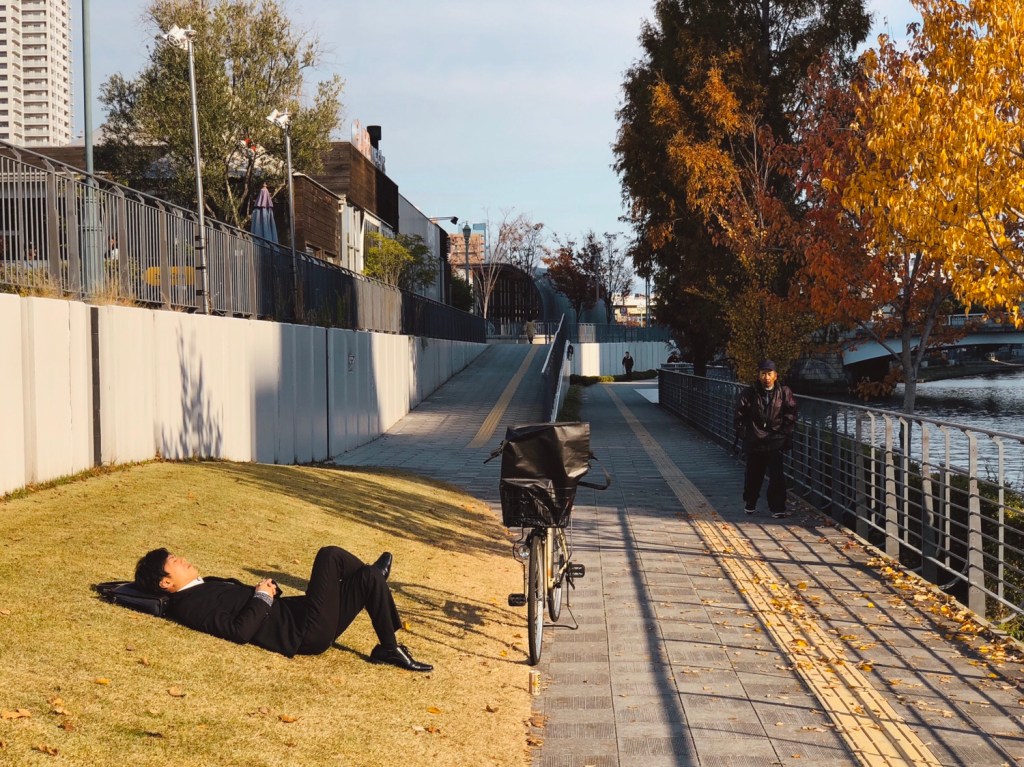
    Okay, photos.

    Processed with VSCO with 2 preset

    IMG_6961
    The line on the street for Hamilton *after* we got out
    IMG_7030IMG_7005IMG_6995IMG_6880IMG_6875IMG_6840IMG_6815

    IMG_6780
    Couple making out in a hotel had an audience below
    IMG_6758

    IMG_6744
    Freakily realistic statue on the Highline
    IMG_6699
    Saw this the day after Philando Castile was shot
    IMG_6682IMG_6661IMG_6619IMG_6609IMG_6600IMG_6571IMG_6565IMG_6559Processed with VSCO with f3 presetProcessed with VSCO with f1 preset

    Processed with VSCO with a9 preset
    A Starry Night at MoMA
    Processed with VSCO with s3 preset

    Processed with VSCO with a9 preset
    Nintendo World
    Processed with VSCO with k3 preset
    Apple Store in Grand Central Terminal
    Processed with VSCO with e1 preset
    Okay this was HK, during the stopover


  • iOS 10 Makes the Timeline UI a Reality

    Wired: Apple May Have Figured Out the iPhone’s Most Promising Feature

    3D Touch is instrumental to Apple’s newly rethought lock screen, in a way that could fundamentally change how you interact with your iPhone.

    But with iOS 10, you’ll use your home screen a whole lot less.

    This article from Wired today recalls the thinking of many UX designers who believe that homescreens tiled with app icons will soon give way to a new kind of smartphone UI: the timeline. Over the last few years, both iOS and Android have been making their notifications richer, with simple functions like deleting new emails, quickly replying to texts, or faving tweets, amongst others.

    lockscreenBut iOS 10 looks to be taking it to a whole new level. iPhones will light up when you raise them, and interactive notifications can expand into whole widget-like apps with live maps and data, and house more complex options than a dialog box or text input field can provide. And the best place for this new timeline UI to live is on the lock screen of your phone, the starting point of any interaction, and an arguably more valuable space for accomplishing tasks than the homescreen.

    And it’s 3D Touch, launched to public disinterest with last year’s iPhone 6S, that’s been the missing piece all along. Without pressure sensitivity and Apple’s Peek & Pop gestures, a self-activating lock screen might be a pretty bad place to have action buttons that can accidentally touched. I’d be interested to see how it works on phones without it, such as the new iPhone SE. Perhaps they just won’t have Raise to Wake.

    Also worth remembering that this new timeline of Things That Need Your Attention Most will live beside the Today screen of widgets (swipe to the right), which should do a lot for the idea that we’ll all be unlocking our iPhones a lot less and getting stuff done quicker later this September.


  • “Onions” Breaks One of Apple’s Oldest Advertising Rules

    Apple’s new iPhone ad departs from some of their oldest and most inspiring advertising by making fun of what customers do.

    I’m curious what people make of the new iPhone 6S ad from Apple, the comedy one called “Onions”. On the surface, it looks like another one of the fun, irreverent ads that have been made for the 6S series so far — the previous ones leaned heavily on their sassy, self-reflexive voiceovers by the actress Lake Bell. It only has a brief product demo lasting about 3 seconds, followed by nearly a minute of story; it has a celebrity appearance; some humor; and a quirky sign-off that says “Onions on iPhone 6S” before “Onions” becomes “4K Video”.

    While I enjoyed it, I think it perverts one of the unspoken rules that have made past Apple ads great. The people in those ads were always more creative, more talented, doing better work, and living fuller lives than the average viewer. But the ads seemed to believe that you were that person, and always spoke up to you. In other words, they assumed the best of their customers.

    That’s just a company that knows how to utilize aspiration. You see it in fashion advertising, but you’re either model material or you’re not. When it comes to products that let anyone create, the dream is ever alive!

    The Apple Pencil lets an artist draw beautiful lines, an app on the Mac lets a young musician record a touching song for her mom, photographers take billboard-worthy photos on their iPhones, an architect edits blueprints on his iPad Pro at the coffee shop, a misunderstood teenager cuts a family film over Christmas. These are scenes you’ve probably seen, and I’ll bet they inspired you to make more stuff more often, or convinced you that upgrading to the new one would upgrade the quality of your work, or both. The examples were aspirational, but completely relatable.

    “Onions” takes a different tone. It’s a somewhat sarcastic, belittling parody that pokes fun at what its protagonist shoots, pretending to have a bit of fun with exaggeration. It says, “this is what YOU will probably make with the power of a 4K movie camera in your pocket, and this is what you probably think it’s worth: an award presented by Neil Patrick Harris. So, please enjoy your comical fantasy!”. Instead of showing an example of great accomplishment, as was the tradition, it goes for the cheap laugh. It fails at showing us something we should aspire to achieve with an iPhone 6S of our own. It’s an odd departure from a winning formula that has long defined the brand’s outlook on technology enabling creativity, and I hope not to see many more like it.


    I also watched Samsung’s new celebrity-laden ads for the Galaxy S7 phone, and some of them were really entertaining, well-written, and funny. A couple fell flat.

    In comparison with Apple’s style, about 3 of them featured Lil’ Wayne absurdly pouring bottles of expensive champagne all over his waterproof S7, which made the existence of that feature absolutely clear, but didn’t do anything to make me want one. I’m not in the habit of intentionally drowning my phone.

    The waterproofing ad that worked better? A script that meanders about how water is everywhere on earth, making up 72% of our bodies, etc. etc. before ending on a scene where a phone gets dropped into a fountain while taking a photo. The owner picks it back up, and continues getting the shot, no beats missed. Anecdotally, lots of phones have been dropped into water by people I know, and I think this crucial point would resonate with them. A relatable real life moment, real people, and a real problem we’d love to suddenly go away overnight.


  • iPad Pros

      
    When the 12.9″ iPad Pro was first unveiled, I was pretty sure I didn’t want or need one. Then I held it in the Ginza Apple Store while on vacation and bought one later that same day. The experience of holding such a large screen in your hands and touching it directly is more impressive than it sounds. But what you won’t realize while handling one in the store is how heavy it gets once you add a Smart Cover or Smart Keyboard and a silicone case for the back, if so inclined.

    In the couple of months since, I’ve merely used it like a big iPad, watching movies in bed and occasionally reading comics or news on it; that sort of thing. But I knew it was meant for more and wanted to try bringing it to work with the Pencil and Smart Keyboard. Spoiler: it’s awesome, and I could probably do a lot of my daily stuff on it while moving easily from meeting to desk. The main problem has been its weight, especially when carried in my bag with a camera and power bank and umbrella every day. It’s also too much to hold in one hand while sketching with the other.

    So after a few weeks of deliberation and bugging other people with the pros and cons, I decided to pony up for the new 9.7″ size and try to see if I could make justifiable use of two iPad Pros in one life. The Smart Keyboard hasn’t arrived yet, but I expect it will be even easier to type on than the Logitech and Belkin ones I’ve had for earlier iPads. The size and weight are perfect for one-handed use with the Pencil, although the back is slippery without a silicone case. I don’t think adding one is worth the weight gain, though. The larger iPad Pro is going to stay home and try to become a desktop computer in place of my ageing 2010 iMac. It was an unnecessary and guilt-inducing expense, but the thing that helped justify this dual-iPad setup was asking why I’ve allowed the iMac to go so long without an upgrade.

    I got old! Which makes one treat computers differently, not to mention the nature of the tasks have changed.

    Years ago, I would replace my PC/Mac every couple of years, usually by the end of every three-year AppleCare cycle. My computer was at the center of my life, and as a student living in a single bedroom, I’d spend most of the day in front of its screen; it was TV, telephone, game console, word processor, and library. I ate meals in front of it, and I know I wasn’t the only one.

    These days, I spend most of my time at the office in front of a MacBook Pro, and at all other times, the job of that home computer is being done by an iOS device or Apple TV. I have a bigger house to move around in, and I’m almost never found sitting in front of the iMac. Having a desktop for those purposes seems awfully restrictive now, and confronting the mess of my HDD and locally stored files feels tiresome and archaic. Doing everyday tasks on an iPad without that legacy is a sort of escape, and there’s some measure of security to be had in knowing I could use one of the Macs if I really needed to. Chances are, I won’t. With music and photos on iCloud and other files on Dropbox, the iPad has all it takes to be a primary computer most days. I’ve stopped editing photos in Aperture and Lightroom and do it all with an iOS workflow now. You just have to let go and not look back.

    I think all of us iPad Pro owners are waiting on iOS 10 to see Apple’s grand plan to bring this post-PC vision to maturity, but in the meantime it’s not bad at all.


  • Woke up old

    I’m having the somewhat unique/weird experience of working in the same place as a close friend, having joined at different enough points that we don’t share the same views of the company, and aren’t working on any projects together. We’re in each other’s periphery 5 days a week, but otherwise too consumed by the goings on to interact until it’s outside the office. I know she’s doing well, but don’t see it for myself. Anyway we just had a couple of drinks tonight and that was nice.

    Wait, what the heck was that mundane detail about my life?

    We met during the hazy, naive days of early blogging on the internet, and there are entries here dating back to 2003 that detail our conversations and hanging out. In the past few days, I’ve been thinking back on that period while examining older posts I simply don’t remember writing, and missing a time when sharing your daily life and thoughts online was a harmless activity; not one that might later misrepresent the person you’d become. We were teenagers, proto-millennials without much concept of managed identities, and we came online before social networks were ubiquitous, when no search engine was good enough to pick all your words out of the woods. Whatever you wrote was for an audience that let you know who they were, and wasn’t hard to imagine.

    The thing I missed most was the ability to come home and plonk down a daily update without thinking too much. These days, we wouldn’t even be too open on Facebook, which always seemed like the value of an inner-circle network like Path. I loved rereading an old post about how unsure I felt about how I was doing in a class, and wouldn’t trade being able to read about it now, over a decade later, for any measure of respect. I suppose kids still write like that, but anonymously on Tumblr or whatever. Or in private journaling apps that don’t sync to the big bad cloud.

    Part of this nostalgia is probably down to waking up old today and realizing the freedom to say I don’t know what the fuck I’m doing has long departed. Even if I no longer need it, I miss that early internet that wasn’t so far reaching — the one that felt like a separate, parallel society. Now if you’ll excuse me, I’m off to go write meaningful thought pieces on Quora and Medium like a proper adult.


  • One of my tweets from 2008 got a lot of activity today and I just found out why: Buzzfeed.

    //platform.twitter.com/widgets.js

    from Twitter https://twitter.com/sangsara

    February 24, 2016 at 11:04PM

    via IFTTT


  • A UX design walkthrough of Feedly’s new Explore experience

    Eduardo Santos: Introducing feedly’s New Explore Experience

    I’m a pretty light user of Feedly these days, perhaps because RSS is just a chronologically ordered dump of too much information and I’ve grown to prefer a little machine intervention, but this detailed breakdown of a feature redesign is quite the pleasure to read.

    Feedly probably does have a bigger role to play in aiding content discovery (no one can get enough of it), but what’s interesting is that an RSS reader approaches it in a different way from others like Flipboard. It’s less about piecemeal articles, topics, or user-curated magazines. It’s sites! Boosting little known sites and blogs exhibiting consistent quality serves a much more important cause: feeding the cycle of good content creation and letting authors grow their follower base, not enjoying random hits of virality at the whim of algorithms and chance.


  • Because we love Twitter

    Randi Harper: Putting out the Twitter trashfire

    8. Fix Tweetdeck. Fix Twitter for Android. Fix Twitter for OSX. Twitter for OSX still has a hard limit on how many blocks it can apply because they didn’t bother updating the API call when they switched to paged requests. It also crashes a lot if you’re receiving a lot of notifications. Tweetdeck doesn’t use server side mutes. The ability to mute users originated from Tweetdeck prior to Twitter buying it. They then added this functionality to Twitter itself, but never updated the client to store these mutes server side.

    What a fantastic to-do list for the people at Twitter. Reading this, what strikes me most is that the product really is a shitheap on fire sailing down a river with passengers onboard. It’s got so much legacy crap; so much inscrutable complexity built up from rounds of careless iteration and business priorities, that it’s really hard for a team still working under said priorities to fix it all within further digging the UX a grave. Same goes for iTunes, really, but so much harder for a real-time social service that people are posting to thousands of times a second.

    The good news is that the most toxic parts of Twitter, the abuse and management of noise, are probably the most within reach for a quick fix without anyone having to relearn anything.